
还记得 Haskell Curry吗,
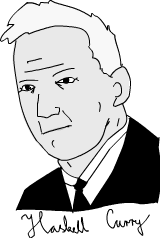
多巧啊, 人家姓 Curry 名 Haskell, 难怪 Haskell 语言会自动柯里化, 呵呵. 但是不奇怪吗, 为什么要柯里化呢. 为什么如此重要导致 Haskell 会默认自动柯里化所有函数, 不就是返回一个部分配置好的函数吗.
我们来看一个 Haskell 的代码.
max 3 4
(max 3) 4

| // Cross browser, backward compatible solution | |
| (function( window, Date ) { | |
| // feature testing | |
| var raf = window.mozRequestAnimationFrame || | |
| window.webkitRequestAnimationFrame || | |
| window.msRequestAnimationFrame || | |
| window.oRequestAnimationFrame; | |
| window.animLoop = function( render, element ) { | |
| var running, lastFrame = +new Date; |
| // http://paulirish.com/2011/requestanimationframe-for-smart-animating/ | |
| // http://my.opera.com/emoller/blog/2011/12/20/requestanimationframe-for-smart-er-animating | |
| // requestAnimationFrame polyfill by Erik Möller. fixes from Paul Irish and Tino Zijdel | |
| // MIT license | |
| (function() { | |
| var lastTime = 0; | |
| var vendors = ['ms', 'moz', 'webkit', 'o']; |

| /System/Library/Frameworks/CoreServices.framework/Versions/A/Frameworks/LaunchServices.framework/Versions/A/Support/lsregister -kill -r -domain local -domain user;killall Finder;echo "Open With has been rebuilt, Finder will relaunch" |

| /* | |
| * There's a bug in Chrome/Safari using overflow:hidden with border-radius. This mask fixes it. | |
| * Solution: http://stackoverflow.com/questions/5736503/how-to-make-css3-rounded-corners-hide-overflow-in-chrome-opera/10296258#10296258 | |
| */ | |
| .masked { | |
| position: absolute; | |
| border-radius: 10px; | |
| overflow: hidden; | |
| /* this fixes the overflow:hidden in Chrome */ | |
| -webkit-mask-image: url(data:image/png;base64,iVBORw0KGgoAAAANSUhEUgAAAAEAAAABCAIAAACQd1PeAAAAGXRFWHRTb2Z0d2FyZQBBZG9iZSBJbWFnZVJlYWR5ccllPAAAAA5JREFUeNpiYGBgAAgwAAAEAAGbA+oJAAAAAElFTkSuQmCC); |

| - (void)viewDidLoad { | |
| [super viewDidLoad]; | |
| self.videoCamera = [[GPUImageVideoCamera alloc] initWithSessionPreset:AVCaptureSessionPreset640x480 cameraPosition:AVCaptureDevicePositionFront]; | |
| self.videoCamera.outputImageOrientation = UIInterfaceOrientationPortrait; | |
| // self.avatarView is a non full screen GPUImageView instance | |
| // created in Storyboard | |
| [self.videoCamera addTarget:self.avatarView]; | |
| [self.videoCamera startCameraCapture]; |

还记得 Haskell Curry吗,
多巧啊, 人家姓 Curry 名 Haskell, 难怪 Haskell 语言会自动柯里化, 呵呵. 但是不奇怪吗, 为什么要柯里化呢. 为什么如此重要导致 Haskell 会默认自动柯里化所有函数, 不就是返回一个部分配置好的函数吗.
我们来看一个 Haskell 的代码.
max 3 4
(max 3) 4
| var transitionEndEventName = (function() { | |
| var i, | |
| undefined, | |
| el = document.createElement('div'), | |
| transitions = { | |
| 'transition':'transitionend', | |
| 'OTransition':'otransitionend', // oTransitionEnd in very old Opera | |
| 'MozTransition':'transitionend', | |
| 'WebkitTransition':'webkitTransitionEnd' | |
| }; |

Fallout 1 was originally designed to run at 640x480 resolution. I wanted to run the Mac OS X version of Fallout on my MacBook 11", which has a 1366x768 display. There is a [high resolution patch][hi-res], but it only supports the Windows version of Fallout.
Turns out that the OS X version of Fallout runs through Wine, so we can get this patch working with just a few configuration changes:
Note for Fallout 2 users: The process for Fallout 2 is essentially the same, with a different patch, and some minor pathing differences. Other than that, the process is exactly the same!

| // hard won knowledge from http://stackoverflow.com/questions/20035615/using-raw-image-data-from-ajax-request-for-data-uri | |
| var xmlHTTP = xhr.XMLHttpRequest(); | |
| xmlHTTP.open('GET', url, true); | |
| xmlHTTP.responseType = 'arraybuffer'; | |
| xmlHTTP.onload = function(e) { | |
| var arr = new Uint8Array(this.response); | |
| var raw = String.fromCharCode.apply(null,arr); | |
| var b64 = base64.encode(raw); | |
| var dataURL="data:image/png;base64," + b64; | |
| }; |
| Y = function(lep) { | |
| return (function (f) { | |
| return f(f); | |
| })(function(f){ | |
| return lep(function(x){ | |
| return f(f)(x); | |
| }); | |
| }); | |
| } |
