- Download this zip file
- Extract it and run the storeX86 file
- Go through the installation process, click yes/finish a bunch of times
- Microsoft store should be installed!

Thomas Explosion-Scratch

This file contains hidden or bidirectional Unicode text that may be interpreted or compiled differently than what appears below. To review, open the file in an editor that reveals hidden Unicode characters.
Learn more about bidirectional Unicode characters
| // ==UserScript== | |
| // @name Screenshots! | |
| // @version 0.1 | |
| // @description Take screenshots in LittleBigSnake by pressing the shift key! | |
| // @author Explosion-Scratch | |
| // @match https://littlebigsnake.com/ | |
| // @icon https://www.google.com/s2/favicons?domain=littlebigsnake.com | |
| // @grant none | |
| // ==/UserScript== | |
| (function() { |
Explosion-Scratch
/ Generate hosts file.js
Last active
March 16, 2023 14:20
Generate hosts file with IPv4 and IPv6 support, mac
This file contains hidden or bidirectional Unicode text that may be interpreted or compiled differently than what appears below. To review, open the file in an editor that reveals hidden Unicode characters.
Learn more about bidirectional Unicode characters
| const fs = require("fs"); | |
| const a = require("child_process"); | |
| const excluded = [ | |
| // Breaks google drive | |
| "clients6.google.com", | |
| ]; | |
| (async () => { | |
| const hostname = a.execSync("hostname").toString().trim(); |
Explosion-Scratch
/ instructions.md
Created
January 6, 2023 17:23
Install microsoft store via UTM Virtual Machine (M1 Mac tested)
Explosion-Scratch
/ box-shadows.json
Created
October 2, 2022 17:26
Box Shadows from https://getcssscan.com/css-box-shadow-examples
This file contains hidden or bidirectional Unicode text that may be interpreted or compiled differently than what appears below. To review, open the file in an editor that reveals hidden Unicode characters.
Learn more about bidirectional Unicode characters
| [ | |
| "rgba(149, 157, 165, 0.2) 0 8px 24px", | |
| "0 7px 29px 0 rgba(100,100,111,.2)", | |
| "rgba(0,0,0,.15) 1.95px 1.95px 2.6px", | |
| "0px 5px 15px rgba(0, 0, 0, 0.35)", | |
| { | |
| "boxShadow": "rgba(0, 0, 0, 0.16) 0 1px 4px", | |
| "credits": "3drops" | |
| }, | |
| "rgba(0, 0, 0, 0.24) 0 3px 8px", |
Explosion-Scratch
/ Reset Chromebook sudo password.md
Created
August 21, 2022 13:16
Reset Chromebook sudo password when you forgot/somehow don't know it.
- Open up shell with Control + Alt + T
- Enter
vmc start termina - You should see something like this:
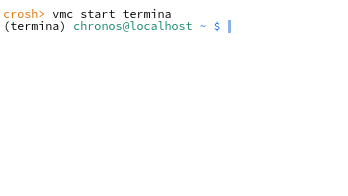
- Enter
lxc start [your_linux_username](don't worry if this says it's already started) - Enter
lxc exec bash-> Now you have a bash root session! - Enter
passwd [your_linux_usernameto set the sudo password, then justpasswdto set the root password - Done!
This file contains hidden or bidirectional Unicode text that may be interpreted or compiled differently than what appears below. To review, open the file in an editor that reveals hidden Unicode characters.
Learn more about bidirectional Unicode characters
| ! name: JavaScript goggles | |
| ! description: Search JavaScript websites better | |
| ! public: true | |
| ! author: Explosion-Scratch | |
| ! avatar: #F0DB4F | |
| $boost=3,site=github.io | |
| $boost=10,site=developer.mozilla.org | |
| $boost=10,site=stackoverflow.com | |
| $boost=5,site=geeksforgeeks.org |
Explosion-Scratch
/ hotreload.js
Created
July 10, 2022 19:26
Hotreload a page (uses fetch to check for updates, automatically senses resources)
This file contains hidden or bidirectional Unicode text that may be interpreted or compiled differently than what appears below. To review, open the file in an editor that reveals hidden Unicode characters.
Learn more about bidirectional Unicode characters
| (async ({ | |
| interval = 500, | |
| method = "fetch", | |
| useIframe = false, | |
| resources = [], | |
| autoDetect = true, | |
| resourceTypes = ["navigation", "script", "resource", "link", "img", "other"], | |
| }) => { | |
| if (autoDetect) { | |
| resources = performance |
Explosion-Scratch
/ Add, remove and run a function with optional permissions.js
Created
July 7, 2022 02:47
Chrome Extension Utilities (manifest V3)
This file contains hidden or bidirectional Unicode text that may be interpreted or compiled differently than what appears below. To review, open the file in an editor that reveals hidden Unicode characters.
Learn more about bidirectional Unicode characters
| const permissions = { | |
| async add(permission = [], origins = []){ | |
| if (!origins?.length){origins = undefined}; | |
| if (typeof permission === "string"){permission = [permission]}; | |
| return new Promise((r, reject) => { | |
| chrome.permissions.request( | |
| {permissions: permission, origins}, | |
| (granted) => { | |
| if (!granted){ | |
| reject("Permission not granted"); |
javascript:void (async () => { let { default: TD } = await import("https://cdn.skypack.dev/turndown"); let json = [ ...document.querySelectorAll(".text-base"), ].map((i) => ({ html: i.innerHTML, text: i.innerText, markdown: new TD().turndown(i), isPrompt: !i.querySelector(".prose"), })); window.open( URL.createObjectURL( new Blob( [ json .map((i) => i.isPrompt ? `**Prompt**: ${i.text}` : `**ChatGPT**: ${i.markdown}` ) .join("\n\n"), ], { type: "text/plain" } ) ) ); })()Get a quick answer from google for any question
(async function answer(q) {
  var html = await fetch(
    `https://cors.explosionscratc.repl.co/google.com/search?q=${encodeURI(q)}`,
Explosion-Scratch
/ Import and export chrome search engines.md
Created
April 2, 2022 16:10
Import and export chrome search engines
Chrome 100, working import / export:
Note: All the other answers weren't working so here's a strategy to debug if this ever stops working:
- Hijack chrome.send and then add a search engine and watch the logs:
let oldsend = chrome.send;
chrome.send = (...args) => {
   console.log("[chrome.send], message: %o, arguments: %o", args[0], args[1]);
 chrome.send(...args);