Note: Entire working code can be found here https://github.com/ManishPoduval/third-party-auth
To integrate Facebook Login into a website or application you need to create a Facebook App at https://developers.facebook.com/apps/


Note: Entire working code can be found here https://github.com/ManishPoduval/third-party-auth
To integrate Facebook Login into a website or application you need to create a Facebook App at https://developers.facebook.com/apps/
| const router = require("express").Router(); | |
| const UserModel = require('../models/User.model') | |
| // The client makes a API request to this url sending the data in the body | |
| router.post("/google/info", (req, res, next) => { | |
| const {firstName, lastName, email, image, googleId} = req.body | |
| // the name itself will include the last name | |
| try { | |
| // Create the user in the DB |
Note: Entire working code can be found here https://github.com/ManishPoduval/third-party-auth
Here we provide you some tips to do the exercise:
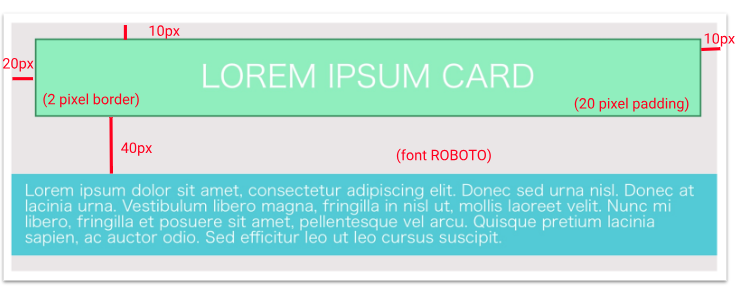
10px on the top and right sides, 20px from the left side and 40px from the content. It also has a 2px border.10px on the left and right sides. On the top and the bottom, there is an space of 5px.
| $(document).ready(function(){ | |
| ace.config.set('basePath', '../js/lib/ace'); | |
| var editor = ace.edit("editor"); | |
| editor.$blockScrolling = Infinity; | |
| editor.setTheme("ace/theme/monokai"); | |
| editor.getSession().setMode("ace/mode/html"); | |
| editor.setOptions({ | |
| enableBasicAutocompletion: true, |
| <style> | |
| /* Add "Completed" to like buttons */ | |
| .view-space--357856 .action-like.action-item { | |
| background-color: #f06e64; | |
| padding: 4px 8px; | |
| border-radius: 5px; | |
| opacity: 1; | |
| position: absolute; | |
| left: 415px; |