Skip to content

Instantly share code, notes, and snippets.

View NuLL3rr0r's full-sized avatar
💭
I may be slow to respond.

Mamadou Babaei NuLL3rr0r

💭
I may be slow to respond.
View GitHub Profile
@Brainiarc7
Brainiarc7 / ffmppeg-advanced-playbook-nvenc-and-libav-and-vaapi.md
Last active September 2, 2024 14:37
FFMpeg's playbook: Advanced encoding options with hardware-accelerated acceleration for both NVIDIA NVENC's and Intel's VAAPI-based hardware encoders in both ffmpeg and libav.

FFmpeg and libav's playbook: Advanced encoding options with hardware-based acceleration, NVIDIA's NVENC and Intel's VAAPI-based encoder.

Hello guys,

Continuing from this guide to building ffmpeg and libav with NVENC and VAAPI enabled, this snippet will cover advanced options that you can use with ffmpeg and libav on both NVENC and VAAPI hardware-based encoders.

For ffmpeg:

@Brainiarc7
Brainiarc7 / ffmpeg-desktop-livestreaming-nvenc-and netcat.md
Last active November 1, 2025 16:54
This gist will show you how to livestream your Linux desktop to a client via FFMpeg using a GPU-accelerated video encoder (NVENC and VAAPI-based)

Low-Latency Live Streaming for your Desktop using ffmpeg and netcat:

Preamble:

In this post I will explore how to stream a video and audio capture from one computer to another using ffmpeg and netcat, with a latency below 100ms, which is good enough for presentations and general purpose remote display tasks on a local network.

The problem:

Streaming low-latency live content is quite hard, because most software-based video codecs are designed to achieve the best compression and not best latency. This makes sense, because most movies are encoded once and decoded often, so it is a good trade-off to use more time for the encoding than the decoding.

package main
import (
agwd "github.com/sclevine/agouti"
tbwd "github.com/tebeka/selenium"
"log"
sgwd "sourcegraph.com/sourcegraph/go-selenium"
)
// Helper for sourcegraph/go-selenium
@posener
posener / go-shebang-story.md
Last active November 18, 2025 07:09
Story: Writing Scripts with Go

Story: Writing Scripts with Go

This is a story about how I tried to use Go for scripting. In this story, I’ll discuss the need for a Go script, how we would expect it to behave and the possible implementations; During the discussion I’ll deep dive to scripts, shells, and shebangs. Finally, we’ll discuss solutions that will make Go scripts work.

Why Go is good for scripting?

While python and bash are popular scripting languages, C, C++ and Java are not used for scripts at all, and some languages are somewhere in between.

@mbinna
mbinna / effective_modern_cmake.md
Last active December 2, 2025 02:23
Effective Modern CMake

Effective Modern CMake

Getting Started

For a brief user-level introduction to CMake, watch C++ Weekly, Episode 78, Intro to CMake by Jason Turner. LLVM’s CMake Primer provides a good high-level introduction to the CMake syntax. Go read it now.

After that, watch Mathieu Ropert’s CppCon 2017 talk Using Modern CMake Patterns to Enforce a Good Modular Design (slides). It provides a thorough explanation of what modern CMake is and why it is so much better than “old school” CMake. The modular design ideas in this talk are based on the book [Large-Scale C++ Software Design](https://www.amazon.de/Large-Scale-Soft

@MoienTajik
MoienTajik / iranian-phone-numbers-regex.md
Last active November 29, 2025 07:27
Regex For Iranian Mobile Phone Numbers

Regex For Iranian Phone Numbers

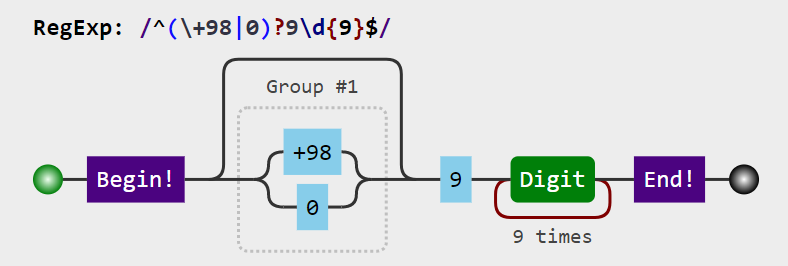
This regex supports all kinds of Iranian mobile phone numbers :

^(\+98|0)?9\d{9}$


Regex Visualized

@spacepatcher
spacepatcher / Breach Compilation (1.4 billion credentials) in Postgres.md
Last active October 28, 2025 16:52
Breach Compilation (1.4 billion credentials) in Postgres.md
@razzbee
razzbee / Libsodium Base64 encode and Decode in C++
Last active October 9, 2024 03:34
Encoding and Decoding Base64 string using Libcodium C library in C++
``
//
// Created by Razak Zakari on 12/04/2018.
//
#define BASE64_VARIATION sodium_base64_VARIANT_ORIGINAL
#include <algorithm>
#include <math.h>
#include <vector>
@jjvillavicencio
jjvillavicencio / setup.sh
Last active November 27, 2025 08:57
Install Android SDK on Windows Bash (WSL)
cd /home/<user>/
sudo apt-get install unzip
wget https://dl.google.com/android/repository/sdk-tools-linux-4333796.zip
unzip sdk-tools-linux-4333796.zip -d Android
rm sdk-tools-linux-4333796.zip
sudo apt-get install -y lib32z1 openjdk-8-jdk
export JAVA_HOME=/usr/lib/jvm/java-8-openjdk-amd64
export PATH=$PATH:$JAVA_HOME/bin
printf "\n\nexport JAVA_HOME=/usr/lib/jvm/java-8-openjdk-amd64\nexport PATH=\$PATH:\$JAVA_HOME/bin" >> ~/.bashrc
cd Android/tools/bin