
TW0 Torgo13


| using UnityEngine; | |
| public class Colors | |
| { | |
| // NOTE: The follwing color names come from the CSS3 specification, Section 4.3 Extended Color Keywords | |
| // http://www.w3.org/TR/css3-color/#svg-color | |
| public static readonly Color AliceBlue = new Color32(240,248,255,255); | |
| public static readonly Color AntiqueWhite = new Color32(250,235,215,255); | |
| public static readonly Color Aqua= new Color32(0,255,255,255); |

| using UnityEngine; | |
| using System.Collections; | |
| public class GyroCamera : MonoBehaviour | |
| { | |
| // STATE | |
| private float _initialYAngle = 0f; | |
| private float _appliedGyroYAngle = 0f; | |
| private float _calibrationYAngle = 0f; | |
| private Transform _rawGyroRotation; |

Wave Function Collapse (WFC) by @exutumno is a new algorithm that can generate procedural patterns from a sample image. It's especially exciting for game designers, letting us draw our ideas instead of hand coding them. We'll take a look at the kinds of output WFC can produce and the meaning of the algorithm's parameters. Then we'll walk through setting up WFC in javascript and the Unity game engine.

The traditional approach to this sort of output is to hand code algorithms that generate features, and combine them to alter your game map. For example you could sprinkle some trees at random coordinates, draw roads with a brownian motion, and add rooms with a Binary Space Partition. This is powerful but time consuming, and your original vision can someti

| using UnityEngine; | |
| using UnityEngine.Rendering; | |
| // This script is added to cameras automatically at runtime by the ObjectNeedingRefraction scripts. | |
| public class CameraTrackingRefraction : MonoBehaviour { | |
| [System.NonSerialized] | |
| public int lastRenderedFrame = -1; | |
| Camera cam; |

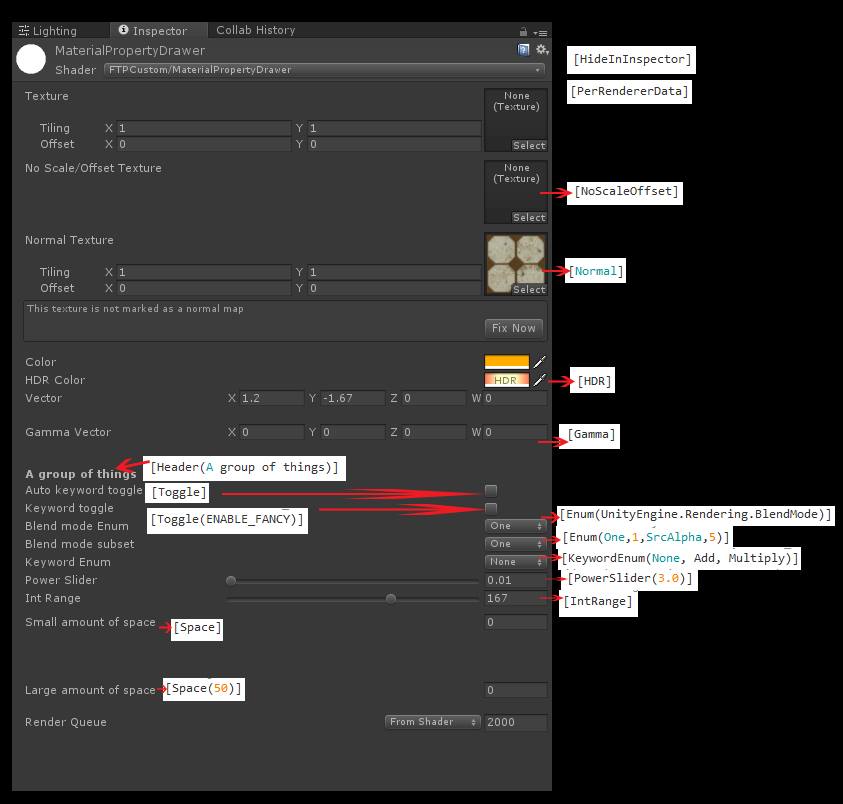
Shader "MaterialPropertyDrawer"
{
Properties
{
_MainTex("Texture", 2D) = "white" {}

[HideInInspector] _MainTex2("Hide Texture", 2D) = "white" {}

| Shader "Unlit/Billboard" | |
| { | |
| Properties | |
| { | |
| _MainTex ("Texture", 2D) = "white" {} | |
| } | |
| SubShader | |
| { | |
| Tags{ "Queue" = "Transparent" "IgnoreProjector" = "True" "RenderType" = "Transparent" "DisableBatching" = "True" } |

| using UnityEngine; | |
| using System; | |
| public class MathParabola | |
| { | |
| public static Vector3 Parabola(Vector3 start, Vector3 end, float height, float t) | |
| { | |
| Func<float, float> f = x => -4 * height * x * x + 4 * height * x; |

| Shader "Name" { | |
| Properties { | |
| _Name ("display name", Range (min, max)) = number | |
| _Name ("display name", Float) = number | |
| _Name ("display name", Int) = number | |
| _Name ("display name", Color) = (number,number,number,number) | |
| _Name ("display name", Vector) = (number,number,number,number) |
| using Unity.Collections; | |
| using Unity.Collections.LowLevel.Unsafe; | |
| using Unity.Mathematics; | |
| using UnityEngine; | |
| public class NativeMeshTest : MonoBehaviour | |
| { | |
| private NativeArray<float3> vertexBuffer; | |
| private Vector3[] vertexArray; |