Skip to content

Instantly share code, notes, and snippets.

View aculich's full-sized avatar
😀
Having fun exploring repos for Computational Text Analysis with D-Lab CTAWG

Aaron Culich aculich

😀
Having fun exploring repos for Computational Text Analysis with D-Lab CTAWG
View GitHub Profile
@lpheller
lpheller / tldr-global-gitignore-ds-store.sh
Created November 11, 2020 08:51
Globally ignore .DS_Store files
# Quick and easy one line command to setup a global .gitignore file and ignore macOS .DS_store files globally
git config --global core.excludesfile "~/.gitignore" && echo .DS_Store >> ~/.gitignore
@tanaikech
tanaikech / submit.md
Last active November 19, 2022 06:08
Sorting Cells on Google Spreadsheet with Background colors using Google Apps Script

Sorting Cells on Google Spreadsheet with Background colors using Google Apps Script

This is a sample script for sorting the cells on Google Spreadsheet with the background colors using Google Apps Script.

Unfortunately, in the current stage, it seems that sort(sortSpecObj) of Class Range cannot directly sort by the background colors of cells. But when Sheets API is used, this goal can be achieved. Here, "SortRangeRequest" of the method of "spreadsheets.batchUpdate" in Sheets API is used.
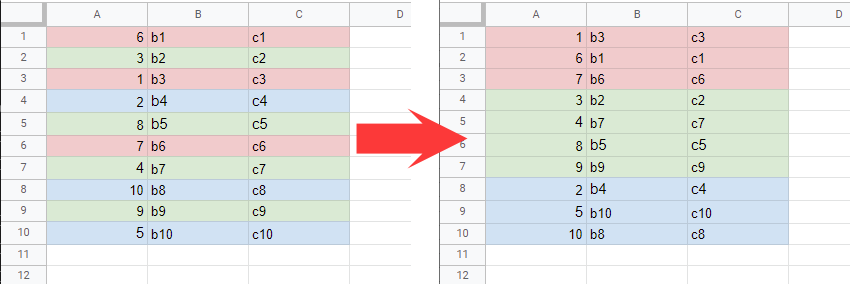
Flow

@scmx
scmx / using-details-summary-github.md
Last active May 1, 2026 21:48
Using <details> <summary> expandable content on GitHub with Markdown #details #summary #markdown #gfm #html

How to use <details> <summary> expandable content on GitHub with Markdown

Firstly, what is <details> <summary>?

The HTML Details Element (<details>) creates a disclosure widget in which information is visible only when the widget is toggled into an "open" state. A summary or label can be provided using the <summary> element. https://developer.mozilla.org/en-US/docs/Web/HTML/Element/details.

Example

@danaspiegel
danaspiegel / zdl.py
Last active July 16, 2024 12:40
Zoom Recording Downloader
#!/usr/bin/env python3
import os
import requests
import itertools
from dateutil.parser import parse
API_KEY = ''
API_SECRET = ''
@aculich
aculich / ansible-summary.md
Created November 7, 2017 15:11 — forked from andreicristianpetcu/ansible-summary.md
This is an ANSIBLE Cheat Sheet from Jon Warbrick

An Ansible summary

Jon Warbrick, July 2014, V3.2 (for Ansible 1.7)

Configuration file

intro_configuration.html

First one found from of

@ttrahan
ttrahan / block_personal_appts
Last active March 23, 2026 14:12
Google Apps Script to automatically create, edit and delete events on work calendar for personal calendar events. Instructions on how to set up can be found at https://medium.com/@willroman/auto-block-time-on-your-work-google-calendar-for-your-personal-events-2a752ae91dab
function sync() {
var id="XXXXXXXXXX"; // CHANGE - id of the secondary calendar to pull events from
var today=new Date();
var enddate=new Date();
enddate.setDate(today.getDate()+7); // how many days in advance to monitor and block off time
var secondaryCal=CalendarApp.getCalendarById(id);
var secondaryEvents=secondaryCal.getEvents(today,enddate);
@nepsilon
nepsilon / how-to-use-mac-keychain-to-store-github-repos-credentials.md
Created July 18, 2017 06:50
How to use Mac KeyChain to store GitHub repos credentials? — First published in fullweb.io issue #108

How to use Mac KeyChain to store GitHub repos credentials?

You know the pain, you cloned a repo over HTTPS, and now Git asks you for your password each time you want to push or pull.

Chances are you already have the git credential-osxkeychain command installed. If not, just install Git with brew: brew install git.

Once installed, just tell Git to use the KeyChain to store your credentials:

git config --global credential.helper osxkeychain
@algesten
algesten / tmux.conf
Created May 14, 2017 08:30
A tmux.conf with pbcopy
# propagate titles to the window
set -g set-titles on
# Minimalist window title "0:bash"
set -g set-titles-string "#I:#W"
# show colors
set -g default-terminal "screen-256color"
@bpmore
bpmore / sort-tabs.txt
Created June 9, 2016 17:41
Sort Tabs in Google Spreadsheets
1. Copy/Paste the information below to the clipboard
2. Open the spreadsheet whose sheets need to be alphabetised
3. Choose Tools > Script editor > Blank (this opens a new tab in the browser)
4. Press Control+A followed by Control+V copy and paste the script in
5. Press Control+S to save the script
6. Choose Run > sortSheets
7. Go back to the spreadsheet tab to view the new sorted tab order
--Copy everything below this line--
function sortSheets () {
@andreicristianpetcu
andreicristianpetcu / ansible-summary.md
Created May 30, 2016 19:25
This is an ANSIBLE Cheat Sheet from Jon Warbrick

An Ansible summary

Jon Warbrick, July 2014, V3.2 (for Ansible 1.7)

Configuration file

intro_configuration.html

First one found from of