Skip to content

Instantly share code, notes, and snippets.

View baldrailers's full-sized avatar
🤖

Julius Francisco baldrailers

🤖
  • Paranaque City, PH
View GitHub Profile
@roadrunner2
roadrunner2 / 0 Linux-On-MBP-Late-2016.md
Last active May 15, 2026 16:35
Linux on MacBook Pro Late 2016 and Mid 2017 (with Touchbar)

Introduction

This is about documenting getting Linux running on the late 2016 and mid 2017 MPB's; the focus is mostly on the MacBookPro13,3 and MacBookPro14,3 (15inch models), but I try to make it relevant and provide information for MacBookPro13,1, MacBookPro13,2, MacBookPro14,1, and MacBookPro14,2 (13inch models) too. I'm currently using Fedora 27, but most the things should be valid for other recent distros even if the details differ. The kernel version is 4.14.x (after latest update).

The state of linux on the MBP (with particular focus on MacBookPro13,2) is also being tracked on https://github.com/Dunedan/mbp-2016-linux . And for Ubuntu users there are a couple tutorials (here and here) focused on that distro and the MacBook.

Note: For those who have followed these instructions ealier, and in particular for those who have had problems with the custom DSDT, modifying the DSDT is not necessary anymore - se

@mdang
mdang / ALEXA.md
Last active December 20, 2019 15:36
Lesson: Alexa
@amishshah
amishshah / har-extract.js
Created February 12, 2017 16:14
Rough script to extract images from HTTP Archive (HAR) files
const fs = require('fs');
const file = JSON.parse(fs.readFileSync('./dump.har')).log;
const targetMimeType = 'image/jpeg';
let count = 1;
for (const entry of file.entries) {
if (entry.response.content.mimeType === targetMimeType) {
// ensure output directory exists before running!
fs.writeFileSync(`output/${count}.png`, new Buffer(entry.response.content.text, 'base64'), 'binary');
count++;
@zparnold
zparnold / one_liner.sh
Last active October 28, 2025 08:15
A simply script to delete all failed pods from Kubernetes
kubectl get pods --all-namespaces | grep Evicted | awk '{print $2 " --namespace=" $1}' | xargs kubectl delete pod
@jsoverson
jsoverson / intercept.js
Created February 19, 2019 21:28
Intercept responses with chrome and puppeteer
const puppeteer = require('puppeteer');
const prettier = require('prettier');
const atob = require('atob');
const btoa = require('btoa');
const scriptUrlPatterns = [
'*'
]
const requestCache = new Map();
@rengler33
rengler33 / scrape_with_logs.py
Last active February 8, 2025 04:09
How to Capture Network Traffic When Scraping with Selenium & Python
# see rkengler.com for related blog post
# https://www.rkengler.com/how-to-capture-network-traffic-when-scraping-with-selenium-and-python/
import json
import pprint
from selenium import webdriver
from selenium.webdriver.common.desired_capabilities import DesiredCapabilities
capabilities = DesiredCapabilities.CHROME
@aanari
aanari / set-alacritty-default.sh
Last active June 15, 2025 21:10
Set Alacritty as Default Terminal Editor (Ubuntu)
sudo update-alternatives --install /usr/bin/x-terminal-emulator x-terminal-emulator $(which alacritty) 50
sudo update-alternatives --config x-terminal-emulator
@benkoshy
benkoshy / ransack-post-form-pagy-2.md
Last active May 17, 2024 02:29
Pagy Documentation - Using Stimulus JS

Using Stimulus JS to POST

Whenever you use pagy links that require interception, you will need to reinitialise any javascript that you need to run. If you submit a form, and use a turbo frame to render those search results, and to also render the pagination links to those results, how are you going to reinitialize your javascript code to intercept those pagy page links?

Stimulus JS is very handy for reinitialising javascript code, and is useful if you are using a library like hotwire (by Basecamp) where changes are made to the DOM.

// pagy_controller.js - a stimulus JS controller
import { Controller } from "@hotwired/stimulus"
@alexrudall
alexrudall / #ChatGPT Streaming.md
Last active December 27, 2025 05:31
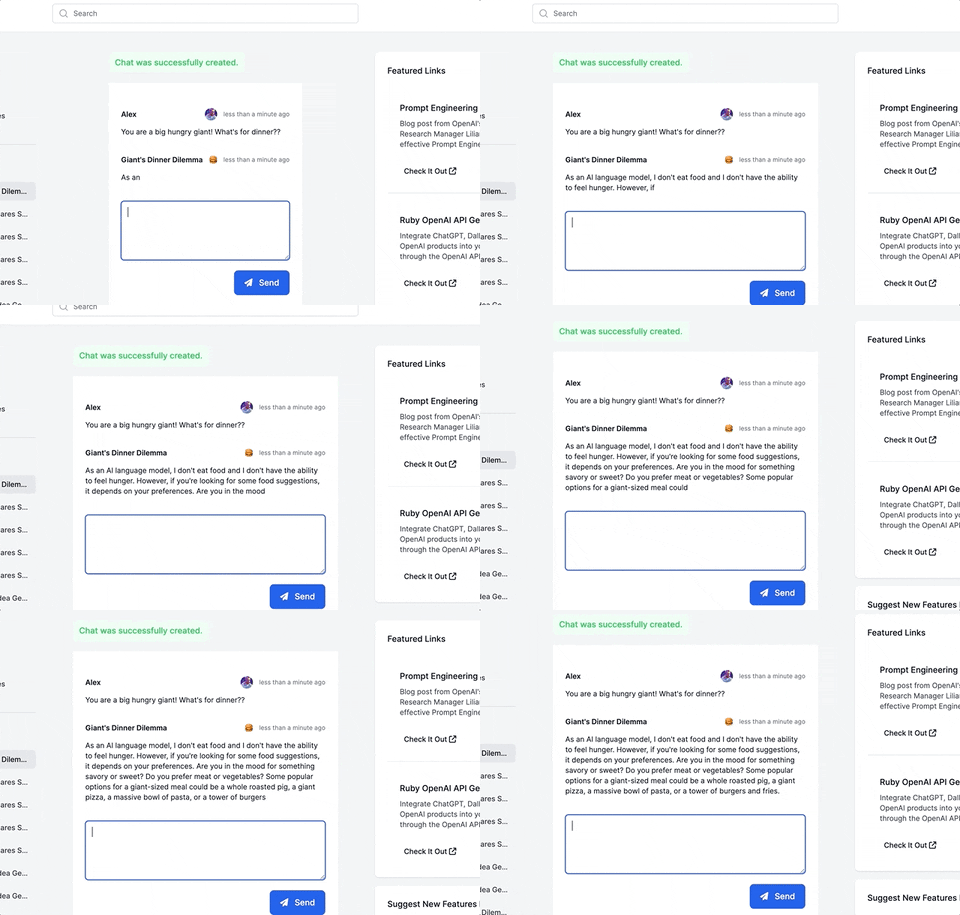
ChatGPT streaming with ruby-openai, Rails 7, Hotwire, Turbostream, Sidekiq and Tailwind!

How to add ChatGPT streaming to your Ruby on Rails 7 app!

This guide will walk you through adding a ChatGPT-like messaging stream to your Ruby on Rails 7 app using ruby-openai, Rails 7, Hotwire, Turbostream, Sidekiq and Tailwind. All code included below!

Want more content like this, for free? Check out my free book, RailsAI!

Alt Text