Skip to content

Instantly share code, notes, and snippets.

View burasuk's full-sized avatar

Krzysztof Doll burasuk

  • Poland
  • 03:54 (UTC +02:00)
View GitHub Profile
@itsbalamurali
itsbalamurali / gravatar_function.php
Created November 27, 2012 07:08
Simple PHP Gravatar Function
<?php
/**
Load a gravatar.
*/
function gravatar($email = '', $rating = 'pg') {
$default = "path/to/defava.png"; // Set a Default Avatar
$email = md5(strtolower(trim($email)));
$gravurl = "http://www.gravatar.com/avatar/$email?d=$default&s=60&r=$rating";
return '<img src="'.$gravurl.'" width="60" height="60" border="0" alt="Avatar">';
@clemtibs
clemtibs / Commit Formatting.md
Last active February 13, 2026 17:19
Angular Commit Format Reference Sheet

Commit Message Format

This specification is inspired by and supersedes the [AngularJS commit message format][commit-message-format].

We have very precise rules over how our Git commit messages must be formatted. This format leads to easier to read commit history.

Each commit message consists of a header, a body, and a footer.

@rponte
rponte / get-latest-tag-on-git.sh
Last active February 2, 2026 14:38
Getting latest tag on git repository
# The command finds the most recent tag that is reachable from a commit.
# If the tag points to the commit, then only the tag is shown.
# Otherwise, it suffixes the tag name with the number of additional commits on top of the tagged object
# and the abbreviated object name of the most recent commit.
git describe
# With --abbrev set to 0, the command can be used to find the closest tagname without any suffix:
git describe --abbrev=0
# other examples
@spalladino
spalladino / mysql-docker.sh
Created December 22, 2015 13:47
Backup and restore a mysql database from a running Docker mysql container
# Backup
docker exec CONTAINER /usr/bin/mysqldump -u root --password=root DATABASE > backup.sql
# Restore
cat backup.sql | docker exec -i CONTAINER /usr/bin/mysql -u root --password=root DATABASE
@Rich-Harris
Rich-Harris / service-workers.md
Last active February 24, 2026 02:06
Stuff I wish I'd known sooner about service workers

Stuff I wish I'd known sooner about service workers

I recently had several days of extremely frustrating experiences with service workers. Here are a few things I've since learned which would have made my life much easier but which isn't particularly obvious from most of the blog posts and videos I've seen.

I'll add to this list over time – suggested additions welcome in the comments or via twitter.com/rich_harris.

Use Canary for development instead of Chrome stable

Chrome 51 has some pretty wild behaviour related to console.log in service workers. Canary doesn't, and it has a load of really good service worker related stuff in devtools.

@yetanotherchris
yetanotherchris / cron_task.sh
Created September 5, 2016 09:45
Run cron inside a docker container.
env - `cat /root/env.sh` /bin/bash -c $1 >> /var/log/cron.log 2>&1
@Slauta
Slauta / .gitlab-ci
Last active July 31, 2025 22:28
electron-updater from private repo gitlab.com
variables:
VERSION_ID: '1.0.$CI_PIPELINE_ID'
stages:
- build
build:
image: slauta93/electron-builder-win
stage: build
artifacts:
@PCreations
PCreations / rxjs-diagrams.md
Last active July 16, 2025 17:55
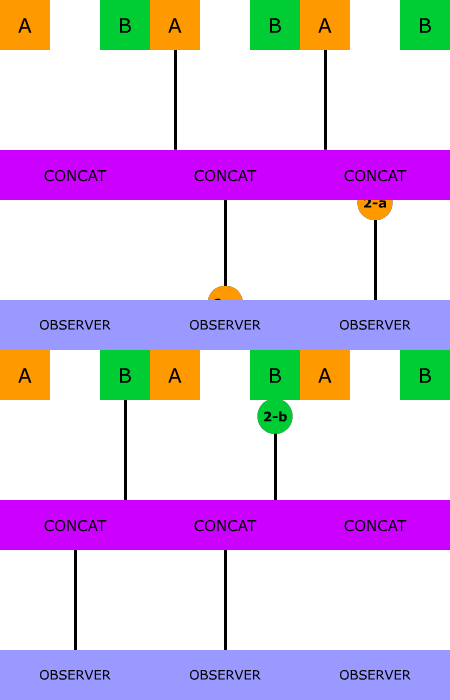
Super Intuitive Interactive Diagrams to learn combining RxJS sequences by Max NgWizard K
@bgauduch
bgauduch / multiple-repository-and-identities-git-configuration.md
Last active May 15, 2026 13:35
Git config with multiple identities and multiple repositories

Setup multiple git identities & git user informations

/!\ Be very carrefull in your setup : any misconfiguration make all the git config to fail silently ! Go trought this guide step by step and it should be fine 😉

Setup multiple git ssh identities for git

  • Generate your SSH keys as per your git provider documentation.
  • Add each public SSH keys to your git providers acounts.
  • In your ~/.ssh/config, set each ssh key for each repository as in this exemple:
@thoroc
thoroc / README.md
Last active November 18, 2025 17:05
Dockerizing all the things: Running Ansible inside Docker container

Automating things in software development is more than useful and using Ansible is one way to automate software provisioning, configuration management, and application deployment. Normally you would install Ansible to your control node just like any other application but an alternate strategy is to deploy Ansible inside a standalone Docker image. But why would you do that? This approach has benefits to i.a. operational processes.

Although Ansible does not require installation of any agents within managed nodes, the environment where Ansible is installed is not so simple to setup. In control node it requires specific Python libraries and their system dependencies. So instead of using package manager to install Ansible and it’s dependencies we just pull a Docker image.

By creating an Ansible Docker image you get the Ansible version you want and isolate all of the required dependencies from the host machine which potentially might break things in other area