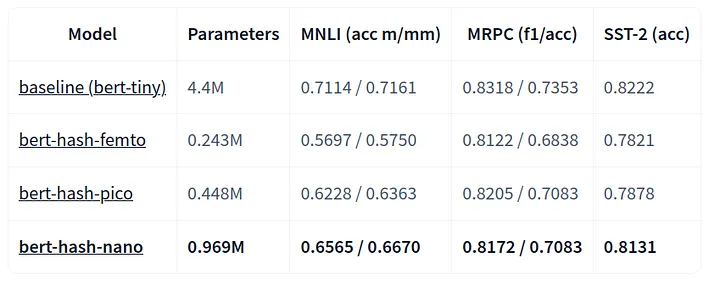
from txtai.pipeline import Textractor

textractor = Textractor(backend="docling", headers={"user-agent": "Mozilla/5.0"})
textractor("https://miro.medium.com/v2/resize:fit:720/format:webp/1*HHPVwIrcxYcLRvjDpwLQyQ.png")
David Mezzetti davidmezzetti

davidmezzetti
/ gguf-vectors.py
Created
November 28, 2025 20:50
This file contains hidden or bidirectional Unicode text that may be interpreted or compiled differently than what appears below. To review, open the file in an editor that reveals hidden Unicode characters.
Learn more about bidirectional Unicode characters
| import numpy as np | |
| from txtai.ann import ANNFactory | |
| # Index 10M vectors using llama.cpp style quants | |
| ann = None | |
| for _ in range(1000): | |
| # Generate batch of vectors | |
| batch = np.random.rand(10000, 768).astype(np.float32) | |
| if not ann: |
davidmezzetti
/ rag-quickstart.py
Last active
December 8, 2025 04:32
This file contains hidden or bidirectional Unicode text that may be interpreted or compiled differently than what appears below. To review, open the file in an editor that reveals hidden Unicode characters.
Learn more about bidirectional Unicode characters
| # RAG Quick Start | |
| # Easy to use way to get started with RAG using YOUR data | |
| # | |
| # For a complete application see this: https://github.com/neuml/rag | |
| # | |
| # TxtAI has 70+ example notebooks covering everything the framework provides | |
| # Examples: https://neuml.github.io/txtai/examples | |
| # | |
| # Install TxtAI | |
| # pip install txtai[pipeline-data] |
davidmezzetti
/ txtai-audio.py
Created
November 15, 2025 12:24
This file contains hidden or bidirectional Unicode text that may be interpreted or compiled differently than what appears below. To review, open the file in an editor that reveals hidden Unicode characters.
Learn more about bidirectional Unicode characters
| import soundfile as sf | |
| from txtai.pipeline import TextToAudio | |
| # Create and run pipeline (Note that model is CC-BY-NC) | |
| tta = TextToAudio("facebook/musicgen-stereo-medium") | |
| speech, rate = tta("Happy 80s rock and synth for a fun startup company") | |
| # Write to file | |
| sf.write("out.wav", speech.T, rate) |
davidmezzetti
/ txtai-tts.py
Created
November 14, 2025 21:57
This file contains hidden or bidirectional Unicode text that may be interpreted or compiled differently than what appears below. To review, open the file in an editor that reveals hidden Unicode characters.
Learn more about bidirectional Unicode characters
| import soundfile as sf | |
| from txtai.pipeline import TextToSpeech | |
| # Build pipeline | |
| tts = TextToSpeech("neuml/kokoro-int8-onnx") | |
| # Generate speech | |
| speech, rate = tts( | |
| """Have you ever considered having a snooty British accent? |
davidmezzetti
/ txtai-textractor-image.md
Created
November 13, 2025 14:48
davidmezzetti
/ webrag.py
Created
November 12, 2025 13:40
This file contains hidden or bidirectional Unicode text that may be interpreted or compiled differently than what appears below. To review, open the file in an editor that reveals hidden Unicode characters.
Learn more about bidirectional Unicode characters
| from smolagents import WebSearchTool | |
| from txtai import LLM | |
| def webrag(query): | |
| prompt = f""" | |
| Answer the following question using ONLY the context below. | |
| Query: {query} | |
| Context: {search(query)} | |
| """ |
davidmezzetti
/ txtai-textractor.py
Created
November 8, 2025 11:23
This file contains hidden or bidirectional Unicode text that may be interpreted or compiled differently than what appears below. To review, open the file in an editor that reveals hidden Unicode characters.
Learn more about bidirectional Unicode characters
| from txtai.pipeline import Textractor | |
| # Docling backend, split text by sections | |
| textractor = Textractor(sections=True, backend="docling") | |
| # BERT Paper | |
| textractor("https://arxiv.org/pdf/1810.04805") | |
| # PDF converted to Markdown, split on Markdown sections | |
| # ['## BERT: Pre-training of Deep Bidirectional Transformers for Language Understanding... |
davidmezzetti
/ text-classify.py
Created
November 7, 2025 14:05
This file contains hidden or bidirectional Unicode text that may be interpreted or compiled differently than what appears below. To review, open the file in an editor that reveals hidden Unicode characters.
Learn more about bidirectional Unicode characters
| from datasets import load_dataset | |
| from sklearn.metrics import accuracy_score | |
| from transformers import AutoModelForSequenceClassification, AutoTokenizer | |
| from txtai.pipeline import HFTrainer | |
| def metrics(pred): | |
| labels, preds = pred.label_ids, pred.predictions.argmax(-1) | |
| # Calculate accuracy | |
| return {"accuracy": accuracy_score(labels, preds)} |
davidmezzetti
/ web2gguf.py
Created
November 6, 2025 21:26
This file contains hidden or bidirectional Unicode text that may be interpreted or compiled differently than what appears below. To review, open the file in an editor that reveals hidden Unicode characters.
Learn more about bidirectional Unicode characters
| from txtai import Embeddings | |
| from txtai.pipeline import Textractor | |
| urls = "https://github.com/neuml/txtai" | |
| textractor = Textractor(chunker="semantic") | |
| embeddings = Embeddings(backend="ggml", ggml={"quantize": "q4_0"}) | |
| embeddings.index((url, x) for x in textractor(url)) | |
| embeddings.save("gguf") |
davidmezzetti
/ txtai-browser-automation.md
Created
April 17, 2025 15:46