- Initially install your pry-rails to group development on your apps Gemfile
group :development do
  # ..
  gem 'pry-rails'
  # ..
end

group :development do
# ..
gem 'pry-rails'
# ..
end
| :r !uuidgen|sed 's/.*/"uid": "&",/' |

If you work across many computers (and even otherwise!), it's a good idea to keep a copy of your setup on the cloud, preferably in a git repository, and clone it on another machine when you need.
Thus, you should keep the .vim directory along with your .vimrc version-controlled.
But when you have plugins installed inside .vim/bundle (if you use pathogen), or inside .vim/pack (if you use Vim 8's packages), keeping a copy where you want to be able to update the plugins (individual git repositories), as well as your vim-configuration as a whole, requires you to use git submodules.
Initialize a git repository inside your .vim directory, add everything (including the vimrc), commit and push to a GitHub/BitBucket/GitLab repository:
cd ~/.vim

| # Assumes the database container is named 'db' | |
| DOCKER_DB_NAME="$(docker-compose ps -q db)" | |
| DB_HOSTNAME=db | |
| DB_USER=postgres | |
| LOCAL_DUMP_PATH="path/to/local.dump" | |
| docker-compose up -d db | |
| docker exec -i "${DOCKER_DB_NAME}" pg_restore -C --clean --no-acl --no-owner -U "${DB_USER}" -d "${DB_HOSTNAME}" < "${LOCAL_DUMP_PATH}" | |
| docker-compose stop db |

| #!/bin/sh | |
| # To reinstall this script in the same or another git repo run: | |
| # curl -sSL https://gist.githubusercontent.com/elliotthilaire/cef91754bb296d67e776/raw/pre-push > .git/hooks/pre-push; chmod +x .git/hooks/pre-push | |
| # check that pronto is installed | |
| hash pronto 2>/dev/null || { | |
| echo >&2 "Pronto is not installed. Install with 'gem install pronto pronto-rubocop'"; | |
| echo >&2 "Find other Pronto runners at https://github.com/mmozuras/pronto#runners"; | |
| exit 0; |

| # iPhone 6 Reservation Availability in Australia | |
| # !! Please use responsibly. Personal use only !! | |
| # `ruby iphone6.rb` - list all available models in all stores | |
| # `ruby iphone6.rb R405` - list available models for a specific store, Rundle Place in this example. | |
| require 'open-uri' | |
| require 'json' | |
| MODEL_NAMES = { | |
| "MG4A2X/A" => "iPhone 6 Space Grey 128GB", |


| #!/bin/bash | |
| # puma - Generic Red Hat Startup script for Puma | |
| # chkconfig: 35 95 05 | |
| # description: Generic Puma Startup Script | |
| # processname: puma | |
| # config: /etc/'filename'.conf | |
| # pidfile: /var/run/puma/'filename'.pid |

| # | |
| # Name: nginx-tls.conf | |
| # Auth: Gavin Lloyd <gavinhungry@gmail.com> | |
| # Desc: Nginx SSL/TLS configuration for "A+" Qualys SSL Labs rating | |
| # | |
| # Enables HTTP/2, PFS, HSTS and OCSP stapling. Configuration options not related | |
| # to SSL/TLS are not included here. | |
| # | |
| # Additional tips: | |
| # |

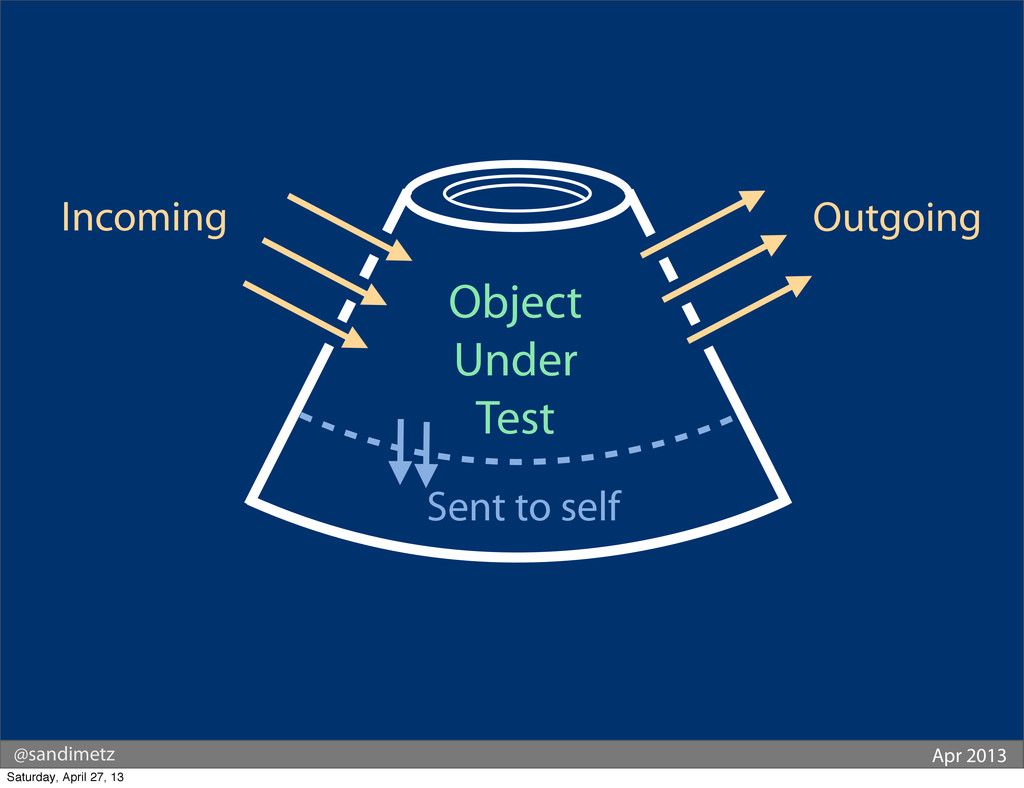
Look at the following image...
...it shows an object being tested.
You can't see inside the object. All you can do is send it messages. This is an important point to make because we should be "testing the interface, and NOT the implementation" - doing so will allow us to change the implementation without causing our tests to break.