You signed in with another tab or window. Reload to refresh your session.You signed out in another tab or window. Reload to refresh your session.You switched accounts on another tab or window. Reload to refresh your session.Dismiss alert
If catalina.out becomes 2GB in size or more, tomcat can crashes and fails to start without any error message. To avoid this scenario you should rotate catalina.out frequently. This article describes how to setup auto rotation of catalina.out on a linux/unix machine.
Java Keytool is a key and certificate management tool that is used to manipulate Java Keystores, and is included with Java. A Java Keystore is a container for authorization certificates or public key certificates, and is often used by Java-based applications for encryption, authentication, and serving over HTTPS. Its entries are protected by a keystore password. A keystore entry is identified by an alias, and it consists of keys and certificates that form a trust chain.
This cheat sheet-style guide provides a quick reference to keytool commands that are commonly useful when working with Java Keystores. This includes creating and modifying Java Keystores so they can be used with your Java applications.
Note: For easier management of your Java Keystores (using a GUI) check out Portecle.
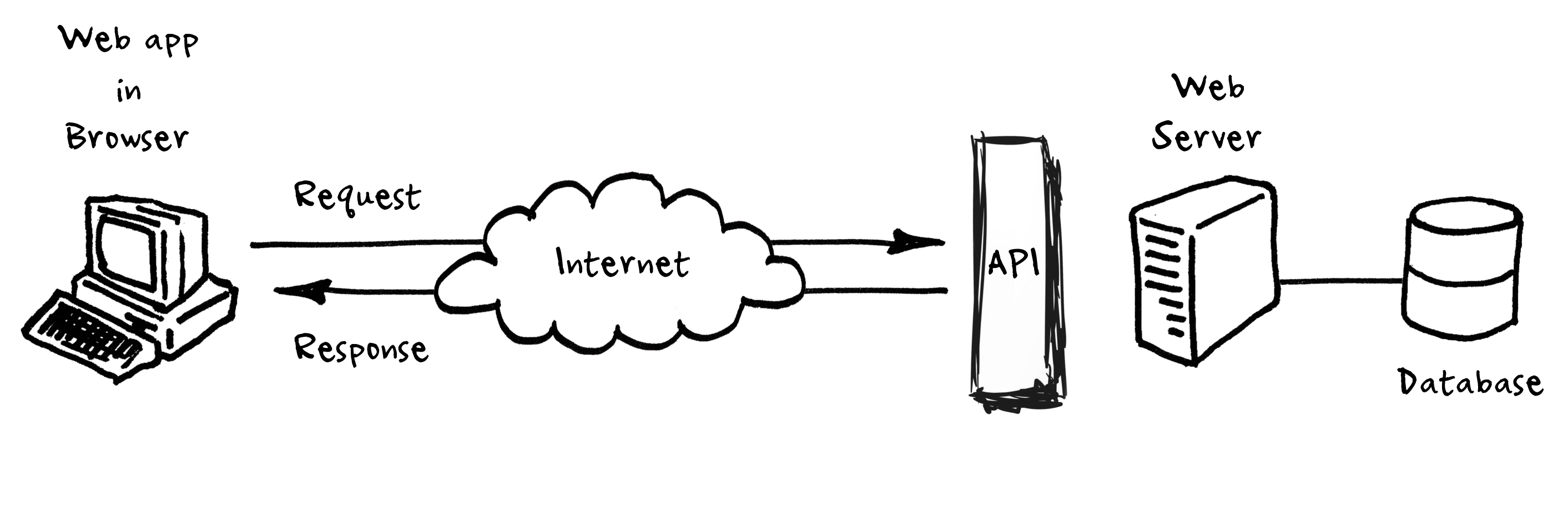
What is an APIs (application programming interfaces)?
An API is a set of programming code that enables data transmission between one software product and another. It also contains the terms of this data exchange.
An API is not a database. It is an access point to an app that can access a database.
They allow us to go get data from outside sources.
This file contains hidden or bidirectional Unicode text that may be interpreted or compiled differently than what appears below. To review, open the file in an editor that reveals hidden Unicode characters.
Learn more about bidirectional Unicode characters
This file contains hidden or bidirectional Unicode text that may be interpreted or compiled differently than what appears below. To review, open the file in an editor that reveals hidden Unicode characters.
Learn more about bidirectional Unicode characters
An example configuration for Tomcat as systemd service. #tomcat #systemd #systemd.service
README
Let Tomcat is download and installed under /opt/tomcat.
Also, let tomcat be a non-provileged user under which the server will be running.
We assume that we keep server's binaries under /opt/tomcat and we will create a server instance named foo under /var/tomcat/ (carrying its own conf, logs, webapps, work, lib directories).
See also https://dzone.com/articles/running-multiple-tomcat.
Create a template service unit file at /etc/systemd/system/tomcat@.service:
Elastic Load Balancing automatically distributes your incoming traffic across multiple targets, such as EC2 instances, containers, and IP addresses, in one or more Availability Zones. It monitors the health of its registered targets, and routes traffic only to the healthy targets. Elastic Load Balancing scales your load balancer as your incoming traffic changes over time. It can automatically scale to the vast majority of workloads.
Elastic Load Balancing supports the following load balancers: Application Load Balancers, Network Load Balancers, Gateway Load Balancers, and Classic Load Balancers.
Application Load Balancer components
The following diagram illustrates the basic components. Notice that each listener contains a default rule, and one listener contains another rule that routes requests to a different target group. One target is registered with two target groups.
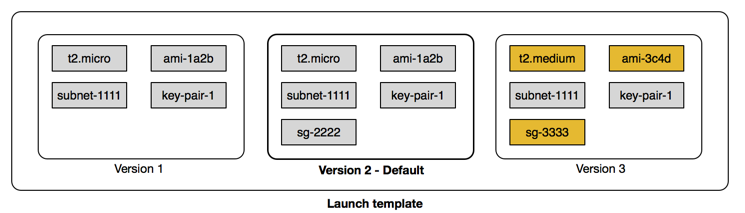
You can create a launch template that contains the configuration information to launch an instance. Launch templates enable you to store launch parameters so that you do not have to specify them every time you launch an instance. For example, a launch template can contain the AMI ID, instance type, and network settings that you typically use to launch instances. When you launch an instance using the Amazon EC2 console, an AWS SDK, or a command line tool, you can specify the launch template to use.
The following diagram shows a launch template with three versions.