[](https://gitpod.io/#https://github.com/[your GitHub username]/[your repository])
Jazz Yao-Tsung Wang jazzwang

This file contains hidden or bidirectional Unicode text that may be interpreted or compiled differently than what appears below. To review, open the file in an editor that reveals hidden Unicode characters.
Learn more about bidirectional Unicode characters
| # Precondition: Git for Windows 2.9.0 + Windows 7, other version of Git for Windows & Windows XP and Windows 10 should also be supported | |
| # In /etc/ssh/sshd_config, set UsePrivilegeSeparation to no | |
| # You can also change other settings of SSHD like port in this file | |
| # Generate key pairs | |
| ssh-keygen -t rsa -f /etc/ssh/ssh_host_rsa_key -q -N "" | |
| ssh-keygen -t dsa -f /etc/ssh/ssh_host_dsa_key -q -N "" | |
| ssh-keygen -t ecdsa -f /etc/ssh/ssh_host_ecdsa_key -q -N "" | |
| ssh-keygen -t ed25519 -f /etc/ssh/ssh_host_ed25519_key -q -N "" |

tianhaoz95
/ open-in-gitpod.md
Last active
February 29, 2024 21:43
Code to add a open in Gitpod badge


PlantUML is a really awesome way to create diagrams by writing code instead of drawing and dragging visual elements. Markdown is a really nice documentation tool.
Here's how I combine the two, to create docs with embedded diagrams.
Get the command-line PlantUML from the download page or your relevant package manager.

NDJSON is a convenient format for storing or streaming structured data that may be processed one record at a time.
- Each line is a valid JSON value
- Line separator is ‘\n’
cat test.json | jq -c '.[]' > testNDJSON.json

- Guide from https://glitchwitch.io/blog/2018-09/windows-10-on-digitalocean/
- Download Windows ISO from https://www.microsoft.com/en-us/software-download/windows10ISO
- Create a build droplet with 4GB RAM
- Install QEMU and run the Windows 10 installation ISO
$ apt-get update && apt-get install qemu -y
$ qemu-img create -f raw windows10.img 16G

TeemuKoivisto
/ HADOOP-ON-K8S.md
Last active
April 20, 2026 05:58
How to install Hadoop to your local Kubernetes cluster
Okey this is not the easiest way of running Hadoop on your local computer and probably you should instead just install it locally.
However if you really insist doing this here's how:
- Install kubectl, minikube and Docker if you don't already have it. I recommend using package-manager like Chocolatey. Minikube should install with VirtualBox as default driver which I recommend. When starting minikube we should increase its memory limit since our Hadoop node's pods need at least 2GB:
minikube --memory 4096 --cpus 2 start(minikube's default is 1GB). NOTE: actually the Hadoop cluster by default uses about 10GB in memory limits and about 3GB running memory. From what I looked my k8s will overprovision to 300% of its capacity limits but use far less. - Install helm. Then run
helm init. - Now you

This file contains hidden or bidirectional Unicode text that may be interpreted or compiled differently than what appears below. To review, open the file in an editor that reveals hidden Unicode characters.
Learn more about bidirectional Unicode characters
| #!/usr/bin/env sh | |
| ############################################# | |
| # WARNING # | |
| # No more commits are going to be made to # | |
| # this gist. Please get the latest script # | |
| # from the new repository: # | |
| # https://github.com/pixelomer/macos-mkjail # | |
| ############################################# |

justinshenk
/ idle-shutdown.sh
Last active
October 28, 2025 17:01
Google Cloud Platform (GCP) instance idle shutdown
This file contains hidden or bidirectional Unicode text that may be interpreted or compiled differently than what appears below. To review, open the file in an editor that reveals hidden Unicode characters.
Learn more about bidirectional Unicode characters
| #!/bin/bash | |
| # Add to instance metadata with `gcloud compute instances add-metadata \ | |
| # instance-name --metadata-from-file startup-script=idle-shutdown.sh` and reboot | |
| # NOTE: requires `bc`, eg, sudo apt-get install bc | |
| # Modified from https://stackoverflow.com/questions/30556920/how-can-i-automatically-kill-idle-gce-instances-based-on-cpu-usage | |
| threshold=0.1 | |
| count=0 | |
| wait_minutes=60 | |
| while true |

dannguyen
/ schemacrawler-sqlite-macos-howto.md
Last active
March 5, 2025 23:27
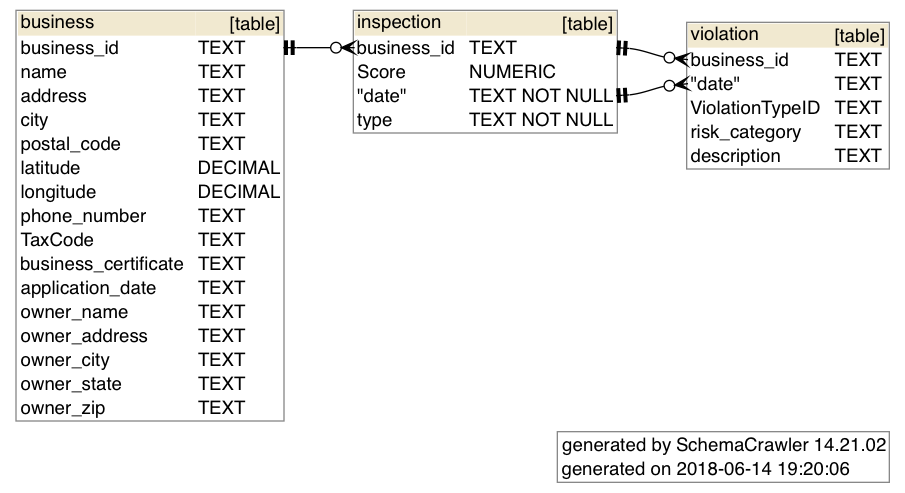
How to use schemacrawler to generate schema diagrams for SQLite from the commandline (Mac OS)
This was tested on MacOS 10.14.5 on 2019-07-16
schemacrawler is a free and open-source database schema discovery and comprehension tool. It can be invoked from the command-line to produce, using GraphViz, images/pdfs from a SQLite (or other database type) file. It can be used from the command-line to generate schema diagrams like these: