Create service config file:
sudo nano /lib/systemd/system/gomake-telemetry.service/lib/systemd/system/gomake-telemetry.service contents:
[Unit]
Description=goMake Telemetry Service
After=multi-user.target

| import giphypop | |
| import urllib | |
| import os | |
| FILE_TYPE = '.gif' | |
| BASE_PATH = os.environ.get('BASE_PATH') or '/usr/local/mhe-dashboard' | |
| GIF_COUNT = os.environ.get('GIF_COUNT') or 20 | |
| DAYS_TO_KEEP = 5 | |
| def get_filename(media_url): |
| 1. ) Take backup/snapshot of current data AND schema for current PROD database: | |
| dledimsum-prod-aurora | |
| 2. ) Export data for dimsum.productEnrollments view -> .sql file | |
| 3.) Perform code rollback steps | |
| 4.) Create new database with name dledimsum-prod-120-aurora | |
| 5. Restore last Datapipe snapshot from dledimsum-prod-aurora into dledimsum-prod-120-aurora (referenced during call as UTC 8-17 PM time) |
Create service config file:
sudo nano /lib/systemd/system/gomake-telemetry.service/lib/systemd/system/gomake-telemetry.service contents:
[Unit]
Description=goMake Telemetry Service
After=multi-user.target
| //Insertion Sort | |
| https://jsfiddle.net/0sxhch8d/ |
| Elementary | |
| Write a program that prints ‘Hello World’ to the screen. | |
| Write a program that asks the user for her name and greets her with her name. | |
| Modify the previous program such that only the users Alice and Bob are greeted with their names. | |
| Write a program that asks the user for a number n and prints the sum of the numbers 1 to n | |
| Modify the previous program such that only multiples of three or five are considered in the sum, e.g. 3, 5, 6, 9, 10, 12, 15 for n=17 | |
| Write a program that asks the user for a number n and gives him the possibility to choose between computing the sum and computing the product of 1,…,n. | |
| Write a program that prints a multiplication table for numbers up to 12. | |
| Write a program that prints all prime numbers. (Note: if your programming language does not support arbitrary size numbers, printing all primes up to the largest number you can easily represent is fine too.) |
| function authenticate(req, res) { | |
| let options = { | |
| method: 'POST', | |
| url: 'http://connected-qa.cdiapps.com/api/v0.1/session', | |
| headers: { | |
| 'content-type': 'application/json', | |
| 'accept': 'application/json', | |
| 'accept-encoding': 'gzip, deflate', | |
| 'accept-language': 'en-US,en;q=0.8,ja;q=0.6' |
| function selectionSort(arr, currentMin) { | |
| while(currentMin === undefined || currentMin < arr.length) { | |
| currentMin = currentMin || 0; | |
| for(var i = currentMin; i < arr.length; i++){ | |
| if(arr[currentMin] > arr[i]){ | |
| var a=arr[currentMin],b=arr[i]; | |
| b = [a, a = b][0]; | |
| arr[currentMin] = a; | |
| arr[i] = b; | |
| } |
| var arr1 = ['a','b','c']; | |
| var arr2 = ['r','t','z','f']; | |
| var alternateArray = function(a, b) { | |
| var i = 0, result = []; | |
| while(a[i] || b[i]) { | |
| if(a[i]){ | |
| result.push(a[i]); | |
| } | |
| if(b[i]){ |
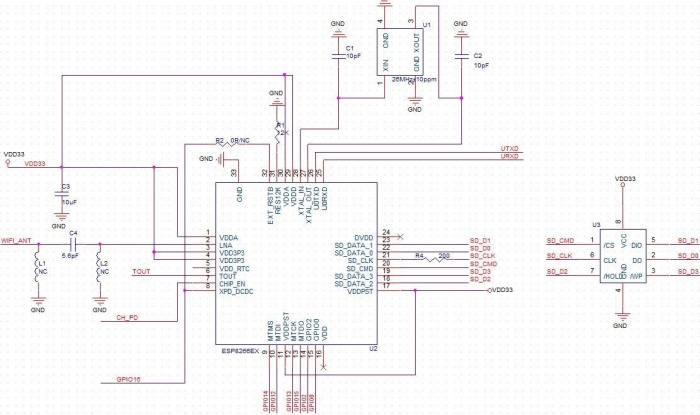
#Overview
The ESP8266 is a versatile chipset that provides client and access point wifi capabilities, on-chip SRAM and flash storage, a RISC processor, GPIO pins, and pin outs for memory and CPU extensability. Bundled as a series of modules with varying features focused around acting as either a wifi extension module to an existing microcontroller or as an self-contained solution for integrating wifi and internet functionality with GPIO control. From an application standpoint, the ESP weighs in as an inexpensive and compact alternative to AVR (arduino) based, wifi-driven IoT solutions.
AT+RST restart the module, received some strange data, and "ready"
#Week 4 Assignment
We will be creating an app with a table view that displays 3 animals in its list (default: tiger, bear, eagle), and the user can also add a new animal to the list.