Homebrew is a great little package manager for OS X. If you haven't already, installing it is pretty easy:
ruby -e "$(curl -fsSL https://raw.github.com/Homebrew/homebrew/go/install)"

$ python get_logs.py rds-db-instance-name rds.log aws-access-key aws-secret-key
$ ./pgbadger -p '%t:%r:%u@%d:[%p]:' ./rds.log
$ open out.html
| // | |
| // _oo0oo_ | |
| // o8888888o | |
| // 88" . "88 | |
| // (| -_- |) | |
| // 0\ = /0 | |
| // ___/`---'\___ | |
| // .' \\| |// '. | |
| // / \\||| : |||// \ | |
| // / _||||| -:- |||||- \ |

We have moved: https://github.com/magnetikonline/linuxmicrosoftievirtualmachines
Due to the popularity of this Gist, and the work in keeping it updated via a Gist, all future updates will take place at the above location. Thanks!

Originally published in June 2008
When hiring Ruby on Rails programmers, knowing the right questions to ask during an interview was a real challenge for me at first. In 30 minutes or less, it's difficult to get a solid read on a candidate's skill set without looking at code they've previously written. And in the corporate/enterprise world, I often don't have access to their previous work.
To ensure we hired competent ruby developers at my last job, I created a list of 15 ruby questions -- a ruby measuring stick if you will -- to select the cream of the crop that walked through our doors.
Candidates will typically give you a range of responses based on their experience and personality. So it's up to you to decide the correctness of their answer.
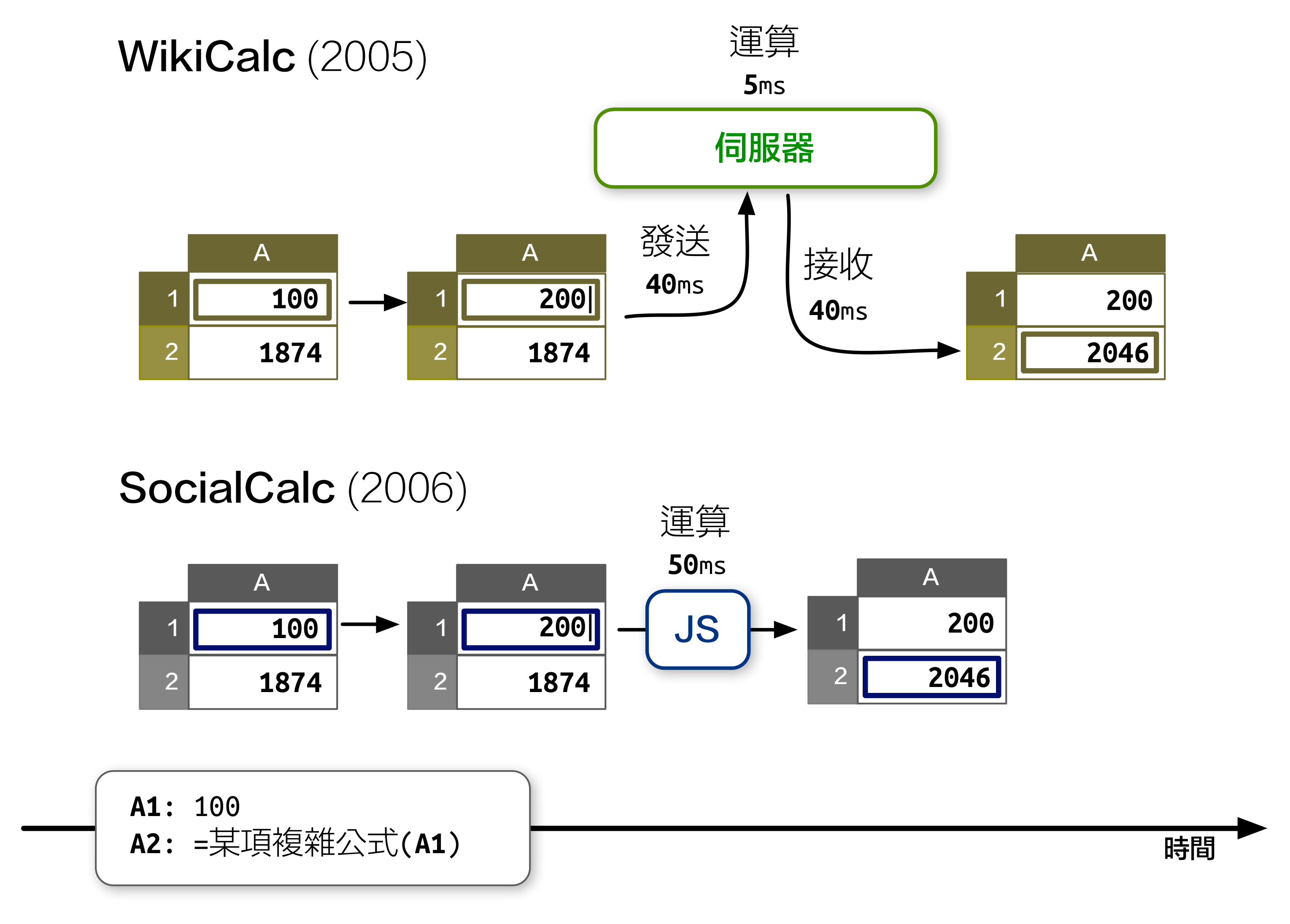
先前在《開源應用程式架構》 一書中,我介紹了 SocialCalc 這個在瀏覽器中運行的試算表編輯器,以取代伺服器為中心的 WikiCalc 架構。SocialCalc 在瀏覽器中執行所有的運算,只有在載入和儲存試算表時才會使用伺服器。
追求效能是 Socialtext 團隊在 2006 年時設計 SocialCalc 的主要目的。重點在於:在 JavaScript 環境下執行客戶端運算,儘管在當年的速度僅有伺服器端 Perl 運算的十分之一,但仍然勝過 AJAX 來回傳輸資料造成的網路延遲:


Node.js core does its best to treat every platform equally. Even if most Node developers use OS X day to day, some use Windows, and most everyone deploys to Linux or Solaris. So it's important to keep your code portable between platforms, whether you're writing a library or an application.
Predictably, most cross-platform issues come from Windows. Things just work differently there! But if you're careful, and follow some simple best practices, your code can run just as well on Windows systems.
On Windows, paths are constructed with backslashes instead of forward slashes. So if you do your directory manipulation

| # Copyright (c) 2012, Thomas Stachl <thomas@stachl.me> | |
| # | |
| # Permission is hereby granted, free of charge, to any person obtaining a copy of this software and | |
| # associated documentation files (the "Software"), to deal in the Software without restriction, | |
| # including without limitation the rights to use, copy, modify, merge, publish, distribute, | |
| # sublicense, and/or sell copies of the Software, and to permit persons to whom the Software is | |
| # furnished to do so, subject to the following conditions: | |
| # | |
| # The above copyright notice and this permission notice shall be included in all copies or | |
| # substantial portions of the Software. |
| # 0 is too far from ` ;) | |
| set -g base-index 1 | |
| # Automatically set window title | |
| set-window-option -g automatic-rename on | |
| set-option -g set-titles on | |
| #set -g default-terminal screen-256color | |
| set -g status-keys vi | |
| set -g history-limit 10000 |