Skip to content

Instantly share code, notes, and snippets.

@lmarkus
Last active November 27, 2025 15:56
Show Gist options
  • Select an option

  • Save lmarkus/8722f56baf8c47045621 to your computer and use it in GitHub Desktop.

Select an option

Save lmarkus/8722f56baf8c47045621 to your computer and use it in GitHub Desktop.
Extracting / Exporting custom emoji from Slack

Extracting Emoji From Slack!

Slack doesn't provide an easy way to extract custom emoji from a team. (Especially teams with thousands of custom emoji) This Gist walks you through a relatively simple approach to get your emoji out.

If you're an admin of your own team, you can get the list of emoji directly using this API: https://api.slack.com/methods/emoji.list. Once you have it, skip to Step 3

HOWEVER! This gist is intended for people who don't have admin access, nor access tokens for using that list.

Follow along...

Step 1

Open your Slack team on your browser (I used FireFox in this example)

Next, Open your developer tools, and go to the network tab. Look for a POST request on /emoji.list step1
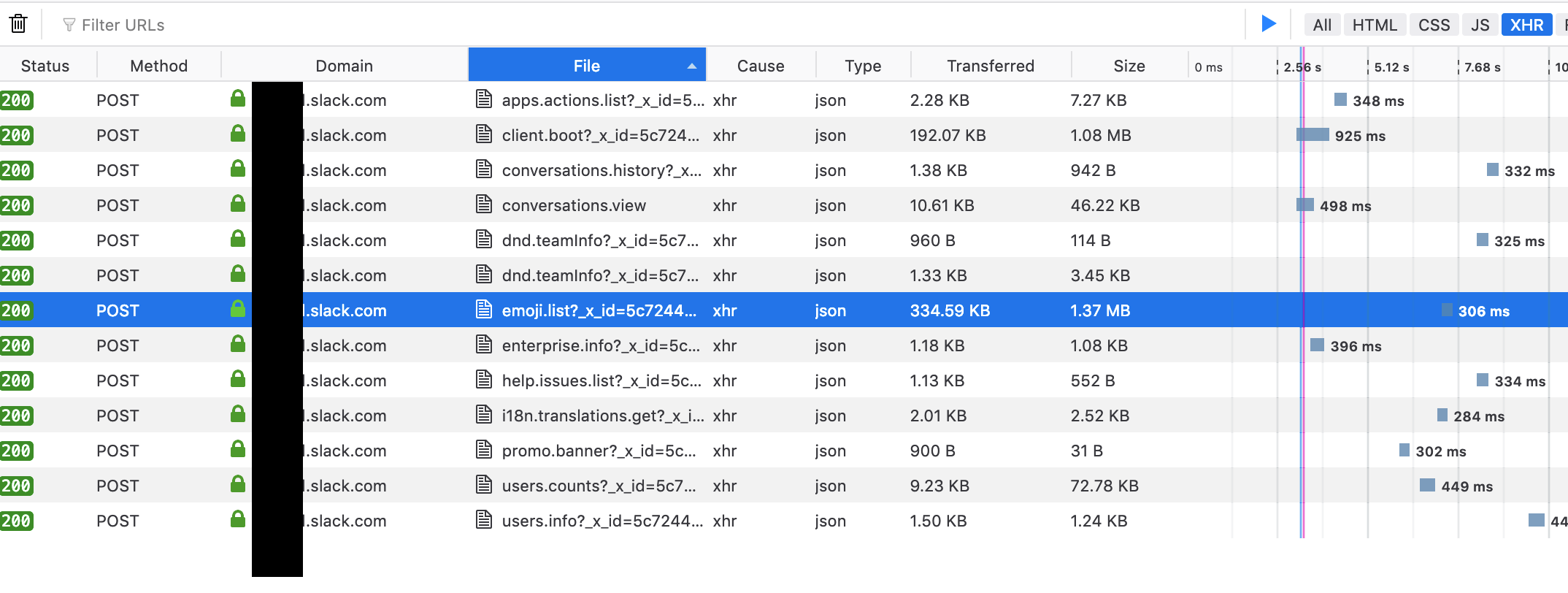
Step 2

Right Click on the request, and choose to open it in a new tab. step2

This will cause the browser to replay the request, yielding a JSON file with all your emoji information. step3
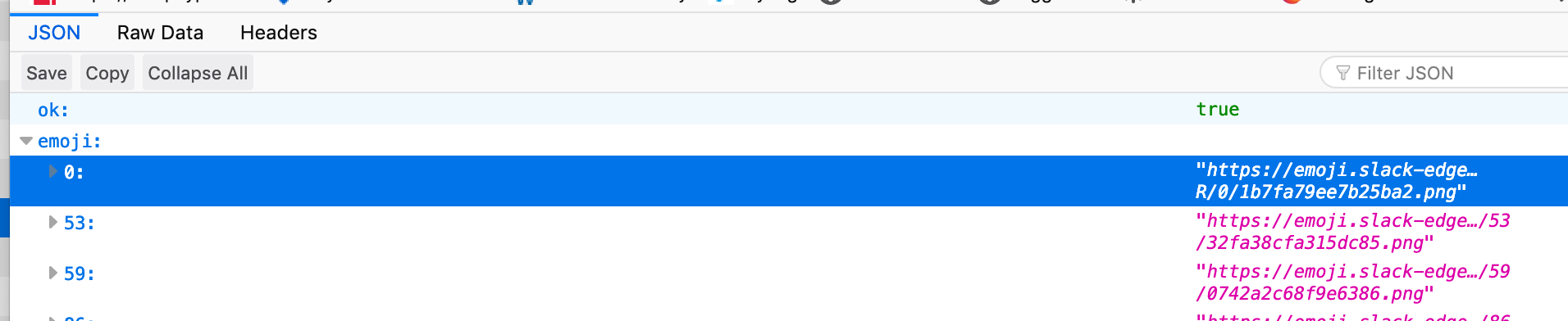
Save this file somewhere as emoji.json

Step 3

Run download.sh on the file. (Make sure you chmod +x it to make it executable. Details on the download.sh file.

./download.sh emoji.json

Sit back and wait. This will create a folder called output and will save all your emoji to it.

Optional Step 4

To bulk upload your emoji into a new team, use this chrome extension: https://chrome.google.com/webstore/detail/neutral-face-emoji-tools/anchoacphlfbdomdlomnbbfhcmcdmjej

Notes

1- This downloads files sequentially, one at a time. I didn't want to incurr Slack's rage by hammering their edge server with concurrent downloads. 2- This will duplicate aliased emoji

#!/usr/bin/env bash
######
## UPDATE for 2019: I completely changed my approach on how to obtain the emoji dump.
## The new approach results in a JSON file, so the processing is a bit diferent than
## with the previous version. This version will also take care of aliased emoji.
# Use:
# Make this file executable, and feed it the results from the Slack emoji URL dump. Files will be downloaded to `output`
# chmod +x download.sh
# ./download.sh emoji.json
# Input File
INPUT="$1"
# Create output directory where downloaded emoji will be stored
mkdir -p output;
# Clean Up Source File:
# Break up the file into individual lines for processing (Comma and { to NewLine)
# Slack's emoji JSON brings an unwanted escape character "\". We need to remove it.
# We'll also remove unwanted quote marks `"` and curly braces "{" "}"
RAW_LIST=$(cat "${INPUT}" | tr ",{" "\\n" | sed -E 's/[\\"{}]//g')
# Separate into Custom Emoji (Ignoring slack's default ones) and Aliases
# Filter for custom emoji (ie: Anything on emoji.slack-edge.com), and remove the ":" separator
EMOJI_LIST=$( echo "${RAW_LIST}" | grep "https://emoji.slack-edge.com" | sed 's/:https/ https/')
# Filter for the aliases, and remove the separator
ALIAS_LIST=$( echo "${RAW_LIST}" | grep ":alias:" | sed 's/:alias:/ /' )
# First download all the emoji
echo "${EMOJI_LIST}" |
while read -r line || [[ -n "$line" ]]; do
parts=($line)
url=${parts[1]}
name=${parts[0]}
extension=${url##*.}
echo "Downloading ${name}.${extension}"
curl -s -o "output/${name}.${extension}" "${url}"
done;
# Now duplicate all the aliases
echo "${ALIAS_LIST}" |
while read -r line || [[ -n "$line" ]]; do
parts=($line)
alias=${parts[0]}
source=${parts[1]}
target=$(echo "${EMOJI_LIST}" | grep "${source} ")
extension=${target##*.}
echo "Looking for source of ${alias} in ${source} -> ${target}"
echo "copying output/${source}.${extension} to output/${alias}.${extension}"
cp "output/${source}.${extension}" "output/${alias}.${extension}"
done;
@bestekov
Copy link

In Nov 2025, this python script still works fine without anything but base dependencies: https://github.com/Firenza/ExportImportSlackEmoji

Only change is as folks alluded above, the network request API cal to look for is now emoji.adminList

Sign up for free to join this conversation on GitHub. Already have an account? Sign in to comment