Skip to content

Instantly share code, notes, and snippets.

@manualbashing
manualbashing / translateBooltoString.ps1
Created November 8, 2019 11:10
Translate boolean value to string using a filter in #PowerShell
filter translateBoolToString {
$result = "deaktiviert"
if ($_) {
$result = "aktiviert"
}
return $result
}
@manualbashing
manualbashing / Invoke-LaTeXCommand.ps1
Last active November 14, 2019 09:04
[PowerShell command to set documents in LaTeX, based on Docker] #LaTeX #PowerShell
function Invoke-LaTeXCommand {
[CmdletBinding(SupportsShouldProcess = $true)]
[Alias('latexcmd')]
param (
# Interpreter to process the .tex file with.
[Parameter(Position = 0, Mandatory = $true, ParameterSetName = 'Execute Command')]
[ValidateSet('xelatex', 'pdflatex', 'latexmk')]
[String]
$Interpreter,
@manualbashing
manualbashing / should_process.ps1
Last active November 14, 2019 08:13
Implement -WhatIf in #PowerShell cmdlet by using SupportsShouldProcess
function Test-ShouldProcess {
[CmdletBinding(SupportsShouldProcess, ConfirmImpact='Medium')]
param()
# Preparation
if ($PSCmdlet.ShouldProcess("ShouldProcess?")) {
# Critical code
}
@manualbashing
manualbashing / remove_git_history.md
Created November 14, 2019 15:41
[Remove password from git history] #git
git filter-branch --tree-filter "find . -type f -exec sed -i -e 's/originalpassword/newpassword/g' {} \;"
  • Source:
@manualbashing
manualbashing / convert_docx_markdown.md
Last active November 22, 2019 10:19
[Convert from docx to markdown while preserving the images] #pandoc

Pandoc has a flag, that allows to extract media, that is embedded in a docx Document.

pandoc --extract-media --to 'markdown_strict+pipe_tables' --atx-headers ./static input.docx -so output.md
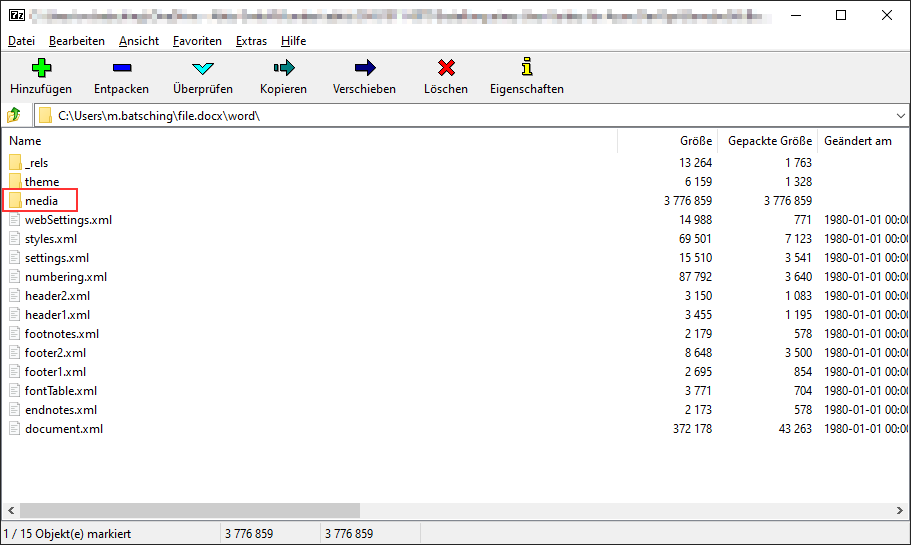
  • If you need to manually extract images from a docx, open the file with 7-Zip.
  • All media files are found in the path file.docx/word/media/

image

@manualbashing
manualbashing / testing_choco.md
Last active November 25, 2019 09:49
[Testing Chocolatey Packages locally] #chocolatey
  • During the package installation a folder with the package name is createsd in C:\ProgramData\chocolatey\lib.
  • If the install fails, this folder is removed again.
  • To inspect your package during install you can the pause, when choco prompts for confirmation to run chocolateyInstall.ps1

Some observations about chocolateyInstall.ps1:

  • $PSScriptRoot points during install to C:\ProgramData\chocolatey\lib\<packageName>\tools
@manualbashing
manualbashing / ansible_cheats.md
Last active December 2, 2019 21:33
[Ansible Cheatsheet]

Execute only for this host:

--limit '10.11.110.111'

Execute for all but this host:

--limit '!10.11.110.111'
@manualbashing
manualbashing / background_image.json
Created December 27, 2019 12:30
Set a background image to #vscode
"background.useDefault": false,
"background.customImages": [
"https://raw.githubusercontent.com/rwu823/vscode-bg-img/master/images/17/baby-black.png",
"https://raw.githubusercontent.com/rwu823/vscode-bg-img/master/images/17/baby-white.png",
"/your/patch/image"
],
"background.style": {
"background-position": "95% 95%",
"background-size": "20%",
"opacity": 0.8
@manualbashing
manualbashing / azure_functions_cheat.md
Created December 30, 2019 14:05
[Azure Functions Cheatsheet]

Exclude files from deployment

A project folder may contain language-specific files and directories that shouldn't be published. Excluded items are listed in a .funcignore file in the root project folder.