Skip to content

Instantly share code, notes, and snippets.

View natewalck's full-sized avatar

Nate Walck natewalck

View GitHub Profile
@gregneagle
gregneagle / gist:60ce73c7e267d993f1c1
Created August 13, 2014 17:23
Using the SystemConfiguration framework via PyObjC to get "ComputerName"
import SystemConfiguration
prefs = SystemConfiguration.SCPreferencesCreate(None, "SystemConfiguration", None)
print SystemConfiguration.SCPreferencesGetValue(prefs, "System")["System"]["ComputerName"]
@pudquick
pudquick / AppleJRE.py
Created April 9, 2015 05:40
Use Apple's PrivateFramework "JavaLaunching" functions to determine if the Apple JRE is installed (without triggering the dialog)
import sys
from ctypes import CDLL
JavaLaunching = CDLL('/System/Library/PrivateFrameworks/JavaLaunching.framework/JavaLaunching')
if (JavaLaunching.JLIsRuntimeInstalled() == 0):
print "Apple JRE is not installed."
sys.exit(1)
else:
print "Apple JRE is installed."
sys.exit(0)
@loderunner
loderunner / 01-mac-profiling.md
Last active July 31, 2025 17:31
Profiling an application in Mac OS X

Profiling an application in Mac OS X

Finding which process to profile

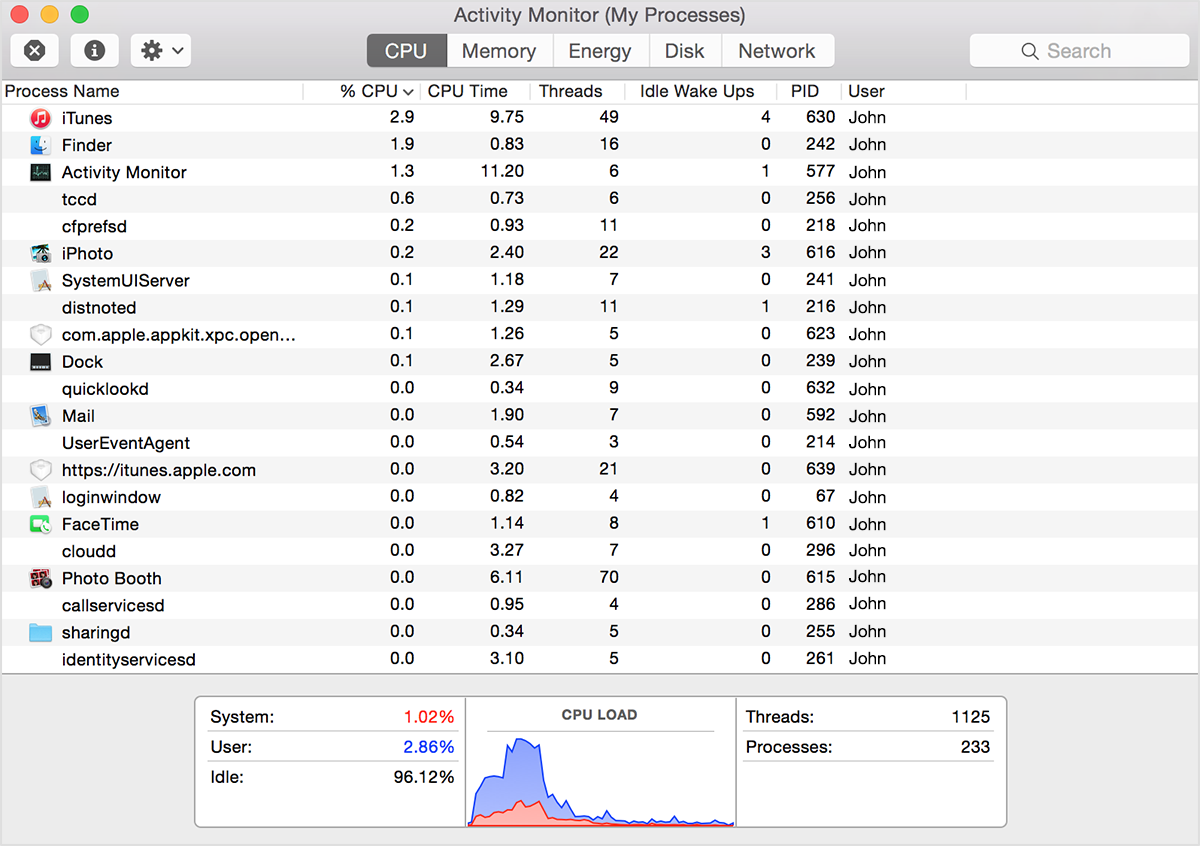
If your system is running slowly, perhaps a process is using too much CPU time and won't let other processes run smoothly. To find out which processes are taking up a lot of CPU time, you can use Apple's Activity Monitor.

The CPU pane shows how processes are affecting CPU (processor) activity:
@pudquick
pudquick / mount_shares_better.py
Last active January 19, 2023 22:07
Mounting shares in OS X using python and pyobjc - works with OS X 10.8+
import objc, CoreFoundation, Foundation
class attrdict(dict):
__getattr__ = dict.__getitem__
__setattr__ = dict.__setitem__
NetFS = attrdict()
# Can cheat and provide 'None' for the identifier, it'll just use frameworkPath instead
# scan_classes=False means only add the contents of this Framework
NetFS_bundle = objc.initFrameworkWrapper('NetFS', frameworkIdentifier=None, frameworkPath=objc.pathForFramework('NetFS.framework'), globals=NetFS, scan_classes=False)
@lalibi
lalibi / Set-WindowState.ps1
Last active October 8, 2025 22:13 — forked from Nora-Ballard/Set-WindowState.ps1
Hide, Show, Minimize, Maximize, etc window from Powershell.
function Set-WindowState {
<#
.SYNOPSIS
Set the state of a window.
.DESCRIPTION
Set the state of a window using the `ShowWindowAsync` function from `user32.dll`.
.PARAMETER InputObject
The process object(s) to set the state of. Can be piped from `Get-Process`.
@pudquick
pudquick / 8021x_inspect.py
Last active September 27, 2022 10:04
802.1x configuration / data collection on OS X using python and the PrivateFramework "EAP8021X.framework"
# This was all run from user space
# I haven't tested it with root
# ... but it didn't prompt for any permissions under userspace ^_^
# Tested on 10.11.5
import objc
from Foundation import NSBundle
EAP8021X_bundle = NSBundle.bundleWithPath_('/System/Library/PrivateFrameworks/EAP8021X.framework')
Security_bundle = NSBundle.bundleWithIdentifier_('com.apple.security')
@n-st
n-st / .bash_profile
Created May 29, 2016 12:04
Start zsh from bashrc. Useful when you can't use chsh or when the same LDAP account is used both on systems with zsh installed and ones without.
# .bash_profile is executed for login shells,
# .bashrc is executed for interactive non-login shells.
# We want the same behaviour for both, so we source .bashrc from .bash_profile.
# Also, when .bash_profile exists, bash ignores .profile, so we have to source
# it explicitly.
if [ -f "$HOME/.profile" ]; then
. "$HOME/.profile"
fi
@groob
groob / hi_frogor.go
Last active December 12, 2019 01:26 — forked from pudquick/hi_groob.py
Search my gists ;p
package main
import (
"flag"
"fmt"
"io"
"log"
"net/http"
"os"
)
@schmich
schmich / ducky.md
Last active January 18, 2026 08:51
Programming media keys on the Ducky One 2 Skyline

Programming Media Keys on the Ducky One 2 Skyline

To use media keys on the Ducky One 2 Skyline, you must record a macro to bind the media function to a hotkey combination, i.e. Fn plus some key.

Example

Important: In the instructions below, "Press X+Y+Z" means press and hold key X, press and hold key Y, press and hold key Z in that order, and then release all three.

As an example, to bind Fn+PgUp to the play/pause media function:

@ahmetb
ahmetb / gcpauth.go
Created May 22, 2018 17:21
Authenticating to GKE cluster with client-go, IAM service account and a Google auth plugin written from scratch
package main
import (
"context"
"fmt"
"log"
"net/http"
"golang.org/x/oauth2"
"golang.org/x/oauth2/google"