Skip to content

Instantly share code, notes, and snippets.

View rodw's full-sized avatar

Rod Waldhoff rodw

View GitHub Profile
@ghaiklor
ghaiklor / v8-compile-javascript-example.cc
Last active February 1, 2022 13:25
Simple example how V8 can compile JavaScript source and run it
// Create a new context.
Local<Context> context = Context::New(isolate);
// Enter the context for compiling and running the hello world script.
Context::Scope context_scope(context);
// Create a string containing the JavaScript source code.
Local<String> source = String::NewFromUtf8(isolate, "'Hello' + ', World!'");
// Compile the source code.
@DocumentAlchemy
DocumentAlchemy / powerpoint-to-pdf
Last active March 15, 2019 09:08
Shell script using https://documentalchemy.com API to convert a PowerPoint file into a PDF.
#!/bin/bash
# powerpoint-to-pdf <PPT-FILE> [<PDF-FILE>]
# Uses <https://documentalchemy.com/> to convert a PowerPoint document to PDF.
# SET YOUR DOCUMENT ALCHEMY API KEY HERE (OR PASS AS AN ENV VAR).
# SIGN UP AT <https://documentalchemy.com/> TO GET YOUR FREE API KEY.
DA_API_KEY=${DA_API_KEY:-"EDs2UQEprGn9aD4vg6HCPhFvgQFDahQgRzzIfocJ"}
# PRINT USAGE MESSAGE
show_help() {
@rodw
rodw / draw-histogram.sh
Created February 26, 2018 21:04
bash script that generates an ASCII-art histogram (bar chart) from input data.
#!/bin/bash
#-------------------------------------------------------------------------------
# draw-histogram - generates an ASCII-art histogram (bar chart) from input data.
#-------------------------------------------------------------------------------
# Expects a series of lines of the form `<category-name> <count>` to passed
# via stdin.
#
# Generates a table the looks something like the following:
#
# +-------+----+
@sualeh
sualeh / README.md
Last active October 23, 2025 05:35
Create Nice-looking Schema Diagrams in PlantUML

Create Nice-looking Schema Diagrams in PlantUML

PlantUML is a descriptive language to generate a number of types of software diagrams, such as sequence, class, deployment and state diagrams, and many others. PlantUML does not generate very good-looking schema diagrams out of the box, but it supports themes and preprocessed macros. If you use themes and macros, you can not only use a simplified syntax, but also generate beautiful diagrams.

Here is an example of a PlantUML schema diagram, and we will build up the code to generate it.
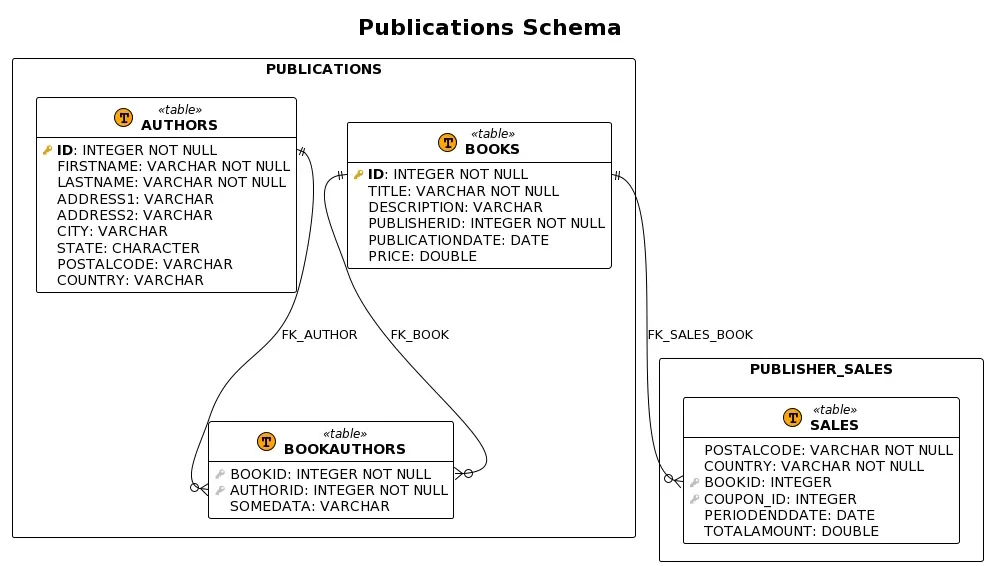
Schema diagram

To start, describe your schemas, tables and columns using this syntax as an example.