迁移文件,powertoys,system,config
- 首先安装 brew,中间可能会提示安装 Command line tool,必须先安装。命令
ruby -e "$(curl -fsSL https://raw.github.com/mxcl/homebrew/go/install)"
| #!/usr/bin/ruby | |
| # Using GPL v2 | |
| # Author:: DongYuwei(mailto:newdongyuwei@gmail.com) | |
| # 更新部分内容应对2010年7月25日飞信升级 | |
| require 'uri' | |
| require 'net/http' | |
| require 'net/https' | |
| require "socket" | |
| require 'rexml/document' |

| var PROXY = { | |
| "direct":"DIRECT", | |
| "gfw":"SOCKS 127.0.0.1:1983", | |
| "http_gfw":"PROXY 127.0.0.1:8123" | |
| }; | |
| var DEFAULT = "direct"; | |
| var SECTIONS = [ | |
| { |
迁移文件,powertoys,system,config
ruby -e "$(curl -fsSL https://raw.github.com/mxcl/homebrew/go/install)"
| /* Heartbleed OpenSSL vulnerbility POC | |
| * CVE-2014-0160 | |
| * | |
| * You need to modify OpenSSL client code: ssl/t1_lib.c, function tls1_heartbeat | |
| * Previous line: \/\* Payload length (18 bytes here) \*\/ | |
| * Old line: s2n(payload, p); | |
| * New line: s2n(65536 - 100, p); // pretend that we have so many bytes of payload... | |
| * | |
| * To compile: | |
| * gcc -g -o testssl -Iinclude -L. -lssl ssl/*.o testssl.c |
| <!DOCTYPE HTML> | |
| <html> | |
| <head> | |
| <meta charset="UTF-8"> | |
| <title>Title</title> | |
| </head> | |
| <body> | |
| <script src="https://ajax.googleapis.com/ajax/libs/jquery/1.9.1/jquery.min.js"></script> | |
| <script type="text/javascript" src="http://documentcloud.github.com/underscore/underscore-min.js"></script> |
var Person = Backbone.Model.extend();
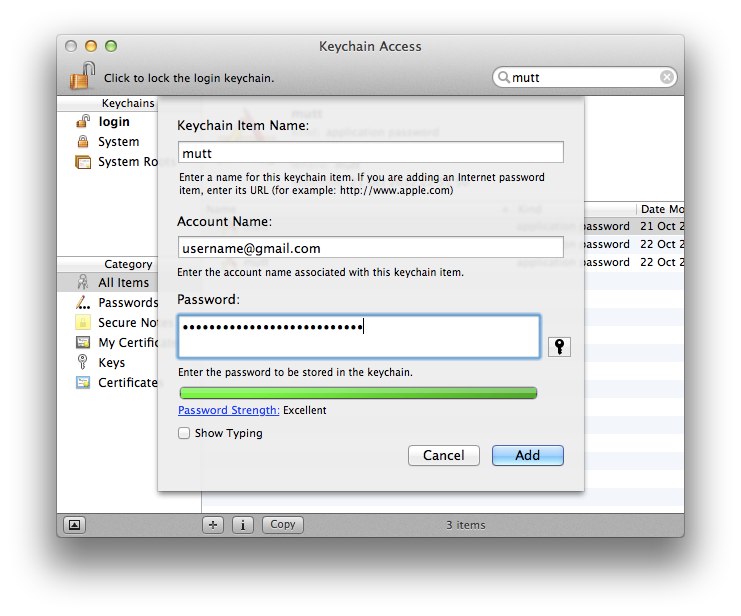
Create a new keychain item, enter the Keychain Item Name as mutt, the Account Name as your gmail email address and then enter your password, then add the keychain item.
If you're using Google 2-step auth, you'll need to generate an Application-specific password from your Google Account settings and enter that as the password.
| #!/usr/bin/env python | |
| # with help and inspiration from | |
| # * ASN1_generate_nconf(3) (specifically the SubjectPublicKeyInfo structure) | |
| # * http://www.sysmic.org/dotclear/index.php?post/2010/03/24/Convert-keys-betweens-GnuPG%2C-OpenSsh-and-OpenSSL | |
| # * http://blog.oddbit.com/2011/05/converting-openssh-public-keys.html | |
| import sys | |
| import base64 | |
| import struct |
| 1. System Settings -> System Info -> Graphics -> Forced Fallback Mode ON | |
| 2. .gnomerc in your $HOME | |
| export WINDOW_MANAGER=/usr/local/bin/awesome-wm | |
| 3. /usr/local/bin/awesome-wm | |
| #!/bin/sh | |
| awesome & | |
| 4. /usr/share/gnome-session/sessions/awesome.session | |
| [GNOME Session] | |
| Name=Awesome session | |
| RequiredComponents=gnome-settings-daemon; |
| "取消自动备份 | |
| set nobackup | |
| "语法高亮 | |
| syntax on | |
| "设置Tab和空格 | |
| set tabstop=4 | |
| set shiftwidth=4 | |
| set expandtab |