
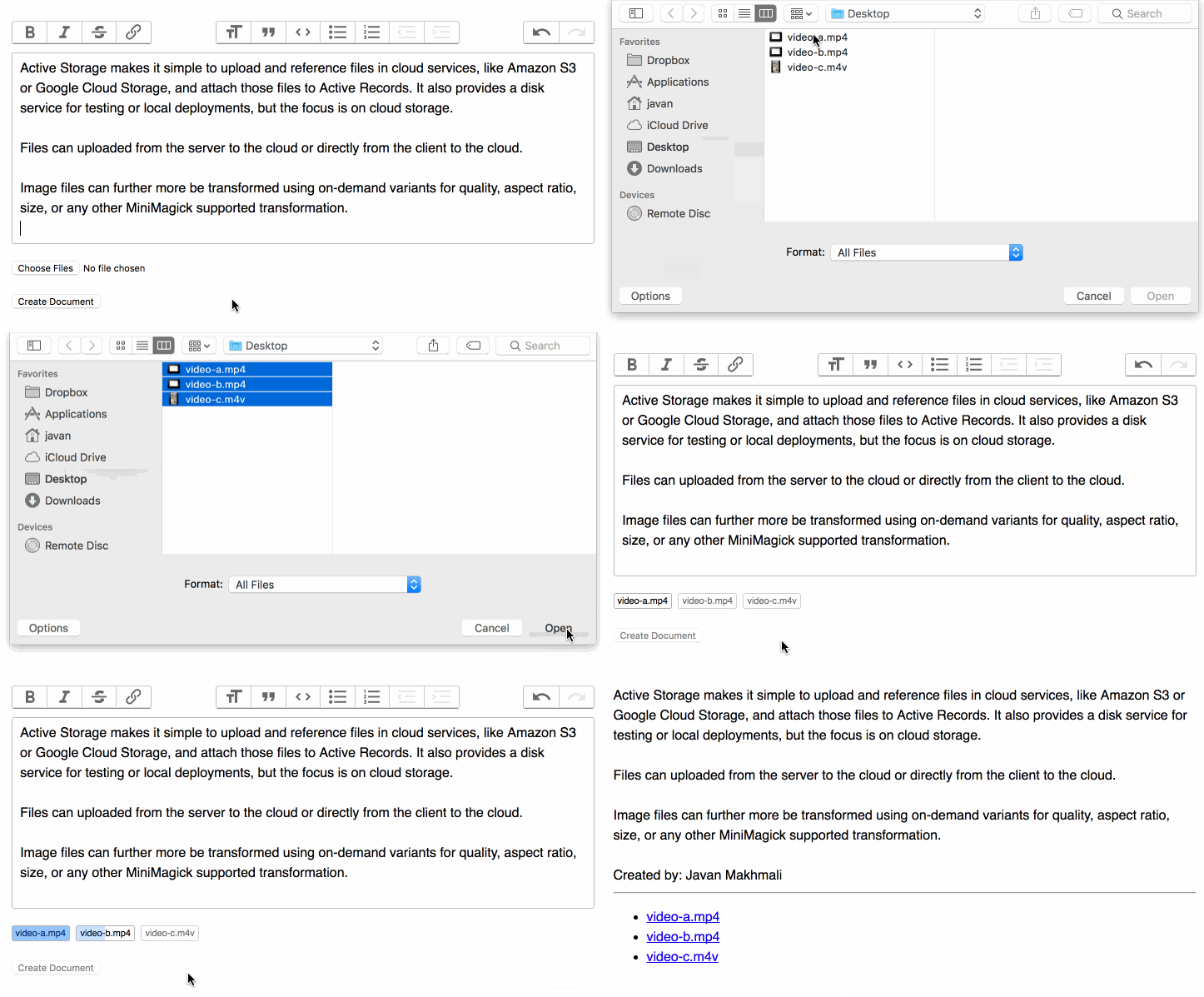
// direct_uploads.js

addEventListener("direct-upload:initialize", event => {
  const { target, detail } = event
  const { id, file } = detail
// direct_uploads.js
addEventListener("direct-upload:initialize", event => {
const { target, detail } = event
const { id, file } = detail| ['.m_question_qimg', '.m_question_q'].forEach(function (x) { | |
| return $(x).each(function (i, e) { | |
| var arr = $(e).attr('onclick').replace(')', '').split(','); | |
| if (arr.slice(0, -1).indexOf(arr[6]) !== -1) { | |
| $(e).css({ | |
| transform: 'rotate(-720000deg)', | |
| background: '#b3f9d2', | |
| transition: '1000s' | |
| }); | |
| } else { |

| #!/usr/bin/env bash | |
| # https://developers.supportbee.com/blog/setting-up-cucumber-to-run-with-Chrome-on-Linux/ | |
| # https://gist.github.com/curtismcmullan/7be1a8c1c841a9d8db2c | |
| # https://stackoverflow.com/questions/10792403/how-do-i-get-chrome-working-with-selenium-using-php-webdriver | |
| # https://stackoverflow.com/questions/26133486/how-to-specify-binary-path-for-remote-chromedriver-in-codeception | |
| # https://stackoverflow.com/questions/40262682/how-to-run-selenium-3-x-with-chrome-driver-through-terminal | |
| # https://askubuntu.com/questions/760085/how-do-you-install-google-chrome-on-ubuntu-16-04 | |
| # Versions | |
| CHROME_DRIVER_VERSION=`curl -sS https://chromedriver.storage.googleapis.com/LATEST_RELEASE` |

| <template> | |
| <div> | |
| <input v-validate data-rules="required" :class="{'has-error': errors.has("textInput")}" id="textInput" name="textInput" type="text"> | |
| <span class="error" v-show="errors.has("textInput")">{{ errors.first("textInput") }}</span> | |
| </div> | |
| </template> | |
| <script> | |
| import { find, propEq } from 'ramda' | |
| import bus from './bus' |

| # This makes sure Chrome is always up to date in your test suite | |
| # On average this adds about 10 seconds to your build suite | |
| # Be sure to use Ubuntu 14.04 (Trusty) in the CircleCI's OS setting (Settings > Build Environment) | |
| dependencies: | |
| pre: | |
| - curl -L -o google-chrome.deb https://dl.google.com/linux/direct/google-chrome-stable_current_amd64.deb | |
| - sudo dpkg -i google-chrome.deb | |
| - sudo sed -i 's|HERE/chrome\"|HERE/chrome\" --disable-setuid-sandbox|g' /opt/google/chrome/google-chrome | |
| - rm google-chrome.deb |
In the below keyboard shortcuts, I use the capital letters for reading clarity but this does not imply shift, if shift is needed, I will say shift. So ⌘ + D does not mean hold shift. ⌘ + Shift + D does of course.
| Function | Shortcut |
|---|---|
| New Tab | ⌘ + T |
| Close Tab or Window | ⌘ + W (same as many mac apps) |
| Go to Tab | ⌘ + Number Key (ie: ⌘2 is 2nd tab) |
| Go to Split Pane by Direction | ⌘ + Option + Arrow Key |

-moz-appearance to none. This will "reset" the styling of the element;text-indent to 0.01px. This will "push" the text a tiny bit[1] to the right;
| Secure sessions are easy, but not very well documented. | |
| Here's a recipe for secure sessions in Node.js when NginX is used as an SSL proxy: | |
| The desired configuration for using NginX as an SSL proxy is to offload SSL processing | |
| and to put a hardened web server in front of your Node.js application, like: | |
| [NODE.JS APP] <- HTTP -> [NginX] <- HTTPS -> [PUBLIC INTERNET] <-> [CLIENT] | |
| Edit for express 4.X and >: Express no longer uses Connect as its middleware framework, it implements its own now. |

| i386 : iPhone Simulator | |
| x86_64 : iPhone Simulator | |
| arm64 : iPhone Simulator | |
| iPhone1,1 : iPhone | |
| iPhone1,2 : iPhone 3G | |
| iPhone2,1 : iPhone 3GS | |
| iPhone3,1 : iPhone 4 | |
| iPhone3,2 : iPhone 4 GSM Rev A | |
| iPhone3,3 : iPhone 4 CDMA | |
| iPhone4,1 : iPhone 4S |


