
Want to create a Gist from your editor, the command line, or the Services menu? Here's how.

weakish weakish
This file contains hidden or bidirectional Unicode text that may be interpreted or compiled differently than what appears below. To review, open the file in an editor that reveals hidden Unicode characters.
Learn more about bidirectional Unicode characters
| #!/bin/bash | |
| ## vim:ts=4:sw=4:tw=100:ai:nowrap:formatoptions=croqln: | |
| #*******************************************************# | |
| # tumblr.sh # | |
| # written by Rahul Kumar # | |
| # 2010/01/01 # | |
| # Post, edit, delete, read tumblr.com # | |
| #*******************************************************# | |
| # References: http://www.tumblr.com/api#api_write | |
| # DONE : add read |


Using Python's built-in defaultdict we can easily define a tree data structure:
def tree(): return defaultdict(tree)That's it!

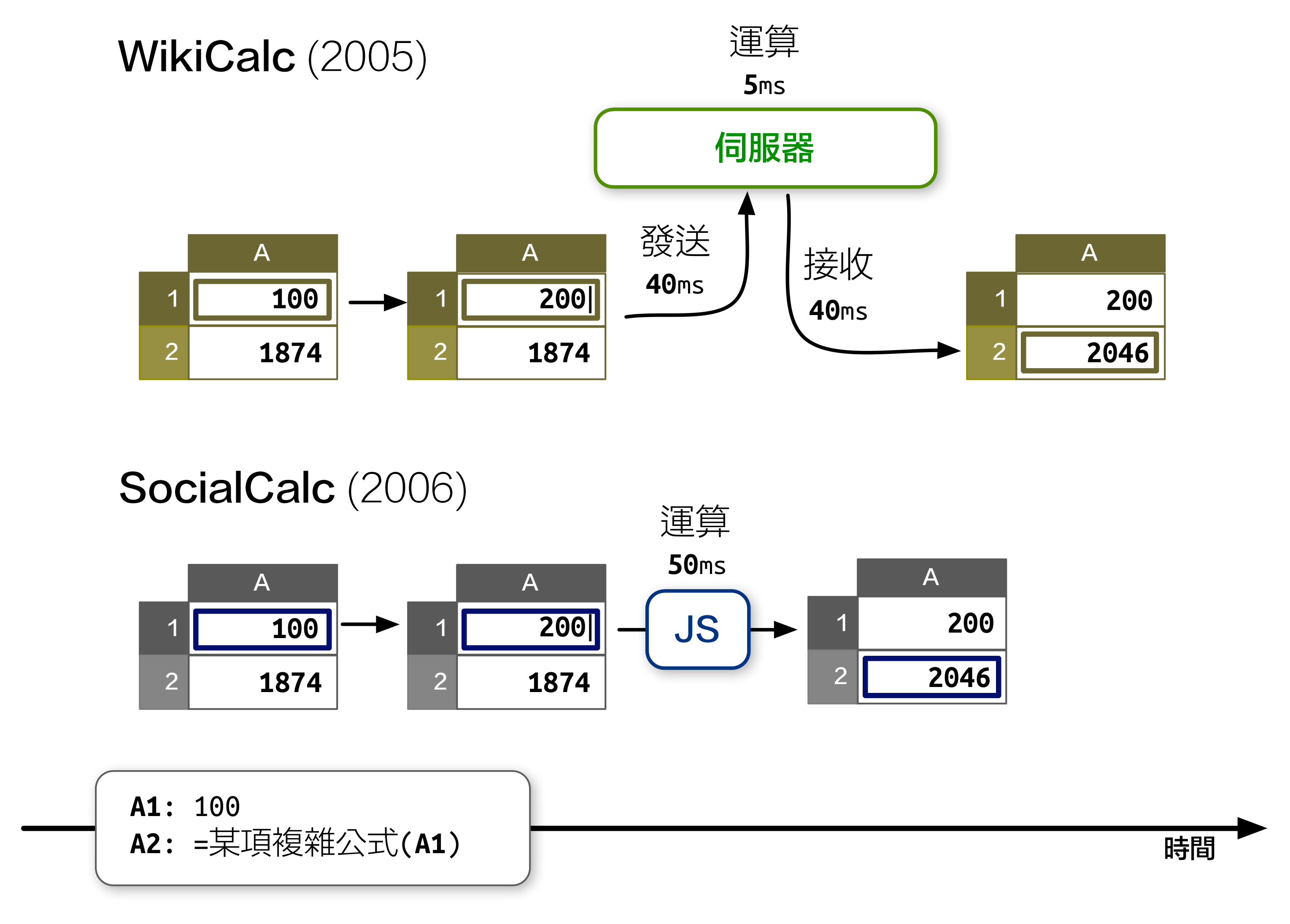
先前在《開源應用程式架構》 一書中,我介紹了 SocialCalc 這個在瀏覽器中運行的試算表編輯器,以取代伺服器為中心的 WikiCalc 架構。SocialCalc 在瀏覽器中執行所有的運算,只有在載入和儲存試算表時才會使用伺服器。
追求效能是 Socialtext 團隊在 2006 年時設計 SocialCalc 的主要目的。重點在於:在 JavaScript 環境下執行客戶端運算,儘管在當年的速度僅有伺服器端 Perl 運算的十分之一,但仍然勝過 AJAX 來回傳輸資料造成的網路延遲:

This file contains hidden or bidirectional Unicode text that may be interpreted or compiled differently than what appears below. To review, open the file in an editor that reveals hidden Unicode characters.
Learn more about bidirectional Unicode characters
| If you don't have meteor, install it: | |
| curl https://install.meteor.com | /bin/sh | |
| Then, just copy paste this into your terminal: | |
| meteor create my-app | |
| cd my-app/ | |
| meteor add coffeescript | |
| meteor add stylus | |
| js2coffee my-app.js > my-app.coffee |

luikore
/ hat-cache-miss.md
Last active
May 5, 2016 15:22
Comparing cache-miss of triez, fast_trie and hash reads
To test out the cache miss behavior of read operations, run a program building the index (30k entries) then another program building then reading the index (30k queries), and find their diff.
Here's how to generate the test script cmd.sh
3.times do |i|
  %w[triez hash da].each do |ty|
    puts "valgrind --tool=cachegrind --cachegrind-out-file=tmp/#{ty} ruby t.rb #{ty}"
    puts "valgrind --tool=cachegrind --cachegrind-out-file=tmp/#{ty}.read ruby t.rb #{ty} read"
    puts "cg_diff tmp/#{ty} tmp/#{ty}.read > tmp/#{ty}#{i}.diff"
xdite
/ checlist.md
Created
May 21, 2013 07:19

ksafranski
/ expecting.md
Last active
February 27, 2026 12:43
Basic principles of using tcl-expect scripts
TCL-Expect scripts are an amazingly easy way to script out laborious tasks in the shell when you need to be interactive with the console. Think of them as a "macro" or way to programmaticly step through a process you would run by hand. They are similar to shell scripts but utilize the .tcl extension and a different #! call.
The first step, similar to writing a bash script, is to tell the script what it's executing under. For expect we use the following:
#!/usr/bin/expect
OlderNewer