This gist shows how to create a GIF screencast using only free OS X tools: QuickTime, ffmpeg, and gifsicle.

To capture the video (filesize: 19MB), using the free "QuickTime Player" application:


| public class DropOutStack<T> : LinkedList<T> | |
| { | |
| private readonly int _capacity; | |
| public DropOutStack(int capacity) | |
| { | |
| _capacity = capacity; | |
| } | |
| public void Push(T item) |

| using UnityEngine; | |
| using System; | |
| using System.Collections; | |
| using System.Collections.Generic; | |
| using System.IO; | |
| using System.Threading; | |
| class BitmapEncoder | |
| { | |
| public static void WriteBitmap(Stream stream, int width, int height, byte[] imageData) |

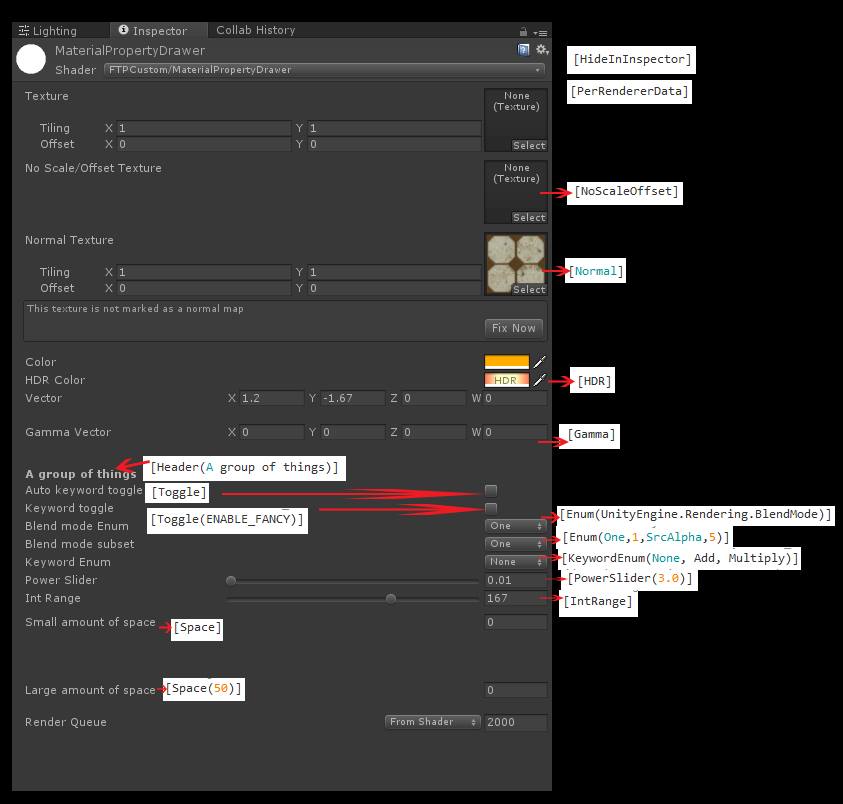
Shader "MaterialPropertyDrawer"
{
Properties
{
_MainTex("Texture", 2D) = "white" {}

[HideInInspector] _MainTex2("Hide Texture", 2D) = "white" {}

| Shader "TextMeshPro/Distance Field-BillboardFacing" | |
| { | |
| // Billboarding version for TextMeshPro (tested in 2018.3), based on default Distance Field shader. | |
| // ** Important part is to DISABLE the dynamic batching! (happens in this shader) ** | |
| // ...Took a while to figure out that one. | |
| // | |
| // Use as you like! | |
| // - Almar |

| // Original shader from https://gist.github.com/kaiware007/8ebad2d28638ff83b6b74970a4f70c9a | |
| // Adapted to URP with instructions from https://docs.unity3d.com/Packages/com.unity.render-pipelines.universal@12.0/manual/writing-shaders-urp-basic-unlit-structure.html | |
| // And using code from https://gist.github.com/kaiware007/8ebad2d28638ff83b6b74970a4f70c9a?permalink_comment_id=4464811#gistcomment-4464811 | |
| Shader "Unlit/Billboard" | |
| { | |
| Properties | |
| { | |
| [MainTexture] _BaseMap ("Texture", 2D) = "white" {} | |
| } |