
-
Star
(140)
You must be signed in to star a gist -
Fork
(20)
You must be signed in to fork a gist
-
-
Save ArthurNagy/1c4a64e6c8a7ddfca58638a9453e4aed to your computer and use it in GitHub Desktop.
| <!-- Drawable used for the bottom sheet dialog background --> | |
| <?xml version="1.0" encoding="utf-8"?> | |
| <shape xmlns:android="http://schemas.android.com/apk/res/android" | |
| android:shape="rectangle"> | |
| <corners | |
| android:topLeftRadius="@dimen/bottom_sheet_corner_radius" | |
| android:topRightRadius="@dimen/bottom_sheet_corner_radius" /> | |
| <padding android:top="@dimen/bottom_sheet_top_padding" /> | |
| <solid android:color="@color/primary" /> | |
| </shape> |
| <dimen name="bottom_sheet_corner_radius">16dp</dimen> | |
| <dimen name="bottom_sheet_top_padding">8dp</dimen> |
| package com.your.package | |
| import android.app.Dialog | |
| import android.os.Bundle | |
| import com.your.package.R | |
| import com.google.android.material.bottomsheet.BottomSheetDialog | |
| import com.google.android.material.bottomsheet.BottomSheetDialogFragment | |
| /** | |
| * BottomSheetDialog fragment that uses a custom | |
| * theme which sets a rounded background to the dialog | |
| * and doesn't dim the navigation bar | |
| */ | |
| open class RoundedBottomSheetDialogFragment : BottomSheetDialogFragment() { | |
| override fun getTheme(): Int = R.style.BottomSheetDialogTheme | |
| override fun onCreateDialog(savedInstanceState: Bundle?): Dialog = BottomSheetDialog(requireContext(), theme) | |
| } |
| <!-- v21 styles, you can merge these two if your minSdkVersion is >= 21 --> | |
| <resources> | |
| <style name="BottomSheetDialogTheme" parent="BaseBottomSheetDialog"> | |
| <item name="android:statusBarColor">@android:color/transparent</item> | |
| <item name="android:navigationBarColor">@color/white</item> | |
| </style> | |
| </resources> |
| <resources> | |
| <!-- set the rounded drawable as background to your bottom sheet --> | |
| <style name="BottomSheet" parent="@style/Widget.Design.BottomSheet.Modal"> | |
| <item name="android:background">@drawable/bg_bottom_sheet_dialog_fragment</item> | |
| </style> | |
| <style name="BaseBottomSheetDialog" parent="@style/Theme.Design.Light.BottomSheetDialog"> | |
| <item name="android:windowIsFloating">false</item> | |
| <item name="bottomSheetStyle">@style/BottomSheet</item> | |
| </style> | |
| <style name="BottomSheetDialogTheme" parent="BaseBottomSheetDialog" /> | |
| </resources> |


In your article.
You show a white navigation bar with dark icons.
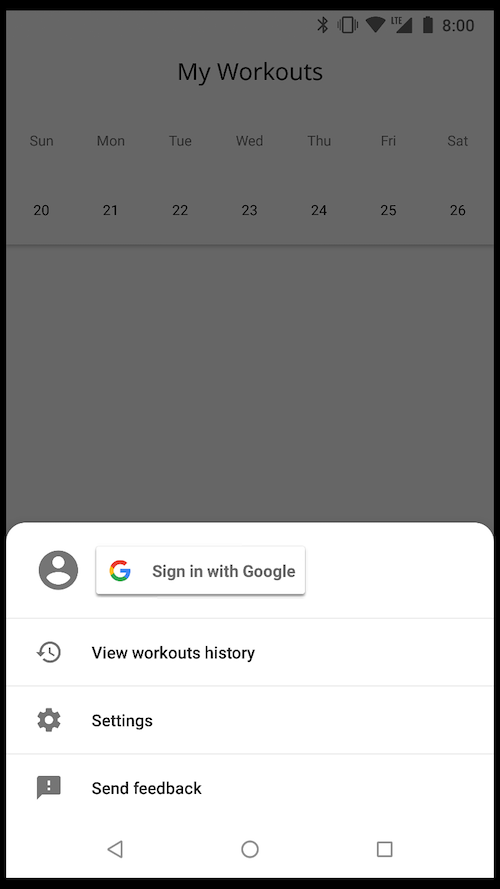
How did you get that?
Did you specify
<item name="android:windowLightNavigationBar">true</item>
In your app theme?

Hey @JoaquimLey good idea, thanks!
@luca992 sorry, didn't get any notification about your comment, to answer your question, yes, I'm using:
<item name="android:windowLightNavigationBar">true</item> in my v27 AppTheme

Hey,
Can you please share the link to the full project am very new to this & Kotlin

This does not work when using MaterialComponents theme.

Seems only kotlin here

Is it possible to customize bottomsheet slide animation (e.q. duration) using BottomSheet style?

MenuBinding no found for my in kotlin.

How to run the bottom sheet using btn.setOnClickListener in the normal version would I call bottomSheetBehavior.state = BottomSheetBehavior.STATE_EXPANDED, as would this in your example?

Change background opacity as you scroll the dialog:
open class RoundedBottomSheetDialogFragment : BottomSheetDialogFragment() {

    override fun getTheme(): Int = R.style.BottomSheetDialogTheme

    override fun onCreateDialog(savedInstanceState: Bundle?): Dialog {
        val dialog = BottomSheetDialog(requireContext(), theme)

        dialog.setOnShowListener {
            dialog.behavior.setBottomSheetCallback(object : BottomSheetBehavior.BottomSheetCallback() {
                override fun onStateChanged(bottomSheet: View, newState: Int) {
                    if (newState == BottomSheetBehavior.STATE_HIDDEN) {
                        dialog.dismiss()
                    }
                }

                override fun onSlide(bottomSheet: View, slideOffset: Float) {
                    if(!slideOffset.isNaN()) dialog.window?.setDimAmount(0.5f - ((slideOffset * -1)/2))
                }
            })
        }

        return dialog
    }
}

How to do MenuBinding in Java?
I want to design bottomsheet like one used in whatsapp for status views. Any idea how to achieve that?

Crashes on API < 21
android.view.InflateException: Binary XML file line #40: Error inflating class

@benhaxe The source code for the actual app is here (although the design has since been revamped): https://github.com/ArthurNagy/WorkoutLog
If you want the old design, view the repository before the new redesign here: https://github.com/ArthurNagy/WorkoutLog/tree/762125a91aeee0c0b6443d8aad6681659f8a5960

Thanks for opening project, but I think there are some parts that missing
File google-services.json is missing. The Google Services Plugin cannot function without it.
I can understand why it was taken out, but was curios if you could include a dummy one so people can at least run the project. Thank you!

When app returning from background, dialog hide and re show quickly. Do you know how fix it?
Thanks for opening project, but I think there are some parts that missing
File google-services.json is missing. The Google Services Plugin cannot function without it.I can understand why it was taken out, but was curios if you could include a dummy one so people can at least run the project. Thank you!
Hey, I think it will work if you add your own google-services.json file. Just create a dummy Firebase project and generate the file. AlthoughI haven't been able to work on the project, so nothing fancy to see there 😢

Alternatively if you don't want to include a google-service.json file you could simply refactor the app build.gradle file to
if (file("google-services.json").exists()) {
    apply plugin: 'com.google.gms.google-services'
}
This just allows the project to build

Not working when using MaterialComponent theme
Hey @cakfan! As I mentioned in my article, there's no reason to use this implementation with MaterialComponents since there is an easier solution using ShapeTheming.

add full source code! :(

Just like this with the new API
<!-- Stuff to make the bottom sheet with round top borders -->
<style name="BottomSheetShapeAppearance" parent="ShapeAppearance.MaterialComponents.LargeComponent">
    <item name="cornerFamily">rounded</item>
    <item name="cornerSizeTopLeft">12dp</item>
    <item name="cornerSizeTopRight">12dp</item>
</style>

<style name="BottomSheet" parent="@style/Widget.Design.BottomSheet.Modal">
    <item name="shapeAppearance">@style/BottomSheetShapeAppearance</item>
</style>

<style name="BaseBottomSheetMenu" parent="@style/Theme.Design.Light.BottomSheetDialog">
    <item name="android:windowIsFloating">false</item>
    <item name="bottomSheetStyle">@style/BottomSheet</item>
</style>

<style name="BottomSheetMenuTheme" parent="@style/BaseBottomSheetMenu" />
Change background opacity as you scroll the dialog:
open class RoundedBottomSheetDialogFragment : BottomSheetDialogFragment() {

    override fun getTheme(): Int = R.style.BottomSheetDialogTheme

    override fun onCreateDialog(savedInstanceState: Bundle?): Dialog {
        val dialog = BottomSheetDialog(requireContext(), theme)

        dialog.setOnShowListener {
            dialog.behavior.setBottomSheetCallback(object : BottomSheetBehavior.BottomSheetCallback() {
                override fun onStateChanged(bottomSheet: View, newState: Int) {
                    if (newState == BottomSheetBehavior.STATE_HIDDEN) {
                        dialog.dismiss()
                    }
                }

                override fun onSlide(bottomSheet: View, slideOffset: Float) {
                    if(!slideOffset.isNaN()) dialog.window?.setDimAmount(0.5f - ((slideOffset * -1)/2))
                }
            })
        }

        return dialog
    }
}
setBottomSheetCallback is now deprecated, you can use addBottomSheetCallback now

Hi there,
you guys can read this article and take advantage of a modern way to do this.
Hi there,
you guys can read this article and take advantage of a modern way to do this.
Hey! I appreciate your modern implementation recommendation, but if you read the article linked at the top of the gist you'll see that the solution you are proposing is referenced in the article as well since the article was written before the introduction of shapeAppearances from MaterialComponents.
Hey, how about you include a link to your article here? :) keep those traffic loops working :)