Skip to content

Instantly share code, notes, and snippets.

@Ashwinning
Last active April 11, 2022 14:31
Show Gist options
  • Select an option

  • Save Ashwinning/d253cb86ad9cad6f904375e401483cfa to your computer and use it in GitHub Desktop.

Select an option

Save Ashwinning/d253cb86ad9cad6f904375e401483cfa to your computer and use it in GitHub Desktop.
Add Bash on Ubuntu on Windows to context menu #gistblog #ubuntu #bash #windows

Add Bash on Ubuntu on Windows to context menu

Bash on Ubuntu on Windows (installation instructions) is a Linux Subsystem for Windows.

To add it to the Windows right click context menu, perform the following steps:

  • Open regedit from the run menu Win + R.

  • Under HKEY_CLASSES_ROOT\Directory\Background\shell create a key called Bash on Ubuntu on Windows.

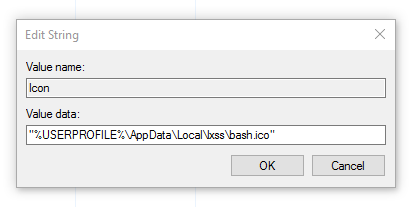
  • Now add a string value to this key called Icon with a path to the desired icon "%USERPROFILE%\AppData\Local\lxss\bash.ico" (including quotes).

  • Create a new key called Command under Bash on Ubuntu on Windows.

  • Change the default value to the path where your bash.exe is, like C:\Windows\System32\bash.exe.

@SGM3

SGM3 commented Oct 10, 2016

Copy link
Copy Markdown

Based on how Git Bash inserts the GUI and Bash into the context menu, you have the option to have the HKEY_CLASSES_ROOT\Directory\Background\shell to have a more consistent name like ubuntu_bash (no spaces) and have the default value of the key have the [unquoted] displayed name.

@aryan-02

aryan-02 commented Jan 8, 2018

Copy link
Copy Markdown

Post the Fall Creators Update, the path for lxss has changed. Please update the steps

@Azeirah

Azeirah commented Jan 17, 2018

Copy link
Copy Markdown

@aryan-02, I found the icon at %localappdata%\lxss\bash.ico

@changhenry2

Copy link
Copy Markdown

Hi, is there anyway to create context menu when "right click on folder items"?
The current version is working when using windows explorer, but in some explorer alternatives (xyplorer) the current method is not working because it has its own context menu.

@adrianjost

Copy link
Copy Markdown

With Windows 10, Version 1903 I don't need to do all these steps anymore. If you right click in a fodler while holding the shift key, an option Open Linux-Shell here appears.

@goberlan

Copy link
Copy Markdown

But is there a way to set it so you don't have to use shift?

@twocs

twocs commented Jul 30, 2020

Copy link
Copy Markdown

Change the directory to that as well:
wsl.exe --distribution Ubuntu-20.04 --cd "%V"

(Working on 19042.421)

@chiqui3d

Copy link
Copy Markdown

Change the directory to that as well:
wsl.exe --distribution Ubuntu-20.04 --cd "%V"

(Working on 19042.421)

Thanks bro, Better yet, open it with Windows Terminal:

wt -p "Ubuntu18" wsl.exe -d Ubuntu18 -u myusername --cd "%V"

I couldn't find the ubuntu icon in the system, so I downloaded it from here in ico format. https://iconarchive.com/show/simply-styled-icons-by-dakirby309/OS-Ubuntu-icon.html

Sign up for free to join this conversation on GitHub. Already have an account? Sign in to comment