Skip to content

Instantly share code, notes, and snippets.

Show Gist options
  • Select an option

  • Save GINK03/09cd7588f9876cba943b531181052cf8 to your computer and use it in GitHub Desktop.

Select an option

Save GINK03/09cd7588f9876cba943b531181052cf8 to your computer and use it in GitHub Desktop.
proxy-command portforward.

例えば踏み台を利用して一気に透過的にパスする

sshpass -p $SSHPASS ssh -o ProxyCommand='sshpass -p '"${SSHPASS}"' ssh -W %h:%p '${SONET}'' 192.168.14.17

Jupyterなどのユーザアプリとマップする

sshpass -p $SSHPASS ssh -L 8888:localhost:8888 -o ProxyCommand='sshpass -p '"${SSHPASS}"' ssh -L 8888:localhost:8888 -W %h:%p '${SONET}'' 192.168.14.17

Appendix. macにsshpassをインストールする

$ brew install http://git.io/sshpass.rb

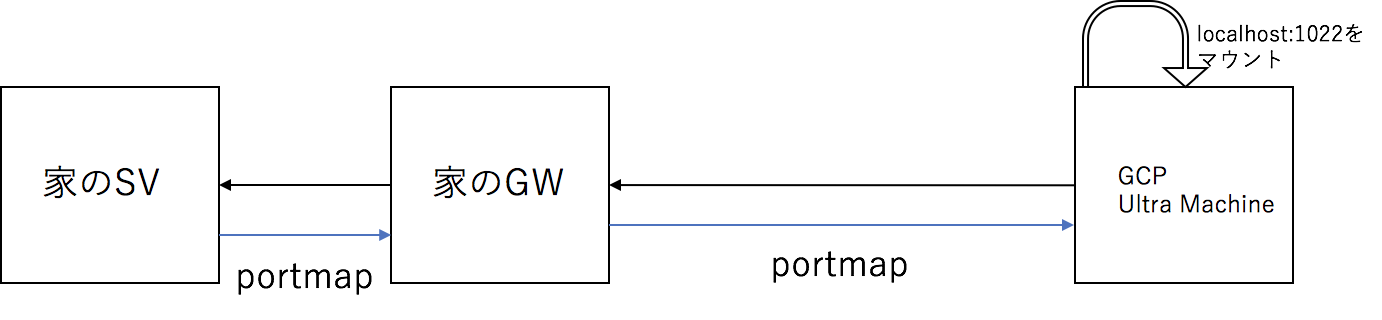
SSHFSで家のマシンのディスクをマウントする

portforwarding

例 SV設定

/etc/ssh/sshd_configのポートを2つ開ける
Port 22
Port 10022

例 GW設定

$ sshpass -p $PSSH ssh -L 10022:localhost:10022 192.168.14.20

例 CL設定 remote uname

$ sshfs -p 10022 ${UNAME}@localhost:/home/${UNAME}/ machine/
Sign up for free to join this conversation on GitHub. Already have an account? Sign in to comment