Skip to content

Instantly share code, notes, and snippets.

Show Gist options
  • Select an option

  • Save HimDek/eb8704e2da1d98240153165743960e17 to your computer and use it in GitHub Desktop.

Select an option

Save HimDek/eb8704e2da1d98240153165743960e17 to your computer and use it in GitHub Desktop.
This Guide will show you how to Install Windows Subsystem for Android or WSA on any Edition of Windows 11 non Insider release.

Install Windows Subsystem for Android on Windows 11 non Insider

WSA or Windows Subsystem for Android is a Tool that allows Windows to run Android Apps directly without using any emulator. The problem is Windows Subsystem for Android is currently only available through preview via the Beta Channel of the Windows Insider Program. But if you follow this guide, you don't have to be in Windows Insider Program to try it out. The only thing you need is Windows 11 installed and some patience.

Prerequisites:

  • A Device with any version and Edition of Windows 11 installed.
  • Internet Connection.
  • Hyper-V enabled.

Enable Hyper-V:

  • If Hyper-V is already enabled, click here to skip this part.
  • If your Windows Edition is Home, click here to know how to enable Hyper-V in Windows Home Edition.
  • If your Windows Edition is Pro, Enterprise or Education follow the bellow steps to enable Hyper-V:
    • Search for Turn Windows features on or off in the Start Menu search bar and open it. 10
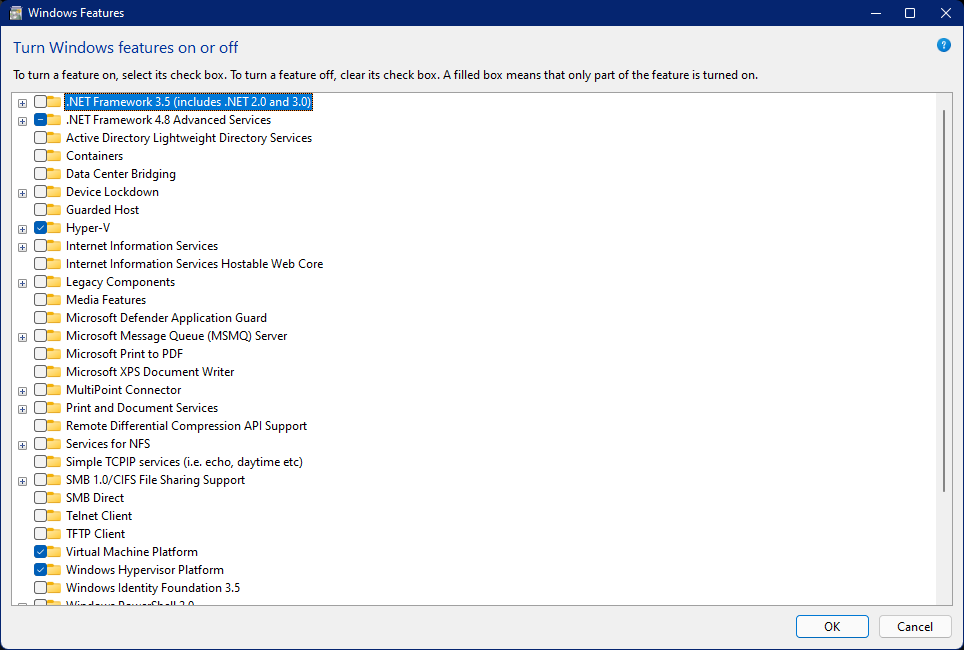
    • In the Window, lookout for Hyper-V, Virtual Machine Platform and Windows Hypervisor Platform. Then check the check boxes before them and click OK. This will also take some time and then a Restart is necessary. After this step, Hyper-V will be enabled.

Follow these steps:

  • Go to https://store.rg-adguard.net/. You will see the page shown in the below screenshot. 1
  • Select ProductID from the first drop down list.
  • Enter 9p3395vx91nr in the box next to it.
  • Select Slow from the drop down box next to it. 2
  • Then click the checkmark icon.
  • A list of files will appear below as results.
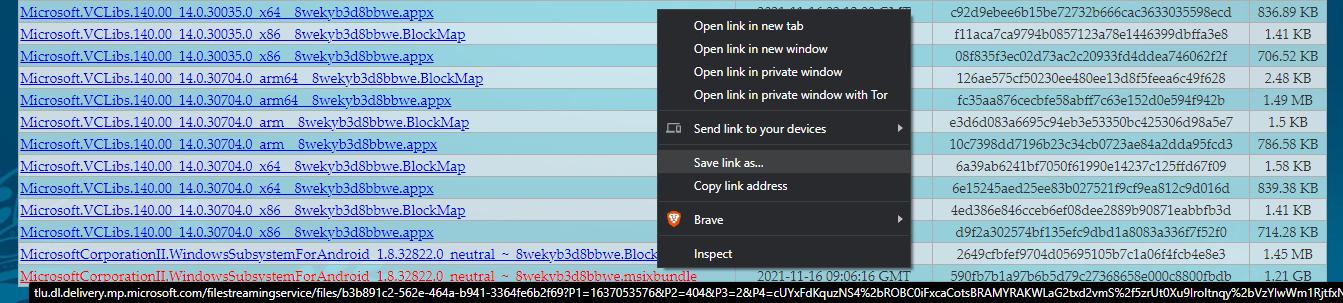
  • You have to find MicrosoftCorporationII.WindowsSubsystemForAndroid_<version>.msixbundle from that list. In the list the <version> will be replaced by the current version number. As of writing this the file size is around 1.2GB.
  • Right Click this file and click Save link as... from the context menu as shown in the screenshot below. 3
  • Now save the file and remember its location. The file will be downloaded to that location.
  • If you see a warning that the file can't be downloaded securely as shown in the screen shot below, click the upward arrow icon and click keep. Then the download will start. 4
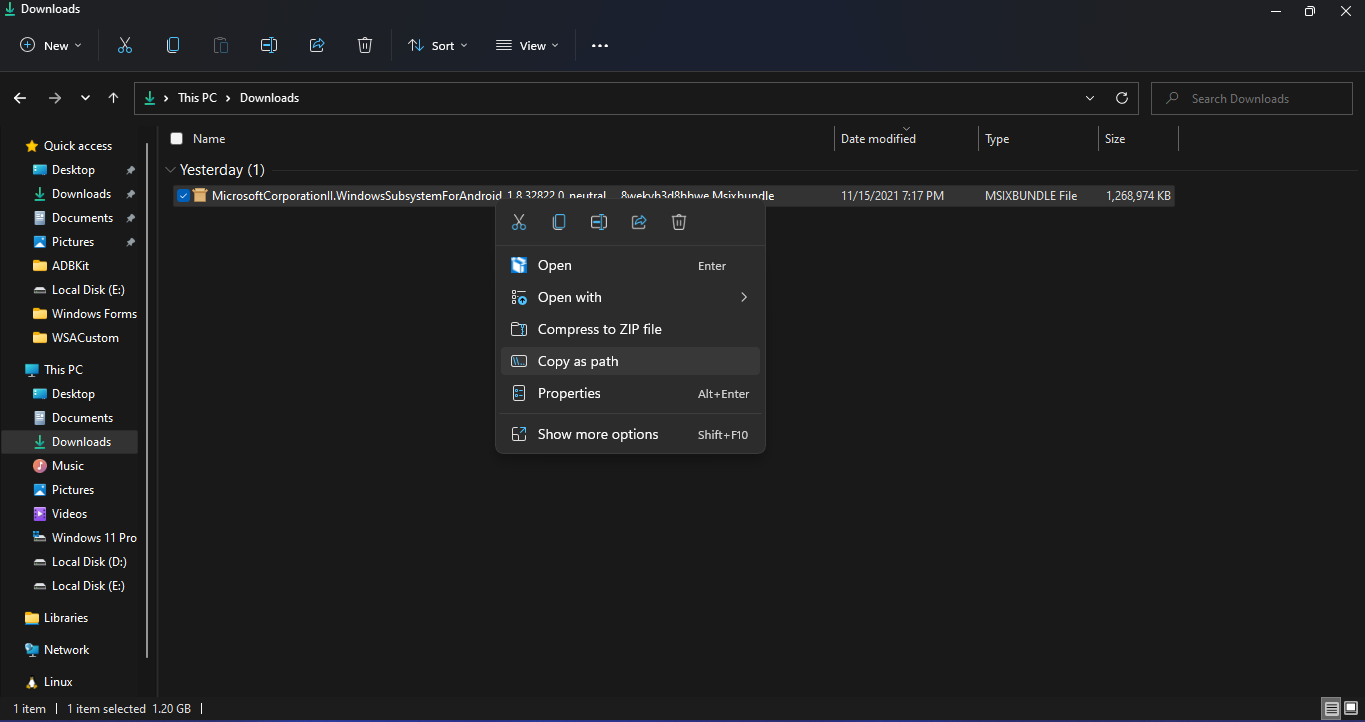
  • After the download is finished, browse to its location, Right click it and click Copy as path as shown in the screenshot below. 5
  • In the start menu, search powershell, right click Windows PowerShell and click Run as Administrator as shown in the screenshot below. 6
  • In the powershell window, type Add-AppxPackage and then paste the path that you copied by pressing Ctrl + V. The powershell window should look simillar to the screenshot below. Then press Enter. The installation will start. 7
  • After the installation is done, you can close the PowerShell window and the Windows Subsystem for Android Setting will appear on the Start Menu. 8
  • On running Windows Subsystem for Android Setting, the window shown in the screenshot below will appear. There, click on the icon in the extreme left side of the Files box. This will start Windows Subsystem for Android and open the File Manager App in Android. 9

You might also like:

@gossipidea

Copy link
Copy Markdown

WSA is a useful feature for running Android apps natively on Windows 11 without relying on heavy emulators, so it makes sense why many users want it outside the Insider program. The setup process can still be a bit technical, especially when sideloading components and handling compatibility requirements.

Before proceeding, it’s always good to ensure your system meets the Windows 11 requirements and that virtualization is enabled in BIOS. I also came across a similar step-by-step breakdown on daveshotchicknmenu that discusses alternative installation approaches and user experiences with WSA outside the Insider channel.

@gossipidea

Copy link
Copy Markdown

This is a useful guide for users who want to try Android apps on Windows 11 without joining the Insider Program. The biggest challenge is usually getting all the required components installed correctly, but the extra effort is worth it for native Android app support.

I was researching different tech troubleshooting topics recently and came across water damage repair cost phone while comparing device recovery and software solutions. Guides like this are great for users who prefer practical workarounds instead of waiting for official rollouts.

@aliclass0011-design

Copy link
Copy Markdown

Yearwin Games offers an engaging gaming experience with a variety of entertaining options for players. Its user-friendly platform and exciting gameplay make it a great choice for those looking to enjoy online gaming and stay entertained.

@queenelizabethuk95-art

Copy link
Copy Markdown

The verification process is quick, convenient, and accessible to anyone with internet access. By checking registration details online, users can instantly confirm whether a security practitioner remains active and compliant. This transparency improves confidence in security-related employment and services.

@henrycollins1456

Copy link
Copy Markdown

This guide is exactly what a lot of people have been looking for! Standard Android emulators can be incredibly resource-heavy and usually tank your PC’s frame rates, especially if you are trying to play intensive mobile open-world games. Running apps natively via WSA completely skips that performance lag.

It's an absolute game-changer for people testing out highly modded action games or custom mobile setups on a larger screen. For instance, testing graphical patches or game tweaks from platforms like gtasahub runs so much smoother on a native Windows environment compared to a sluggish emulator. Thanks for sharing the walkthrough, the patience is definitely worth it!

@GabrielWalli13

Copy link
Copy Markdown

Captura de tela 2025-05-13 161918

My virtualization is enabled and this error is still occurring.

you gotta turn on CPU virtualization from your BIOS Settings

@gossipidea

Copy link
Copy Markdown

This is honestly a lifesaver for people who want to experience mobile gaming on a bigger screen without the lag of heavy emulators. WSA has changed the game for running APKs natively.

For instance, a lot of players trying out trending Android games often look for setup guides or optimized versions to run smoothly on both mobile and PC environments. If anyone here is trying to test or install casual action games on their setup, you can check out this guide for the Mano Knapula App to see how the installation and gameplay work. Thanks for sharing this step-by-step method, it makes testing Android apps on Windows 11 so much easier!

@n2548358-arch

Copy link
Copy Markdown

Yaarwin Games | YearWin Games is a fast-growing online gaming platform that offers players an exciting and user-friendly gaming experience. Whether you enjoy color prediction games, Wingo, Aviator, slots, lottery games, or other popular online entertainment options, YaarWin Games provides a variety of choices designed to keep players engaged.
YaarWin Game App Download | Earn 5000 Daily. Our goal is to deliver a secure, smooth, and enjoyable platform where users can explore different games, access promotional rewards, and enjoy a seamless gaming experience. With a simple registration process, mobile-friendly interface, and regular bonus offers, YaarWin Games continues to attract players looking for entertainment and exciting opportunities.
 
Why Choose Yaar Win Game?
Easy and quick account registration
Mobile-friendly gaming platform
Wide selection of popular online games
Regular promotions and bonus offers
Fast and secure transactions
User-focused gaming experience
24/7 accessibility from compatible devices. YaarWin Games regularly introduces special promotions, welcome rewards, referral programs, and limited-time bonus offers to enhance the gaming experience. Players can stay updated through the official platform and community channels to learn about the latest opportunities and events.
 
Our Mission
Our mission is to create a reliable online gaming platform that combines entertainment, convenience, and innovation. We strive to provide users with a modern gaming environment where they can enjoy their favorite games anytime and anywhere.

@SchusJon13

Copy link
Copy Markdown

Is there a way to side load Google playstore and it works. I have side load it before but when I open it, It close automatically. Any ideas, because power shell does not include playstore in the installation on my hardware.

For anyone that wants to use Play Store:
Install the Aurora Store. Its FOSS but uses the APKs from the Play Store. It even works with every Google App.

@SchusJon13

Copy link
Copy Markdown

Is there a way to side load Google playstore and it works. I have side load it before but when I open it, It close automatically. Any ideas, because power shell does not include playstore in the installation on my hardware.

https://github.com/MustardChef/WSABuilds

Look at the Comment. Its a known bug in the unofficial Build...

Sign up for free to join this conversation on GitHub. Already have an account? Sign in to comment