
Last active
November 7, 2020 08:03
-
-
Save JerryNixon/8db0588b89da876c321d3557cd4cdf28 to your computer and use it in GitHub Desktop.
Blazor troubles with rendering <option/>
This file contains hidden or bidirectional Unicode text that may be interpreted or compiled differently than what appears below. To review, open the file in an editor that reveals hidden Unicode characters.
Learn more about bidirectional Unicode characters
| @using Microsoft.AspNetCore.Components.Rendering | |
| <EditForm Model="@Model"> | |
| <InputSelect class="form-control" @bind-Value="Model.Selection"> | |
| @{ MakeOption(__builder, "John"); } | |
| @{ MakeOption(__builder, "Jack"); } | |
| @{ MakeOption(__builder, "Mark"); } | |
| </InputSelect> | |
| </EditForm> | |
| @code { | |
| // https://stackoverflow.com/a/57840040/265706 | |
| // https://visualstudiomagazine.com/articles/2019/10/02/blazor-gotchas.aspx | |
| public class Record | |
| { | |
| public string Selection { get; set; } | |
| } | |
| public Record Model { get; set; } = new Record(); | |
| void MakeOption(RenderTreeBuilder __builder, string name) | |
| { | |
| <option value="@name">@name</option> | |
| } | |
| } |

After fiddling with this a bit more, I'm fairly certain the original approach does not work because you're in a RenderFragment that already has its own builder and simply does not plug yours into the rendering.
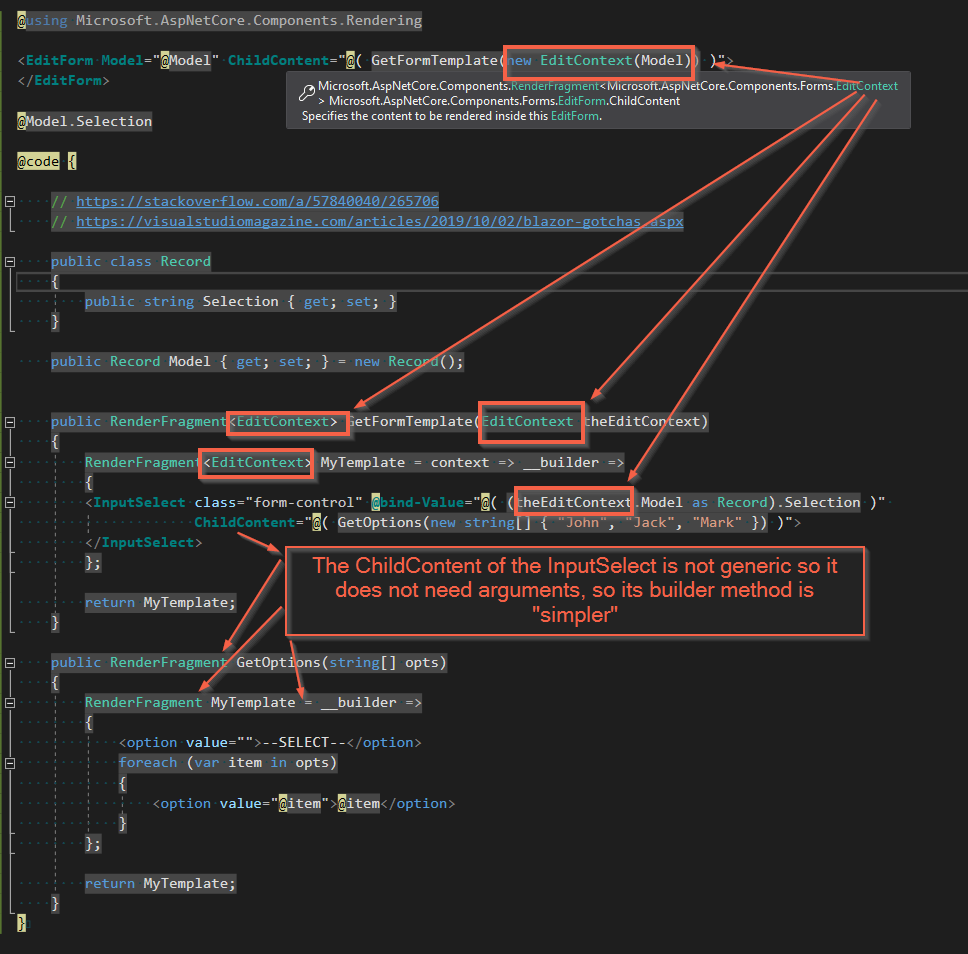
Here's how I hacked it to work (screenshot that tries to explain the ugliness is also below).
<EditForm Model="@Model" ChildContent="@( GetFormTemplate(new EditContext(Model)) )">
</EditForm>

@Model.Selection

@code {

    // https://stackoverflow.com/a/57840040/265706
    // https://visualstudiomagazine.com/articles/2019/10/02/blazor-gotchas.aspx

    public class Record
    {
        public string Selection { get; set; }
    }

    public Record Model { get; set; } = new Record();


    public RenderFragment<EditContext> GetFormTemplate(EditContext theEditContext)
    {
        RenderFragment<EditContext> MyTemplate = context => __builder =>
        {
        <InputSelect class="form-control" @bind-Value="@( (theEditContext.Model as Record).Selection )"
                     ChildContent="@( GetOptions(new string[] { "John", "Jack", "Mark" }) )">
        </InputSelect>
        };

        return MyTemplate;
    }

    public RenderFragment GetOptions(string[] opts)
    {
        RenderFragment MyTemplate = __builder =>
        {
            <option value="">--SELECT--</option>
            foreach (var item in opts)
            {
                <option value="@item">@item</option>
            }
        };

        return MyTemplate;
    }
}
Third post- here's how I would do it - the method is to apply some logic that can now be pure and straightforward C#. If you don't need such complexity, do the text like the value - directly from the foreach.
<EditForm Model="@Model">

    <InputSelect class="form-control" @bind-Value="Model.Selection">
        @{
            string[] opts = new string[] { "John", "Jack", "Mark" };
            foreach (string item in opts)
            {
                <option value="@item">@GetComplexText(item)</option>
            }
        }
    </InputSelect>

    @Model.Selection

</EditForm>

@code {

    // https://stackoverflow.com/a/57840040/265706
    // https://visualstudiomagazine.com/articles/2019/10/02/blazor-gotchas.aspx

    public class Record
    {
        public string Selection { get; set; }
    }

    public Record Model { get; set; } = new Record();

    //that's how I'd get a more complex text or value for this if I needed it and it made the foreach unreadable
    string GetComplexText(string item)
    {
        return $"{item} {DateTime.Now.Ticks}";
    }
}
Sign up for free
to join this conversation on GitHub.
Already have an account?
Sign in to comment
I think this might have something to do with the form and that its contents are already a
RenderFragment- it has aChildContentparameter which is how you add content to it. Below is a sample that showcases the difference.I personally never got the hang of this mixing HTML into your real C# code, and I never liked it so I am not 100% sure what's going on. Perhaps you could open an issue for MS to take a look at. The way I'd do this is to have a component render my child content and HTML rather than a function. If it is as simple as an option, I'd keep it in the markup. Maybe add a method to return a proper name or value if there are a couple of if-blocks in there.