Skip to content

Instantly share code, notes, and snippets.

View KiranMantha's full-sized avatar
🎯
Focusing on PlumeJS

Kiran Mantha KiranMantha

🎯
Focusing on PlumeJS
View GitHub Profile
@KiranMantha
KiranMantha / api-guidelines-from-day1.md
Last active December 29, 2025 03:34
The 3 a.m. Call That Changed The Way I Design APIs - The New Stack

The 3 a.m. Call That Changed The Way I Design APIs - The New Stack

At 3:17 a.m. on a Tuesday, my phone buzzed with the alert that would reshape the way I think about API design.

Our customer-facing API had stopped responding. Not slowly degrading; it was completely dead. Three downstream services went with it. By the time I got to my laptop, customer support tickets were flooding in.

The root cause? A single database replica had gone down, and our API had no fallback. One failure cascaded into total unavailability. I spent the next four hours manually rerouting traffic while our customers waited.

That night cost us $14,000 in service-level agreement (SLA) credits and a lot of trust. But it taught me something I now apply to every API I build: Every design decision should pass what I call “The 3 a.m. Test.”

The 3 a.m. Test
@KiranMantha
KiranMantha / nested-aem-components.md
Last active October 11, 2025 03:25
Nested aem components

The sling model will give a component that extends Container which dictates the allowed components via policy. In react component, the EditableComponent will be mapped to parent and the add components related aem container is mapped to cqPath/*. This is very important else the child container will take the focus of authoring dialog instead of whole component.

In below example, we have a aem carousel component that provide :items representing the cards or images to be displayed inside the carousel and also have title, layout, cta etc attributes that define the content placement around carousel.

On FE, the design dictates that the title should appear on left side and carousel on right. in editor mode, we should display a Add Components aem container to add the components to the carousel and we're manually iterating through cqItems[which are :items in aem java component] as children to a 3rdparty carousel component (here we're using react-slick slider as carousel that accepts slides as children)

@KiranMantha
KiranMantha / react-native-calander.md
Last active July 16, 2025 14:19
React-Native calander component
// Calander.tsx
import i18n from '@/i18n';
import { FontAwesome } from '@expo/vector-icons';
import { ReactNode, useEffect, useState } from 'react';
import { FlatList, Modal, Pressable, Text, TouchableOpacity, View } from 'react-native';
import { getStyles } from './Calander.styles';

type CalendarModalProps = {
  initialDate?: string;

Original article: https://www.tothenew.com/blog/aem-with-nextjs-remotespa-a-comprehensive-integration-guide/

AEM with NextJs RemoteSPA: A Comprehensive Integration Guide | TO THE NEW Blog

Welcome to our comprehensive guide, where we illuminate the process of updating a Remote Single Page Application (SPA) – operating independently of AEM – to seamlessly consume and deliver content authored within Adobe Experience Manager (AEM). Throughout this blog, our focus centers on the local setup of an AEM instance and a Next.js application, as well as the binding necessary to make them work together harmoniously. We will also create a demo component and drop it on the home page, exposing you to working on Remote SPA with AEM.

Steps to Setup Local AEM Instance with Nextjs App

Step 1: Setup Local AEM Instance

@KiranMantha
KiranMantha / repos.json
Created February 13, 2025 07:25
collections
{
"collections": [
{
"name": "Favorite Projects",
"repos": ["repo-name-1", "repo-name-2"]
}
]
}
@KiranMantha
KiranMantha / copyHtmlTableForExcel.js
Created January 6, 2025 14:04 — forked from drodsou/copyHtmlTableForExcel.js
Copy HTML table to clipboard, for pasting in Excel (javascript)
// In Excel make sure to have this option enabled: Home / Clipboard / Options / Collect without showing the Office clipboard
// Tested in Windows 10 only
let table = document.querySelector('#table').outerHTML;
table = table
.replaceAll('\n','<br style="mso-data-placement:same-cell;"/>') // new lines inside html cells => Alt+Enter in Excel
.replaceAll('<td','<td style="vertical-align: top;"'); // align top
navigator.clipboard.writeText(table).then(
()=>console.log("success"),
(e)=>console.log("error", e),
@KiranMantha
KiranMantha / on_ec2.md
Last active October 25, 2024 10:38
Deploying full stack app on AWS
@KiranMantha
KiranMantha / ai-in-cicd.md
Created October 19, 2024 18:02
AI in CI/CD

Original article: https://www.eficode.com/blog/mastering-devops-with-ai-building-next-level-ci/cd-pipelines

Mastering DevOps with AI: Building next-level CI/CD pipelines

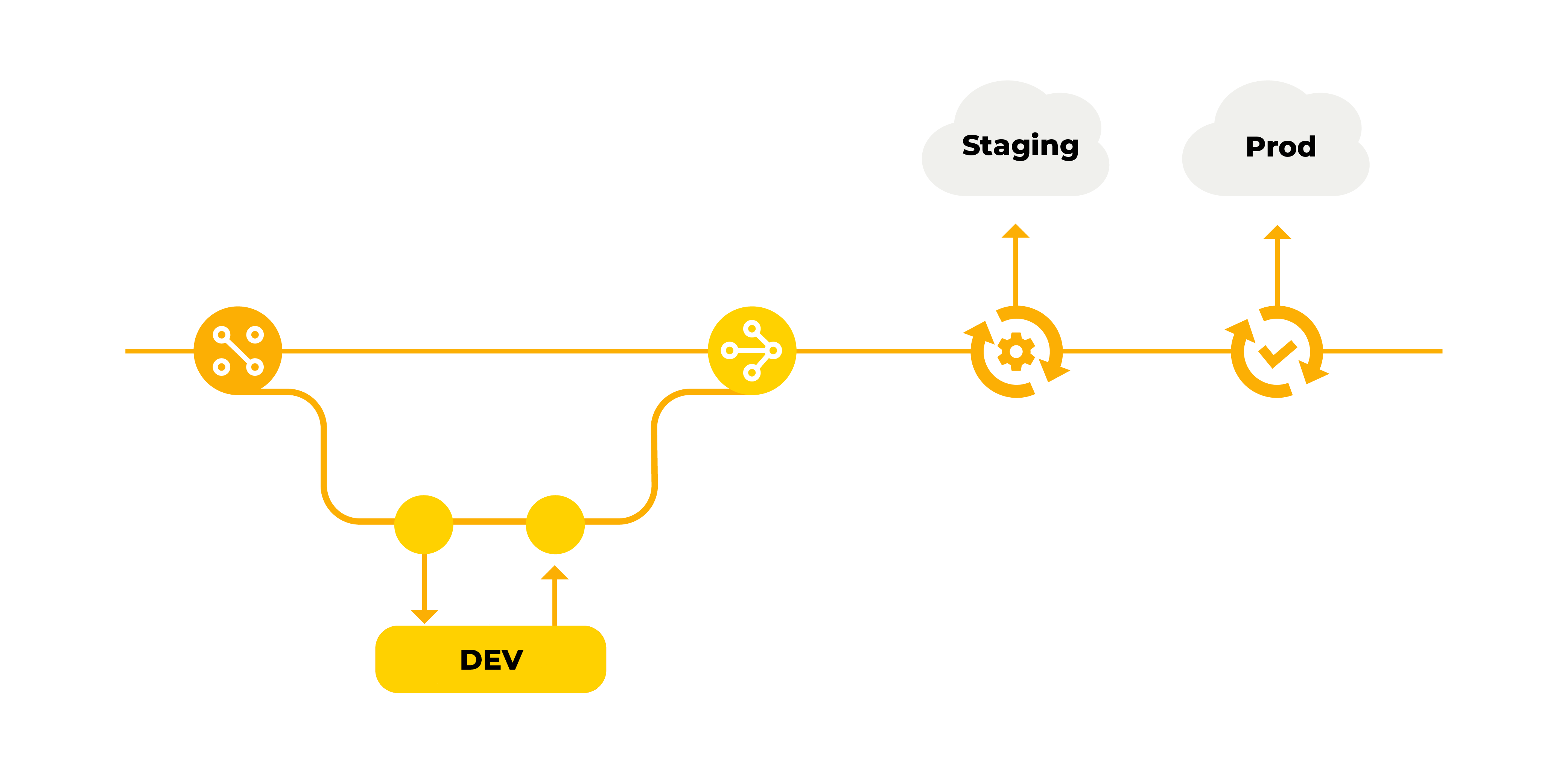
In an era where AI-assisted programming is rapidly evolving, the importance of robust DevOps practices can’t be overstated. In this blog post, I will demonstrate the efficient utilization of AI in building and enhancing CI/CD pipelines, highlighting that while AI brings significant advancements, human expertise remains crucial.

Establishing a solid DevOps foundation is no longer a months-long endeavor. With the right approach and tools, even small projects can and should have proper DevOps in place within days or weeks. Now, let's shift our focus to the foundational aspects of CI/CD, starting with the Git workflow.

![image-1](https://www.eficode.com/hs-fs/hubfs/Eficode%202020%20site%20images/Blog%20images/image-1.png?width=4167&amp;height=2084&amp;name=imag