

Disclaimer: ChatGPT generated document.
-
Introduced in 1984 at MIT
-
Current widely used version: X11 (X.Org Server)
-
Built on a client–server architecture
-
Responsible for:
- Drawing windows
- Handling input (keyboard/mouse)
- Communicating with applications
👉 In simple terms: X11 is an old, very flexible system that acts as a middleman between apps and your display.
- Introduced around 2008 by Kristian Høgsberg
- Designed as a modern replacement for X11
- Much simpler architecture
- Moves many responsibilities to the compositor
👉 In simple terms: Wayland removes the middleman and lets apps talk more directly to the display system.
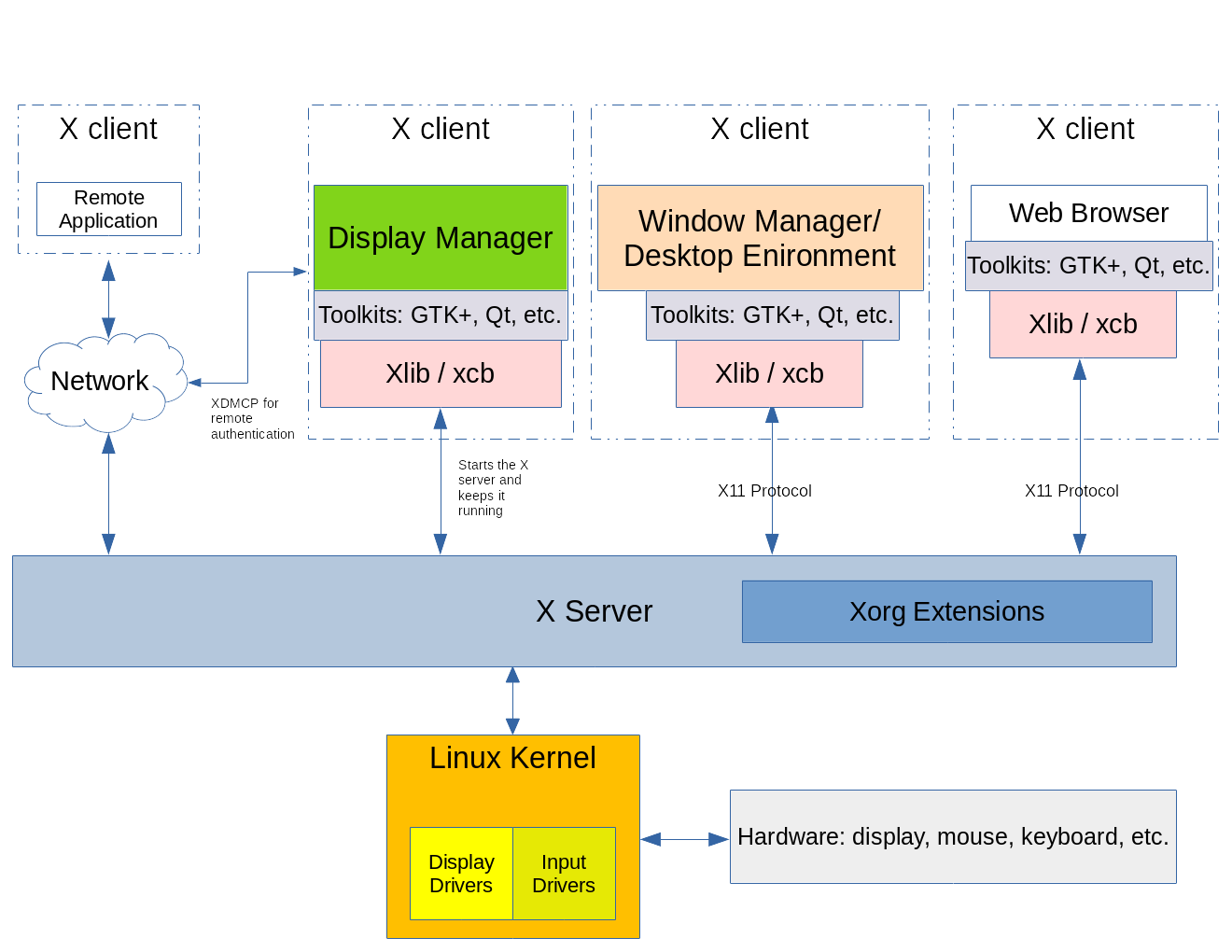
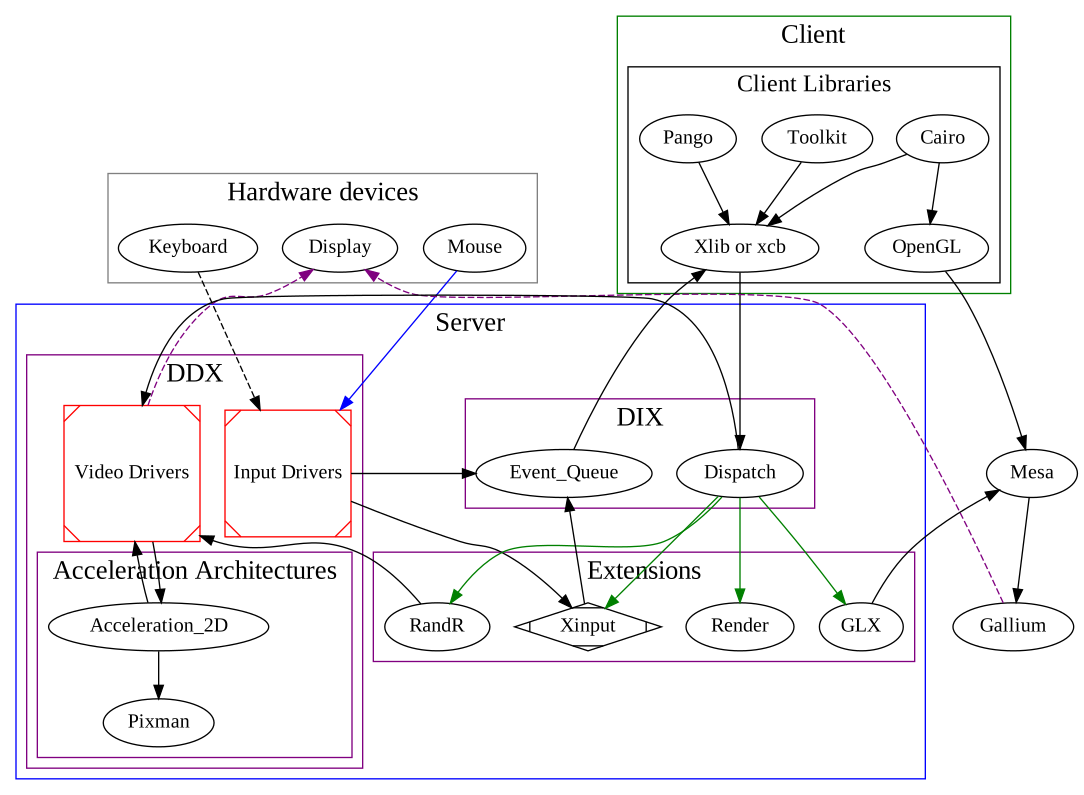
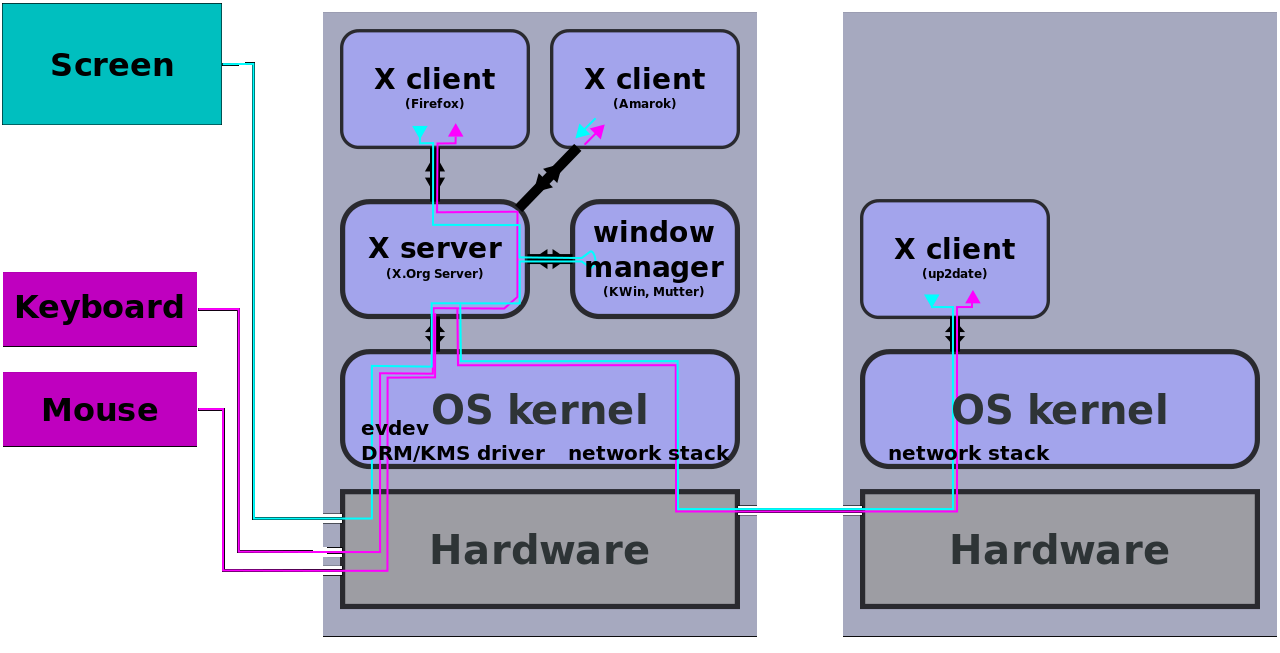
- Application → X Server
- X Server → Window Manager
- Window Manager → X Server
- X Server → Display
- Network transparent (can run apps remotely)
- Uses many protocols/extensions
- Window manager is separate (e.g., i3 window manager, Openbox)
- Very complex
- Lots of legacy baggage
- Performance overhead
- Security issues (everything can spy on everything)
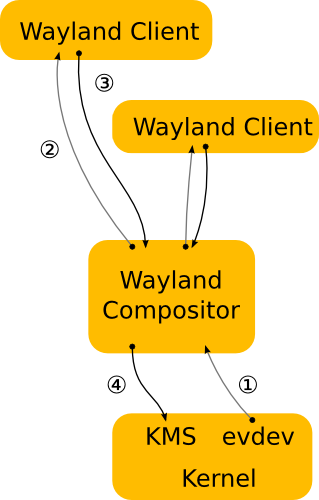
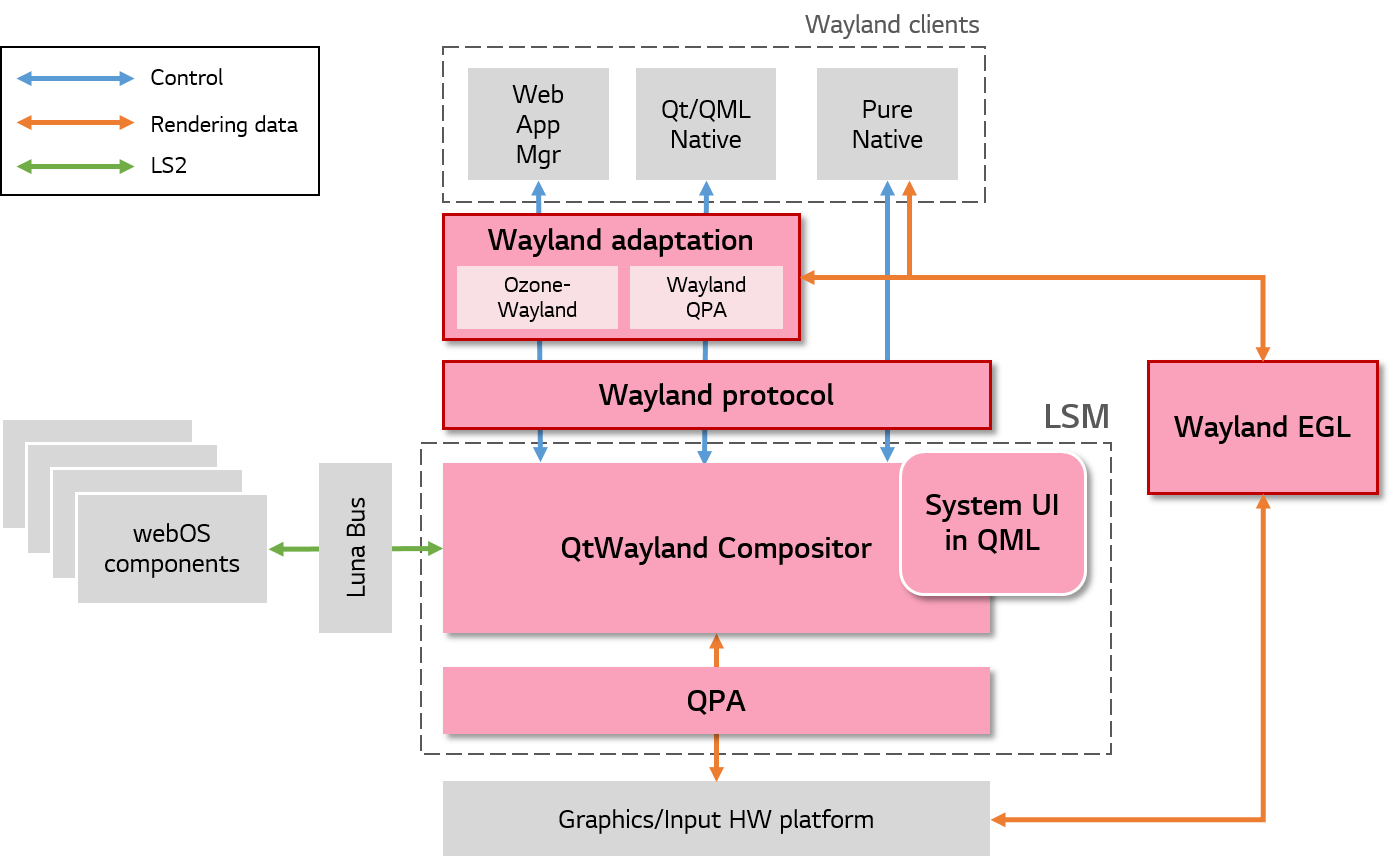
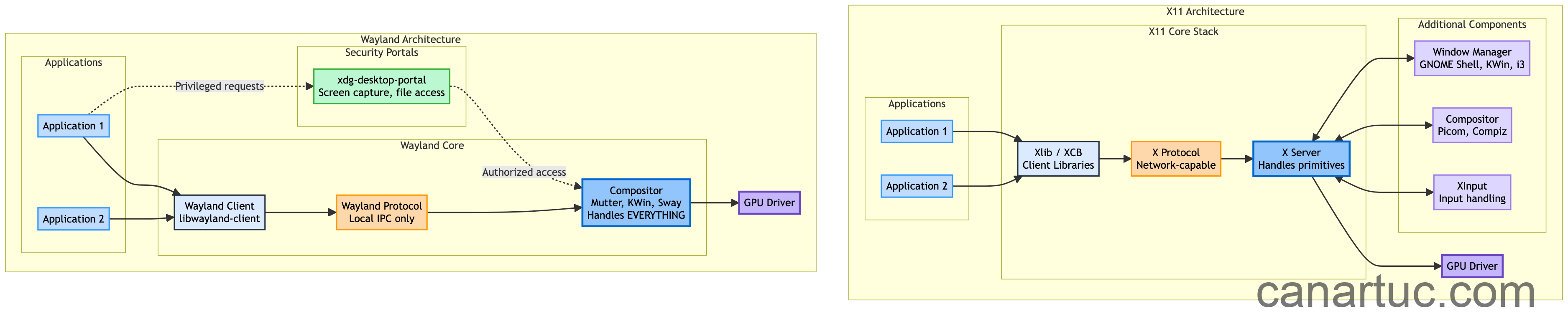

- Application → Compositor
- Compositor → Display
-
No central X server
-
Compositor does everything:
- Rendering
- Input handling
- Window management
Popular compositors:
- Weston
- Mutter
- KWin
- Sway
- App → X Server → Kernel → GPU → Screen
- Often includes round-trips (slow)
-
App → Compositor → GPU → Screen
-
Uses:
- Direct rendering (EGL)
- Shared buffers
👉 Result:
- Lower latency
- Less tearing
- Better performance
-
Any app can:
- Read keystrokes from other apps
- Inject input
- Screenshot everything
👉 Huge security hole.
-
Strict isolation:
- Apps cannot spy on each other
- Input is controlled by compositor
-
Permissions required for:
- Screenshots
- Screen recording
👉 Much closer to modern OS security expectations.
-
Input handled globally
-
No proper concept of:
- Per-window input isolation
-
Multi-monitor is messy
-
Input is per-surface
-
Better support for:
- HiDPI scaling
- Multi-monitor setups
- Fractional scaling
- Works with everything
- Decades of compatibility
-
Still catching up in some areas:
- Screen sharing (improving)
- Remote desktop
- Some legacy apps
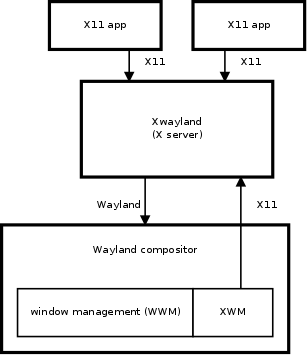
- Compatibility layer for X11 apps
- Runs X apps inside Wayland
👉 You usually won’t notice it.
| Feature | X11 | Wayland |
|---|---|---|
| Latency | Higher | Lower |
| Tearing | Common | Rare |
| FPS stability | Variable | Stable |
| GPU efficiency | Lower | Higher |
👉 Wayland wins clearly here.
- Window manager = optional
- Compositor = optional (e.g., picom)
- Compositor = EVERYTHING
👉 This is the biggest conceptual shift.
-
Uses:
- Xlib (old)
- XCB (modern)
-
Complex protocol
-
Tons of edge cases
-
Uses:
- Wayland protocol (XML-based)
- libwayland
-
Cleaner API
-
Requires:
- More responsibility in apps
- Historically better support
- Mature drivers
-
Now catching up fast:
-
Works great with:
- Vulkan
- Mesa
-
-
Steam + Proton works well
👉 Still some edge cases (especially with NVIDIA, though improving)
- GNOME (default Wayland)
- KDE Plasma (Wayland stable)
- XFCE
- LXDE
-
Built-in network transparency:
ssh -X app -
But:
- Slow
- Not secure
-
No native network transparency
-
Uses:
- PipeWire
- RDP/VNC solutions
👉 Trade-off: Security & performance > convenience
- Screen recording used to be hard (now mostly solved via PipeWire)
- Some apps need patches
- NVIDIA support historically problematic
- Global shortcuts harder to implement
- Clipboard behavior differences
“Everything should be flexible, even if messy.”
“Do fewer things, but do them correctly and securely.”
-
You want:
- Better performance
- Better security
- Modern Linux experience
-
You use:
- GNOME / KDE
-
You need:
- Legacy tools
- Remote X apps
- Specific workflows (e.g., global hooks, some dev tools)
| Category | Winner |
|---|---|
| Performance | Wayland |
| Security | Wayland |
| Compatibility | X11 |
| Simplicity | Wayland |
| Flexibility | X11 |
Wayland is not just “X11 but newer” — it’s a complete redesign of how Linux graphics works.
- X11 = powerful but chaotic legacy system
- Wayland = clean, modern, secure future
👉 The industry is clearly moving toward Wayland.
If you want, I can go even deeper into:
- Wayland protocol internals (wl_surface, wl_buffer, etc.)
- Frame timing & vsync mechanisms
- How compositors like KWin or Mutter are implemented
- Input stack (libinput, evdev)
- How XWayland actually works internally

https://www.youtube.com/watch?v=AIxmYKw79HU
https://www.youtube.com/watch?v=Cbg_bRphdDw