
Last active
October 27, 2023 11:16
-
-
Save Mikkareem/7660956a06c5bf9e6b4e89158d3d1cef to your computer and use it in GitHub Desktop.
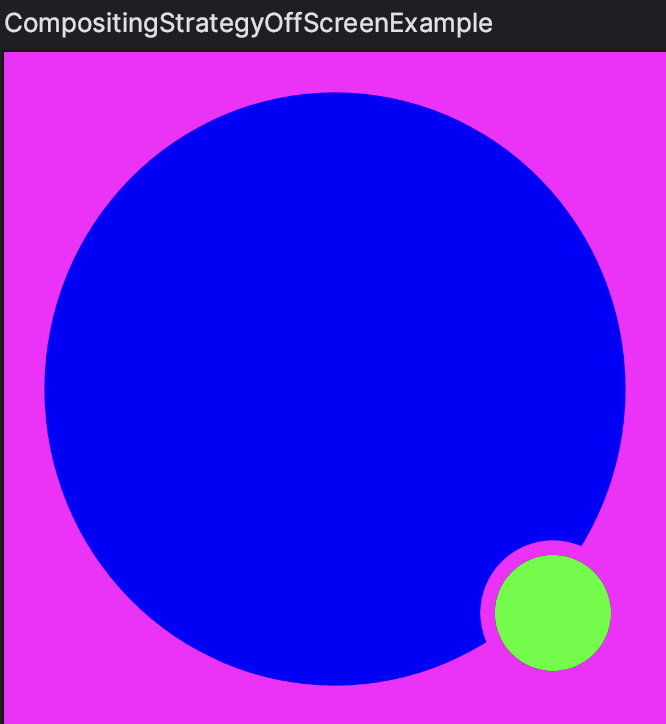
An example of how to use BlendMode.Clear in Jetpack Compose Canvas
This file contains hidden or bidirectional Unicode text that may be interpreted or compiled differently than what appears below. To review, open the file in an editor that reveals hidden Unicode characters.
Learn more about bidirectional Unicode characters
| @Preview | |
| @Composable | |
| fun CompositingStrategyOffScreenExample() { | |
| Box( | |
| modifier = Modifier | |
| .size(400.dp) | |
| .background(color = Color.Magenta) | |
| .padding(24.dp) | |
| .graphicsLayer { | |
| compositingStrategy = CompositingStrategy.Offscreen | |
| } | |
| .drawWithCache { | |
| val path = Path() | |
| path.addOval( | |
| oval = Rect( | |
| topLeft = Offset.Zero, | |
| bottomRight = Offset(size.width, size.height) | |
| ) | |
| ) | |
| onDrawWithContent { | |
| clipPath(path) { | |
| [email protected]() | |
| } | |
| val dotSize = size.width / 8f | |
| val dotCenter = Offset( | |
| x = size.width - dotSize, | |
| y = size.height - dotSize | |
| ) | |
| // Clip the Circle to draw the dot. | |
| drawCircle( | |
| color = Color.Black, | |
| radius = dotSize, | |
| center = dotCenter, | |
| blendMode = BlendMode.Clear | |
| ) | |
| drawCircle( | |
| color = Color.Green, | |
| radius = dotSize * .8f, | |
| center = dotCenter, | |
| ) | |
| } | |
| } | |
| ) { | |
| Box(modifier = Modifier.size(700.dp).background(color = Color.Blue)) | |
| } | |
| } |

Author
Mikkareem
commented
Oct 27, 2023
Sign up for free
to join this conversation on GitHub.
Already have an account?
Sign in to comment