-
-
Save Peppe/14aef652f37b5c84bc75b3d71c79d9d1 to your computer and use it in GitHub Desktop.
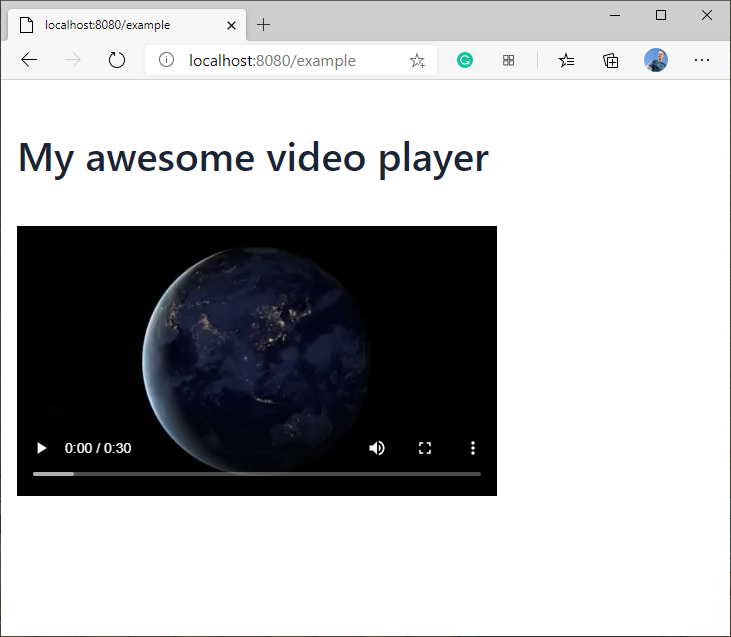
| This is an example on how to create a custom component in Vaadin 14 to make the HTML native <video> tag available from Java. | |
| You have to add the Video.java file below to your project, where after you can do `new Video(src);` to embed videos. | |
| I only implemented the src attribute to be dynamic, and added that the controls property should always be on. | |
| Similarly you can add other properties like autoplay, loop, and muted. | |
| Check https://www.html5rocks.com/en/tutorials/video/basics/ for info on what attributes are available in <video>. | |
| If you need more example code, check from com.vaadin.flow.component.html.Image how things are done there. | |
| Video file is placed in my spring boot app under META-INF/resources/img/video.mov. | |
| Check https://stackoverflow.com/questions/57553973/where-should-i-place-my-vaadin-10-static-files/57553974#57553974 | |
| for where static files should go. |
| package com.vaadin.example.views; | |
| import com.vaadin.example.components.Video; | |
| import com.vaadin.flow.component.html.H1; | |
| import com.vaadin.flow.component.orderedlayout.VerticalLayout; | |
| import com.vaadin.flow.router.Route; | |
| @Route("example") | |
| public class ExampleView extends VerticalLayout { | |
| public ExampleView() { | |
| H1 header = new H1("My awesome video player"); | |
| Video video = new Video("img/video.mov"); | |
| add(header, video); | |
| } | |
| } |
| package com.vaadin.example.components; | |
| import com.vaadin.flow.component.*; | |
| @Tag("video") | |
| public class Video extends HtmlContainer implements ClickNotifier<com.vaadin.flow.component.html.Image> { | |
| private static final PropertyDescriptor<String, String> srcDescriptor = PropertyDescriptors | |
| .attributeWithDefault("src", ""); | |
| public Video() { | |
| super(); | |
| getElement().setProperty("controls", true); | |
| } | |
| public Video(String src) { | |
| setSrc(src); | |
| getElement().setProperty("controls", true); | |
| } | |
| public String getSrc() { | |
| return get(srcDescriptor); | |
| } | |
| public void setSrc(String src) { | |
| set(srcDescriptor, src); | |
| } | |
| } | |


How can we add <source> tag to it like below.
<video controls style="width:640px;height:360px;" poster="poster.png">
  <source src="devstories.webm"
          type='video/webm;codecs="vp8, vorbis"' />
  <source src="devstories.mp4"
          type='video/mp4;codecs="avc1.42E01E, mp4a.40.2"' />
  <track src="devstories-en.vtt" label="English subtitles"
         kind="subtitles" srclang="en" default></track>
</video>
As I see it, <source> is a very similar tag as <video>. I haven’t tested this, but what I would do is make a very similar class, Source.java, which has @Tag(“source”), and a constructor that sets the src and type properties. Then the Video.java class would have a addSource(String src, String type) method which creates a Source instance with the parameters and attaches it to the Video object. I think attaching would be done with something like getElement().add(source.getElement()). Add or append, I don’t recall the API keywords by heart.

The Vaadin 8 example in the sampler shows how to embed videos hosted externally, is there a method to do that in 14 similar to what you have above?

How can we add
<source>tag to it like below.<video controls style="width:640px;height:360px;" poster="poster.png"> <source src="devstories.webm" type='video/webm;codecs="vp8, vorbis"' /> <source src="devstories.mp4" type='video/mp4;codecs="avc1.42E01E, mp4a.40.2"' /> <track src="devstories-en.vtt" label="English subtitles" kind="subtitles" srclang="en" default></track> </video>
I'm working on a similar problem right now. Did you manage to make any progress on adding subtitles to your video in this manner?
Screenshot of the view above.