
Navigate to your browsers profile manager,
simply type the following in the url bar:
about:profiles
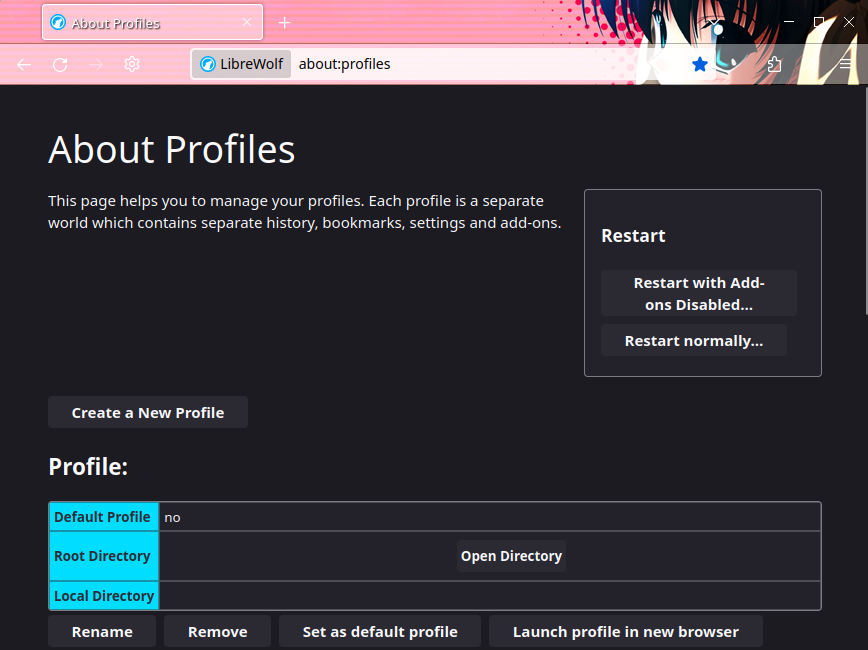
You either need to know a profiles name or it's location,
both are displayed in the profile manager, note however
that a profiles name might not work if the profile is in a
non-standard location.
As such I would recommend using the profile's path instead.
Name : What comes after Profile:
Path : String found in Root Directory
A profile can be launched with the --profile argument.
< Browser > --profile < Name / Path >firefox --profile TemptationStairwaylibrewolf --profile /media/melody/Holesome/Twitch/MainPronfile/Don't forget to add " around names and paths that
contain problematic characters, such as spaces.
You might need to use the path to your browsers executable
instead of it's name in case your system can't find it.
Now simply create a shorcut, name it and use
the above command as the value / target.