
Although Grunt and Gulp are both popular task runners, the Web Development community has moved to module bundlers such as Webpack since it can accomplish the same task as Grunt and Gulp, and in addition to that it can do a lot more.
The benefit of using Webpack is that it enables to work on projects as modules. We can have one webpack.config.js file for every project and use it as a starting point. It will achieve:
- Code modularization
- Transpiling ES6 to ES5
- SCSS to CSS
- Bundle all JS files into 1
.jsfile - Bundle all SCSS files into 1
.cssfile - Code minification
- It can also be used to convert and optimize image files from JPEG to WEBP if needed be
I already have the package.json setup ready to be used directly in any future theme or plugin projects.
Before starting to work on a project, the developer will have to run 2 commands:
npm install: To install all dependenciesnpm run dev: This will watch the changes made in any SCSS or JS files
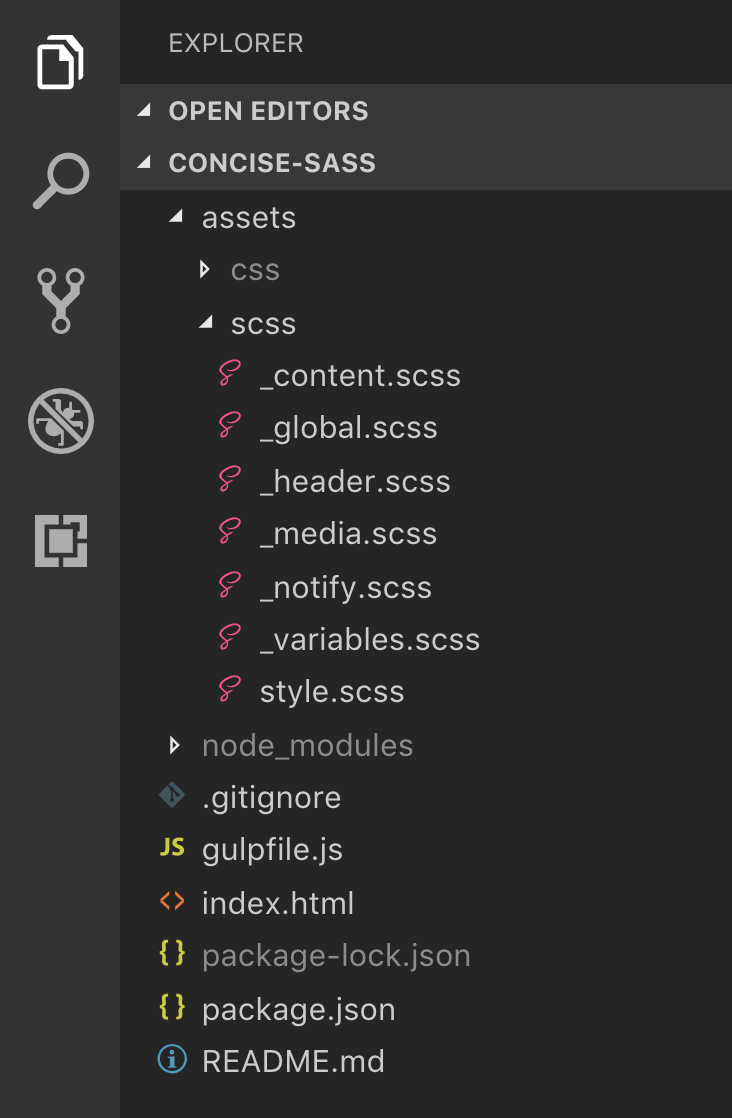
Writing CSS as SCSS is beneficial in the following ways.
- Modularisation of code
- When all developers work on a single
style.cssfile, it has a high probability to give rise to merge conflicts. Since specific tasks were assigned to each developer, it makes sense that developers focus on their own files. For example, Bhaskar has to focus on just the_header.scssfile whereas Kothai will focus onmedia.scss, depending on the task - Writing SCSS means lesser code. Lesser code means saving time
- Code is more readable and maintainable
- Using SASS variables means consistency. For example, there was a lot of ambiguity whether to use
320pxor480pxfor mobile devices. A simple variable called$mobile: 480pxcan be used everywhere, this will make the code consistent. The variables can be used for a lot of other things like primary color, secondary color, primary font, root font size - SASS allows to create helper functions which can be reused everywhere. This is my personal project I made almost a year ago, it makes use of mixins, partials, extend and media.
Local By Flywheel is a tool made specifically to setup WordPress development environments.
This is a tool that has impressed me a lot. All WordPress environments live within a single application. It is super fast. Faster than Vagrant that we're currently using.
It is fully configurable, with the choice to select a range of PHP versions(necessary for testing), a choice to select either NginX or Apache and also a range of MySQL versions are available.
What it provides:
- Mailhog: An SMTP server to catch emails
- Xdebug: Debugger and Profiler Tool for PHP
- SSL support for HTPPS websites
- SSH access to the site
- Built in WP-CLI
- And a range of add-ons that you can install if needed be
- Live URLs using ngrok: You can access a localhost website using a URL from anywhere.
Since we are working mostly on WordPress projects, we must setup WordPress autocomplete in the editors. For example:
This is available for almost all the IDEs/editors like PHPStorm, Sublime Text, Atom, etc.
Dash is something I came across lately. It's an API documentation manager and also provides the ability to run snippets globally from any other app.

1. HTML
Use correct HTML tags whenever necessary. HTML5 was a major improvement over its previous version in regards to semantics. For example if you want to display address and contact information, use HTML's
<address></address>tag. It helps search engines to better understand your website. Read more of HTML5 here.2. CSS
Use SCSS to write CSS. Break down your file into separate logical divisions of the webpage and include them in a single SCSS file.
Foe example:
All the SCSS files that start with an underscore are imported in the
style.scssfile. This avoids merge conflict and enables maintainable code.2.1 Never use fixed widths for layout unless it is a requirement or absolutely necessary.
For a body layout:
The above code will break the website on devices smaller than
1024px.Use
max-widthwithwidth.This means that no matter how big the screen is, the body width will go as far as
1024pxand not beyond that. But if the screen goes smaller than1024px, then the body width will automatically adjust. This is important, please note.2.2 Learn what each position values are for
There are 4 default positioning rules:
Whenever you use
absolutepositioning on an element, please use it in conjunction with the immediate parent's positioning.If the parent has
staticorfixedposition, then addingabsoluteon the child will cause unwanted behavior. It will be wise to set parent torelativein most of the cases. In such a case, the child will position itself relative to it's parent.Use
fixedonly if you want to remove the element from the HTML flow.2.3 Cross browser consistency
Every browser parses and renders CSS and JSS in their own way. This causes inconsistent view across different browsers. To fix this, most of the CSS frameworks like Bootstrap and Foundation include either the
reset.cssornormalize.csslibraries. A default WordPress theme will make use ofnormalize.cssto make the UI consistent across all modern browsers.This is one aspect, the other aspect is to use vendor prefixes wherever necessary.
Few CSS properties are not supported across all the browsers, for example
transformwill work on Chrome by default. But for it to work correctly on Firefox, you'll require-moz-transform. So your entire code will look something like this:There are other few properties which are not at all supported on few browsers, to verify that, use caniuse.com
2.4 Use classes instead of id for styling
Whenever you want to style an element using CSS, use style instead of IDs
2.5 em vs rem
Use
pxonly if it is absolutely necessary. When working with layouts, it is better to useemorrem.Both the units depend on the font sizes.
remwill refer to the font size of the root element, i.e.;html, whereasemwill refer to the font size of the current element being styled.So if font size of
htmlis set to20px, then settingpadding-left: 2remon any randomdivwill set thepadding-leftto 2 x 20 =40px2.6 Don't use float
If you're already using Bootstrap with the flex layout, please do not use
float. That would be going backwards. Usingfloatwill enable the collapse of height of its parent element. To deal with this, you'll have to use the clearfix hack everywhere. This would be tedious. Instead useflexsince it does not have the same problem.This a very beautiful and immersive article written by Chris Coyier on the flexbox model.
3. JavaScript
The language we all love/hate.
3.1 Cache DOM selections
The code above searches the DOM twice for
.some-element, which is an overhead. Instead cache it this way:3.2 Event Delegation
Instead of adding an event listener to the child element, add the event listener to the parent and capture the events bubbling up from its children. For example, lets say if you want to click an
<li>item and do some actions, we would generally do something like this:Above, you are attaching event handler to every
liitem. Instead, we can do it in the following way:This is more performant than the previous one.
3.3 Don't use var, use const or let instead
This is part of the ES6 specification. Using
varpolluted the globalwindowobject. Useconstorletinstead.Note: Unlike
var,letandconstdon't undergo variable hoisting.3.4 Don't concatenate, use template literals instead
This is from the development point of view. A neater codebase is very easy to develop on.
Look at the following example:
How untidy is that concatenation?
ES6 introduced template literals, using back-ticks (`)
3.5 Avoid unnecessary usage of IIFE
This is a very powerful design pattern, most of the libraries are built using this pattern. An IIFE will execute as soon as the script is loaded. It will not wait for the DOM ready event. So make sure to use DOM ready inside the IIFE.
3.6 Understand the value of this as per the context in which it is being defined
This is one of the most confusing concepts in JavaScript and it requires a lot of examples and experience to understand. I'll instead post a link to the best most in-depth article I've ever come across.
4. WordPress
For working on WordPress, make sure the PHP version you're using is above
5.64.1 Escape output instead of directly printing
Whenever you're trying to output value on the screen, it is necessary to sanitize and validate. Especially if the data is being fetched from the database or a filesystem. For example:
This is a very wrong approach. We don't know what malicious code the variables might contain. Hence we need to escape it. Look at the following:
But the above code is untidy since we open-close the php tags many times. I would recommend to use
printf()orsprintf()This is much more neater.
Read more on Data Validation to get a list of WordPress functions used for the same.
4.2 Use WP template tags instead of accessing global variables
For example, if you want to display the post content, use
the_content()function instead doing something like:The reason being that
the_content()andget_the_content()functions return value after passing it through the the_content filter. And the following functions are hooked on tothe_contentfilter:4.3 Use WP_Query instead of get_posts()
The below diagram does a great job explaining, for in depth analysis, refer this.
4.4 Safety checks
4.4.1 Looping array
Before iterating a variable, check if the variable is an array or not.
4.4.2 Use isset() while accessing keys in associating array
To avoid index/offset errors, check the key using in_array() for indexed array and array_key_exists() for associative array.
These methods prevent fatal errors, undefined errors and the WSoD (white screen of death)
4.3 Check what the function returns
Many functions return value of different types, depending on the conditions. For example, have a look at the WordPress Core function called get_terms(). It might return values of 3 types: (array|int|WP_Error)
When using such functions, don't try to directly access the values hoping that the function has successfully returned. It could be an error too. The better way to go about it would be:
4.5 Validate and Sanitize external global variables
Do not access
$_GET,$_POST, and$_SERVERvariables directly.We need to perform validation and sanitization before accessing.
4.6 Use string interpolation instead of concatenation
Concatenation
String interpolation
4.7 printf()/sprintf() over echo
Try closing-opening
<?php ?>PHP tags very often. Try to write code which will avoid it.For example:
This can be neatly written using printf() as:
We avoided closing the PHP tag completely
4.8 Use strict comparison
Instead of
==, use===and!==.When using
in_array(), pass the 3rd boolean argument astruefor strict comparison.