
Some code to automatically stream among us in dank memer, uses discord.py-self's rebase branch
import discord
from discord.ext import commands

bot = commands.Bot(command_prefix=commands.when_mentioned, guild_subscription_options=discord.GuildSubscriptionOptions.off(), self_bot=True)
channelId = int
gameChoice = int

@bot.event
async def on_ready():
    print("Ready!")
    channel = await bot.fetch_channel(channelId)
    await channel.send("pls stream")
    resp = await bot.wait_for("message", check=lambda m: m.channel.id == channelId)
    await resp.components[0].children[0].click()
    resp = await bot.wait_for("message_edit", check=lambda m, a: a.channel.id == channelId)
    resp = resp[1]
    await resp.components[0].children[0].choose(resp.components[0].children[0].options[gameChoice])
    await resp.components[1].children[0].click()


bot.run("token")
Options for game choice
| Name of Game | Number to set |
|---|---|
| Among Us | 0 |
| Animal Crossing | 1 |
| Apex Legends | 2 |
| Battlefield 2042 | 3 |
| Counter-Strike Global Offensive | 4 |
| Crab Game | 5 |
| Dark Souls II | 6 |
| Destiny 2 | 7 |
| Diablo II | 8 |
| Dota 2 | 9 |
| FIFA 22 | 10 |
| Fortnite | 11 |
| Forza Horizon 5 | 12 |
| Genshin Impact | 13 |
| Get Stuffed | 14 |
| Grand Theft Auto V | 15 |
| Hearthstone | 16 |
| League of Legends | 17 |
| Mario | 18 |
| Minecraft | 19 |
| New World | 20 |
| Overwatch | 21 |
| Phasmophobia | 22 |
| Rocket League | 23 |
| Valorant | 24 |
After the code is run, this is the resulting message, you can get it with
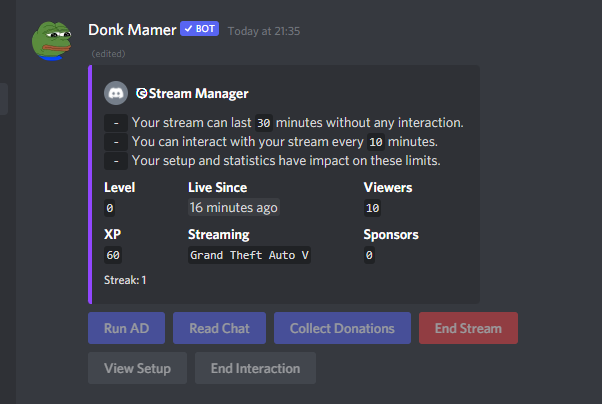
resp = await bot.wait_for("message_edit", check=lambda m, a: a.channel.id == 939538573563138060)
resp = resp[1]
resp.components[0].children # for the first 4 buttons, you can do resp.components[0].children[a num between 0 and 3, 0 being the first button (Run Ad) on the first row, and 3 being the last button (end stream) on the first row].click()
resp.components[1].children # For the two buttons on the second row, resp.components[1].children[num between 0-1].click(), 0 being view setup and 1 being end interaction