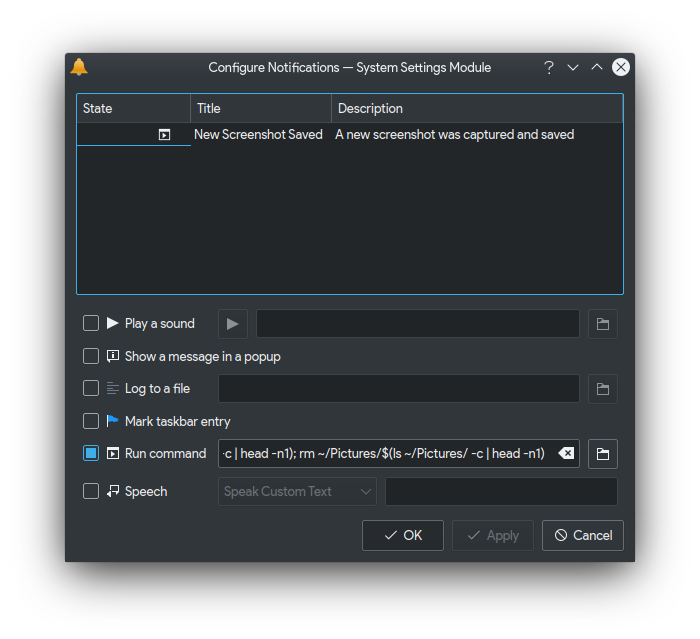
Please install
xclipon your computer first. This script is dependent toxclippackage
- Open System Settings > Notifications > Application: Configure
- Spectacle > Configure Events
- Tick a checkbox on
Run command - Put
/usr/bin/xclip -selection clipboard -t image/png -i ~/Pictures/$(ls ~/Pictures/ -c | head -n1); rm ~/Pictures/$(ls ~/Pictures/ -c | head -n1)as value - Click Apply and OK
- Click Apply button
The screenshot will put into clipboard and will not written as a file. If you want to save it, just remove
rm ~/Pictures/$(ls ~/Pictures/ -c | head -n1)from the script. I put it because most of the case I want to send it to chat rather than save it into my disk. If I want to save it as a file, I open theFile Manager, paste it, give it a name, and then save it.
I know the script is little bit silly since I executed the command two times to get the latest image. At first I want the image path as a file as the variable and than called it. But I've an issue (KDE issue more likely) where the my HOME_DIR appended at the beginning of my script and break it. I dedided to use this workaround. Let me know if you have better solution for this. Thank you

Depends on your personal preference, but for me, I love to untick the "Show a message in a popup"