FINALLY no need for tricks!
bonus tip: for more darkness > https://darkreader.org/

FINALLY no need for tricks!
bonus tip: for more darkness > https://darkreader.org/

Any way to get rid of the stoplight bar at the top of the window and just run "headless"?

If anyone is interested, I created a shell script to make a dark theme work with version 4: https://github.com/mikey-t/slack-dark-theme.
The CSS needs a little TLC as it's for an older version of Slack 3, but it's a pretty good start.
Rather than doing a fetch for the css it's adding them from a file in the same folder as the shell script and is setup to allow for rapid changes to make it easier to make changes and test them quickly.

The script of @demisx is great, however, I still face the following issue:
Adding Dark Theme Code to Slack... cp: dark-theme.css: No such file or directory
52: event-listener.js: No such file or directory
The missing files are in the same folder but unable for the Terminal to locate them out of the blue.
I'm sure it's because I lack some Terminal/coding skills here, but it would be really amazing if someone can explain how to have the script add the .css and the .js files.
Thanks!
Edit: tried to add the path to file in the script but no result.
CSS=/Users/User/Downloads/slack-dark-theme-master/$(<slack-dark.css) JS=/Users/User/Downloads/slack-dark-theme-master/$(<slack-dark.js)

@M-Brond try these instructions: https://github.com/LanikSJ/slack-dark-mode#usage

@LanikSJ thanks A LOT :)
updated the gest with your script and I hope soon we won't need any scripts, they should do it already!
let's nag slack on twitter to push them 🤓
Hey @LanikSJ yes saw that one thanks, but sadly my terminal skills aren't sufficient enough to make this work:
$ git clone https://github.com/LanikSJ/slack-dark-mode && cd slack-dark-mode \
Got this one.
&& chmod +x slack-dark-mode.sh && ./slack-dark-mode.sh \
What about the "&" this isn't a Terminal command is it? Same goes for the rest.
&& osascript -e 'tell application "Slack" to quit' \
&& killall Slack && sleep 60 && open -a "/Applications/Slack.app"
This issue got me started learning the terminal but besides that it would be really owesome to have Slack working in black.
Thanks!

Hey @LanikSJ yes saw that one thanks, but sadly my terminal skills aren't sufficient enough to make this work:
$ git clone https://github.com/LanikSJ/slack-dark-mode && cd slack-dark-mode \
Got this one.
&& chmod +x slack-dark-mode.sh && ./slack-dark-mode.sh \
What about the "&" this isn't a Terminal command is it? Same goes for the rest.&& osascript -e 'tell application "Slack" to quit' \ && killall Slack && sleep 60 && open -a "/Applications/Slack.app"This issue got me started learning the terminal but besides that it would be really owesome to have Slack working in black.
Thanks!
hi
&& it's like and
for example, u can separate these commands like:
$ git clone https://github.com/LanikSJ/slack-dark-mode (to do this command u should have installed git)
$ cd slack-dark-mode

@M-Brond && will execute the next command only if the previous one succeeds (e.g. exits with code 0). Often used as a way to chain multiple commands on one line and ensure the execution chain stops as soon as the first command fails. You can rewrite those to execute one at a time you feel more comfortable that way:
# For macOS users (copy & paste all or one commands at a time)
# Last tested Slack version: 4.0.2
$ git clone https://github.com/LanikSJ/slack-dark-mode
  cd slack-dark-mode
  chmod +x slack-dark-mode.sh
  ./slack-dark-mode.sh
  osascript -e 'tell application "Slack" to quit'
  killall Slack
  sleep 60
  open -a "/Applications/Slack.app"
Where $ indicates shell prompt and may be different for you. You don't need to copy that, obviously. It's not part of a command.
@M-Bond \ are just line separators and just like everyone said before me && is literally translated to "and".

Tried this today; sed doesn't check for bootSonic:"always", which was the default in my local-settings.json .
Hey @M-Brond and @LanikSJ
Thank you so much! It works now, really appreciate your help.

Thank you so much. it works for me.

Hi all!
I just ran the commands for Slack 4.0.2 and the colors are exactly the same. Any recommendations?
At the end of the process I can see in the terminal:
npx: installed 21 in 3.054s
promisify is not a function
Done! After executing this script restart Slack for changes to take effect.
Thanks!
@daspuru try these instructions: https://github.com/LanikSJ/slack-dark-mode#usage
@daspuru try these instructions: https://github.com/LanikSJ/slack-dark-mode#usage
Hi @LanikSJ, thanks, but I followed the instructions with no success.. One thing to notice is that I got this message: promisify is not a function.
Please look at this screenshot:
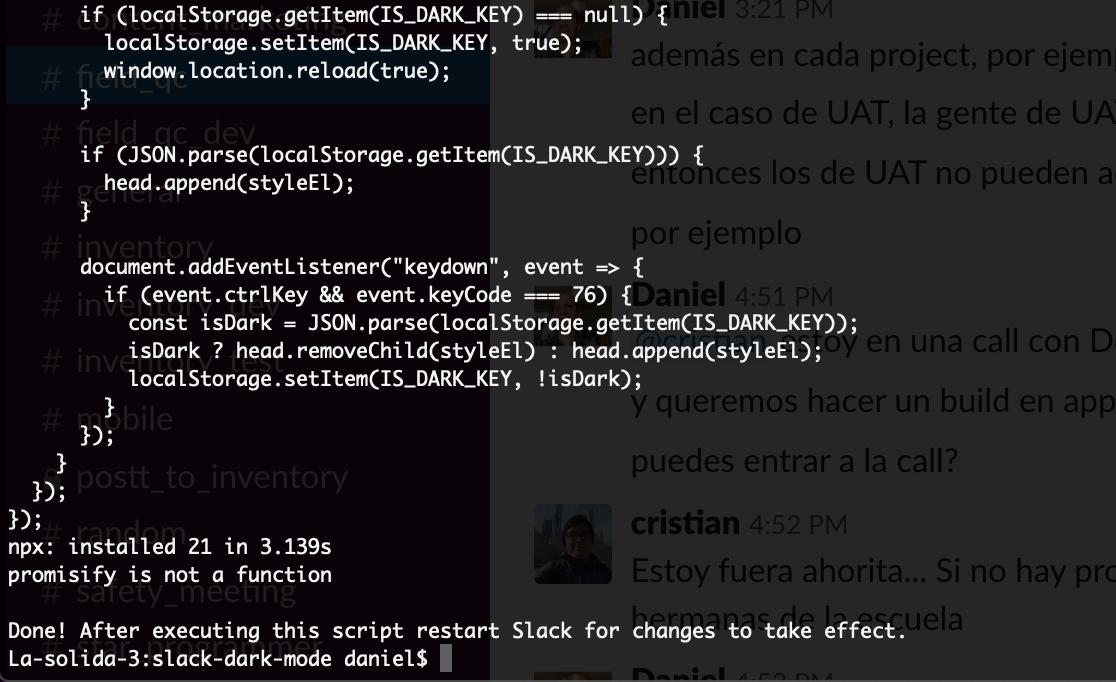
I already tried: npm install util.promisify
In Slack, Help -> Troubleshooting -> Clear Cache and Restart.
Can't help you with your promisify error message. I'm not familiar with it.
@daspuru What version of node are you running? I believe pomisify() fn was introduced in utils package starting with node v8.
$ node -v
You need to update your NodeJS to at least latest LTS.
@LanikSJ Upgrading did the trick. Thanks a lot!! :)

@LanikSJ Thanks for the update, those instructions worked

Using the instructions my terminal session on my Mac just hangs for 3-5 minutes. Once or twice I got a "Socket is not connected" error or something of the like. Otherwise it just hangs and nothing happens. Slack is closed, tried running using sudo and without.
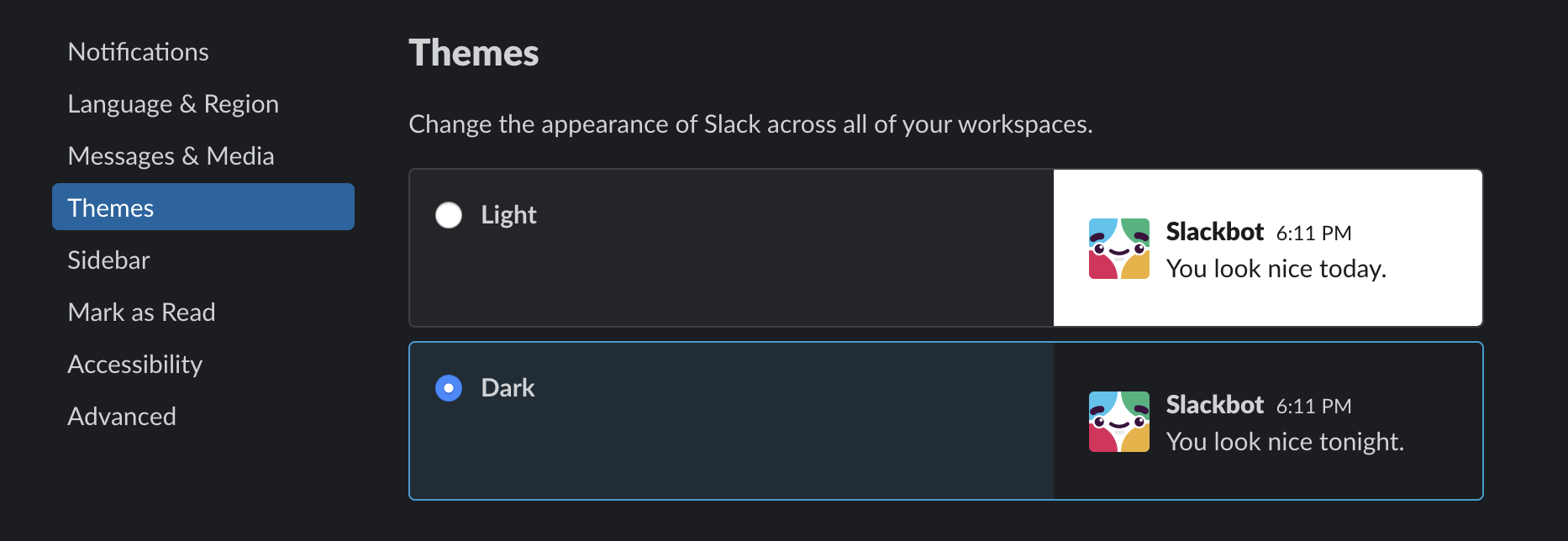
Slack now supports Dark Mode natively: https://slackhq.com/dark-mode-for-slack-desktop
@a7madgamal if you could update the first post to reflect this. 😎
Slack now supports Dark Mode natively: https://slackhq.com/dark-mode-for-slack-desktop
@a7madgamal if you could update the first post to reflect this. 😎
I just saw this! Great news!
FINALLYYYYYYYYY 🎉🎉🎉🎉🎉🎉🎉🎉🎉🎉🎉🎉🎉🎉🎉🎉🎉🎉🎉🎉🎉🎉🎉🎉🎉🎉🎉🎉🎉🎉

How does one remove/uninstall the dark mode content we've been tooling around with using git?
Reinstall Slack. Problem solved. 😎
Thanks! Worked like a charm.

Thank you guys for this beautiful trip! Bye.
Same! Just ran on Mac Mojave 10.14.5 (current as of Aug 1, 2019) and Slack 4.0.1
PERFECT!