
Two weekends, 110 commits, an AI virtual team — How I collaborated with AI to build a local LLM knowledge management product from scratch, Agentic Local Brain. Works even better with QoderWork + XiaoQ. Details: https://github.com/agent-creativity/agentic-local-brain
Introduction: A ten-thousand-word deep dive. Feel free to skim through the section images and table of contents to get the gist, then dive into specific chapters when you have time.
In your desktop agent (OpenClaw / Hermes / Claude / Qoder / Codex / Trae, etc.), simply send the following message to start building your local brain:
Please install or update this knowledge collection skill: http://localbrain.oss-cn-shanghai.aliyuncs.com/skills/localbrain-collect/SKILL.md

An idea strikes you — quickly send yourself a message on DingTalk or WeChat. Three days later, you've long forgotten which corner of your chat history it's buried in.
You read a good article, tap "favorite." WeChat favorites exceed 200 items, your "read later" list has over 100 articles, but how many do you actually go back to? The browser bookmark bar is a black hole — 300+ bookmarks scattered across a dozen folders, impossible to organize. Papers downloaded to your local drive, and half a year later you can't even remember the filenames. The gems in your email are drowned in thousands of messages, local notes scattered across directories.
The reality: At least 5 collection entry points — WeChat, DingTalk, browser bookmarks, read-later apps, local folders — but no unified knowledge entry. These tools don't talk to each other. Your knowledge is like fragments scattered across isolated islands.
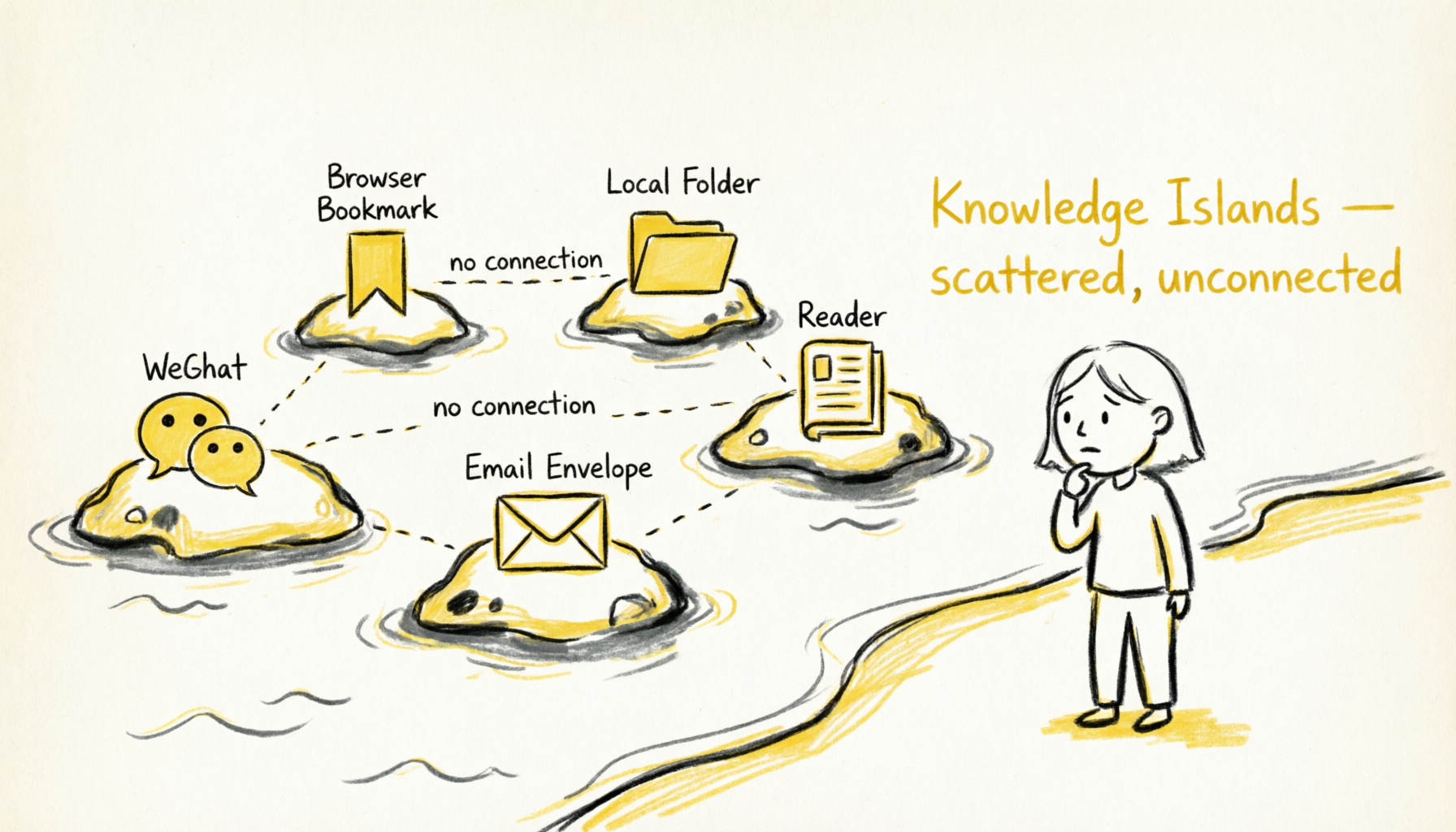
A real scenario: I needed to make a tech stack decision for a RAG system. Looking around, I realized I'd already accumulated quite a bit of relevant material — a browser bookmark with a horizontal comparison of vector databases, a WeChat-favorited article about chunk strategies, a locally downloaded paper comparing embedding model performance, and an email from a colleague last week discussing best practices for retrieval-augmented generation.
These pieces were clearly all talking about different facets of the same thing, but they were scattered across four different tools with no connection between them. I had to dig them out one by one and manually piece them together before realizing "these are actually a complete knowledge chain." How nice it would be if there were a place that could automatically tell me: "These 5 pieces you've saved are all related to RAG — consider reading them together."
This is the "knowledge island" problem — you've collected enough fragments, but no tool helps you discover the connections between them, unable to form a knowledge network.

Every day, valuable information from AI assistant conversations — solutions, code, approaches — either lies forgotten in chat history or gets manually pasted into note-taking apps, only to be forgotten again. AI is a powerful knowledge production tool, but it's disconnected from knowledge management systems.
Core contradiction: Many collection tools, but no time to organize; many storage places, but zero ability to discover connections; powerful AI, but disconnected from knowledge management.
Introducing LocalBrain in one sentence: I needed a system that lets me collect casually from my daily tools, automatically organizes and discovers connections, keeps all data entirely in my own hands. And ideally integrates with AI — making AI the gateway and administrator of my knowledge base.


I spent a day researching and experiencing the knowledge management tools on the market, trying to find a solution to the problem above. The result: each category of tool solves part of the problem, but none solves all of it.
These tools' core positioning is "writing" — they excel at creating and structuring notes.
What they're good at:
- Writing experience — rich text editing, block-level operations, template systems
- Structure — database views, hierarchical pages, attribute fields
- Bi-directional linking —
[[link]]syntax, theoretically building knowledge networks
What they're not good at:
- Collection — you need to manually open Notion, create a new page, paste content, fill in attributes. Every collection is a "decision" process with high friction cost.
- Discovery — while search is supported, there's no semantic understanding. Searching "machine learning" won't find content about "deep learning" or "neural networks" unless they literally contain "machine learning."
- Connection — bi-directional links need to be created manually. After reading 100 articles, you won't remember which ones should link to which others. Even if you manually build links, maintaining the link network becomes an impossible task as article count grows.
My experience: I used Notion for three years, accumulating 500+ pages. But most pages were never opened again after creation. Search functionality is weak — I often couldn't find content I knew existed. Most critically, I didn't know "what I had" in my knowledge base, only that I "stored a lot."
These tools' core positioning is "saving" — they excel at quick collection and read-later.
What they're good at:
- Quick collection — one-click bookmark via browser extensions, mobile share menus
- Cross-platform sync — bookmark on phone, read on computer
- Read-later — reader integration, highlighting and annotation
What they're not good at:
- Organization — bookmarks are just links, without deep understanding of content. You've saved 100 links, but don't know what each link's core points are.
- Discovery — no AI capability, can't answer "what have I saved about RAG?" You can only rely on memory and tags, but tags are manually maintained.
- Data sovereignty — your bookmark data is hosted on someone else's servers. Service shuts down, account gets banned, data is gone.
My experience: I used Raindrop to save web pages, accumulating 300+ bookmarks. Collection felt great each time, but less than 10% were actually revisited. Raindrop doesn't support full-text search — only titles and descriptions can be searched, often making it impossible to find what I wanted.
These tools' core positioning is "AI assistance" — using LLMs for intelligent organization and Q&A.
What they're good at:
- AI-assisted organization — auto-tagging, summarization, key information extraction
- Semantic search — understanding query intent, finding relevant content
- Auto-connection — discovering connections between content
What they're not good at:
- Cloud dependency — data must be uploaded to their servers for processing. This means your private notes and work documents go to third parties.
- Privacy concerns — your knowledge might be used to train models. Even if the service promises not to train, you don't know what happens to your data on their servers.
- Offline unusable — no network, nothing works. Even just searching your own notes requires being online.
My experience: I tried Mem.ai — its auto-connection feature was impressive. But I could never put truly important knowledge in it — because that's "my" knowledge, and I don't want it to become "the service provider's data."
| Requirement | Note-taking | Bookmarking | AI-powered | LocalBrain |
|---|---|---|---|---|
| Multi-source collection | Manual operation | Quick collection | Limited support | 6 sources |
| AI discovery of connections | No capability | No capability | Yes | Yes |
| Local data sovereignty | Local-first | Cloud-hosted | Cloud-processed | Local-first |
| Zero-friction integration | Need to open app | Browser extension | Need to switch tools | IM conversation as collection |
| Offline available | Fully available | Needs internet | Needs internet | Three-tier degradation |
| AI integration | No integration | No integration | Native AI | Skill integration |
Summary: No single tool achieves multi-source collection + AI discovery + local data sovereignty + zero-friction integration simultaneously.
What I wanted:
- Collection should be frictionless — casually collect from daily tools without opening a dedicated app
- Organization should be automated — AI auto-tags and builds connections, no manual maintenance
- Data should be local — my knowledge is mine, not hostage to any service provider
- AI should be integrated — AI assistants can access my knowledge base, becoming my "external brain"
These four requirements drove me to design LocalBrain.

All knowledge is stored as Markdown files in your local file system:
~/.knowledge-base/
├── raw/              # Raw knowledge files
│   ├── files/        # Local files (PDF, Markdown)
│   ├── webpages/     # Web content (Markdown)
│   ├── papers/       # Academic papers
│   ├── emails/       # Emails
│   ├── bookmarks/    # Bookmarks
│   └── notes/        # Flash notes
├── db/
│   ├── metadata.db   # SQLite metadata index
│   └── chroma/       # Chroma vector index
└── config.yaml       # Configuration file
Advantages of this design:
Readable: Any text editor can open it. No software needed — cat or less is enough to read. Ten years from now, even if the LocalBrain project stops, your knowledge remains and is still readable.
Greppable: Command-line search. grep -r "RAG" ~/.knowledge-base/ instantly finds everything mentioning RAG. This is the most primitive yet most reliable search method.
Version controllable: Git-friendly. You can manage your knowledge base with Git, sync across machines, and roll back to historical versions. No worries about providers deleting data.
Portable: Copy to a USB drive and go — no vendor lock-in. Your knowledge won't be held hostage by any platform.
Searchable even without network. The system has three-tier degradation:
| Scenario | Available | Unavailable |
|---|---|---|
| Normal mode | Semantic search + RAG Q&A + auto-tags | Nothing |
| No Embedding API | Keyword search + tag filtering + manual tags | Semantic search, RAG |
| No LLM API | Keyword search + built-in tag extraction | RAG Q&A, auto-tags |
| Fully offline | Keyword search + TF-IDF tags | All AI features |
A tool you'd trust with important knowledge must work offline.
This is my design principle: AI capability is a bonus, not a necessity. Even without any AI services, LocalBrain functions as a reliable knowledge base.
This is one of my core design philosophies for LocalBrain: collection should happen in your most-used tools.
In the past, you sent inspirations to yourself on DingTalk/WeChat. Now you send them to an AI assistant.
Same action, different results:
- Send to WeChat → buried in favorites, never opened again
- Send to AI assistant → auto-collected, auto-tagged, auto-connected, auto-summarized
In QoderWork, CoPaw, or OpenClaw, conversation is collection:
You: Save this link to my knowledge base https://example.com/article
AI: Saved. Title: "RAG System Optimization Practice", auto-extracted tags: RAG, vector database, performance optimization. Summary: This article discusses...

You: Help me save a note: Python's GIL is a performance bottleneck in multi-threading, recommend using multi-processing or async IO
AI: Saved. Tags: Python, concurrency, performance optimization.
No need to open new apps, no context switching. Your daily tools are the collection entry points.
Behind this is a Skill (plugin) at work. The AI assistant recognizes your intent ("save", "collect"), then calls LocalBrain's CLI commands to complete the operation. The whole process feels like "conversation" to you, and "tool invocation" to the AI.
The meaning of zero friction: The lower the friction cost of collection, the higher the collection frequency. If every collection requires opening a dedicated app, you'll tend to "deal with it later." And "later" usually means "never."
Turn collection into conversation, minimize friction, and collecting becomes a natural behavior.
A Skill defines the AI Agent's capability extension mechanism. A Skill defines:
- Trigger conditions: When should this Skill activate
- Intent recognition: What does the user mean
- Command mapping: How intent maps to specific CLI commands
- Result parsing: How to translate CLI output into natural language replies
Taking the localbrain-collect Skill as an example:
name: localbrain-collect
version: 0.6.1
description: Collect knowledge to local knowledge base

trigger_conditions:
  - "save to knowledge base"
  - "collect this"
  - "保存到知识库"
  - "收藏这个"

intent_recognition:
  # URL → default to webpage collection
  - pattern: ".*?(https?://\\S+).*?"
    action: webpage
  # arXiv → paper collection
  - pattern: ".*?(arxiv:\\d+\\.\\d+).*?"
    action: paper
  # Local path → file collection
  - pattern: ".*?(/[\\w/-]+\\.(pdf|md|txt)).*?"
    action: file
  # Plain text with keywords → notes
  - pattern: "(记|存|保存).*(想法|笔记|点子)"
    action: note
30-second installation, plug and play. excute: npx skills add agent-creativity/agentic-local-brain
More importantly, Skills are composable. Knowledge collection is just the first Skill — future expansions include:
knowledge-mine— knowledge mining (implemented in v0.6)knowledge-share— knowledge sharingknowledge-sync— multi-device sync
Each Skill works independently but shares the same knowledge base. It's like installing "skill packs" for AI Agents, expanding capabilities on demand.
This is the most critical design decision, and the part I want to discuss in depth.
Many people think CLI is "for automation friendliness" or "for technical users." That understanding is wrong.
CLI isn't for automation — it's more approachable for Agents.
Let me explain with a comparison table:
| Dimension | REST API | SDK | CLI |
|---|---|---|---|
| AI understanding | Read OpenAPI spec/Swagger, need to understand HTTP semantics | Read type definitions and source, need to understand programming language | --help is the prompt, self-describing |
| Interaction completeness | One endpoint = one atomic operation, composition needs orchestration | Need glue code, manage state | One command = one complete intent |
| Agent execution | Construct HTTP requests (auth, headers, body, error handling) | Import + instantiate + call, need environment config | shell("localbrain collect webpage <url>") |
| Learning cost | High (need to understand API specs) | Medium (need to understand SDK design) | Low (command is documentation) |
| Debugging difficulty | High (network issues, auth issues, format issues) | Medium (dependency issues, version issues) | Low (just run and see output) |
Three Agentic properties of CLI:
1. Self-describing — --help is the prompt
$ localbrain collect --help
Usage: localbrain collect [COMMAND] [OPTIONS]...

Commands:
  file      Collect local files (PDF, Markdown, text)
  webpage   Collect web content
  paper     Collect academic papers (arXiv)
  email     Collect emails
  bookmark  Bookmark favorites
  note      Create flash notes

Options:
  --tags TEXT      Manually specify tags (can be used multiple times)
  --summary TEXT   Manually specify summary
  --skip-existing  Skip already existing content
The Agent only needs to read this help information to understand how to use the tool. No additional documentation, no API specifications needed.
2. Functionally self-contained — one command completes one full action
# Collect a webpage, auto-fetch, extract, tag, and store
localbrain collect webpage add https://example.com/article

# Search for semantically related content
localbrain search semantic "machine learning"

# Start web interface
localbrain web --background
Each command is "one intent → one action → one result." No need to compose multiple API calls, no managing intermediate states.
3. Zero-friction execution — Agent only needs shell access
Agent doesn't need:
- Install SDK
- Configure authentication (API Key, Token)
- Handle HTTP errors (401, 403, 500)
- Understand JSON format

Agent only needs:
- Shell execution permission
- Parse text output
Case Study: The CLI-Anything Revelation
The open-source project CLI-Anything from HKUDS lab at the University of Hong Kong did something interesting: wrapping GUI desktop software like GIMP, Blender, and LibreOffice into CLIs, so AI Agents can control professional software through the command line.
Their core insight: CLI is the greatest common denominator interaction protocol between different software.
- GUI needs visual understanding (AI isn't good at this yet)
- API needs HTTP understanding (adds complexity)
- CLI only needs text understanding (AI's strongest suit)
LocalBrain's design philosophy is CLI-first, API-second:
- FastAPI is for the Web UI (human users)
- CLI is the first-class citizen for Agents
# Agent only needs this one line
localbrain collect webpage add https://example.com/article

# Not:
# 1. Read API docs
# 2. Understand authentication
# 3. Construct JSON body
# 4. Handle HTTP errors
# 5. Parse response format
This is a product design principle for the Agentic era: let AI Agents call your tools in the most natural way. And CLI is the most natural way.

LocalBrain's architecture design follows the principle of "layered decoupling":
┌─────────────────────────────────────────────────────────────────┐
│                         User Interaction Layer                   │
│  ┌─────────────┐  ┌──────────────┐  ┌─────────────────────────┐ │
│  │  CLI Tool   │  │   Web UI     │  │   IM Agent (Skill)      │ │
│  │  localbrain │  │  (FastAPI)   │  │  (QoderWork/CoPaw/Ding) │ │
│  └──────┬──────┘  └──────┬───────┘  └────────────┬────────────┘ │
└─────────┼────────────────┼───────────────────────┼──────────────┘
          │                │                       │
          ▼                ▼                       ▼
┌─────────────────────────────────────────────────────────────────┐
│                         Core Engine Layer                        │
│  ┌─────────────┐  ┌──────────────────┐  ┌─────────────────────┐ │
│  │ Collectors  │  │   Processors     │  │       Query         │ │
│  │             │  │                  │  │                     │ │
│  │ - File      │  │ - Chunker        │  │ - Semantic Search   │ │
│  │ - Webpage   │  │ - Embedder       │  │ - Keyword Search    │ │
│  │ - Bookmark  │  │ - Tagger         │  │ - RAG Q&A           │ │
│  │ - Paper     │  │ - Entity         │  │ - Graph Query       │ │
│  │ - Email     │  │ - Topic          │  │ - Recommend         │ │
│  │ - Note      │  │ - Relation       │  │                     │ │
│  └─────────────┘  └──────────────────┘  └─────────────────────┘ │
└─────────────────────────────────────────────────────────────────┘
          │                                        │
          ▼                                        ▼
┌─────────────────────────────────────────────────────────────────┐
│                         Storage Layer                            │
│  ┌─────────────────────────┐    ┌─────────────────────────────┐ │
│  │    SQLite Storage       │    │     ChromaDB Storage        │ │
│  │    Metadata + Tags      │    │     Vector Embeddings       │ │
│  │    + Relations + Topics │    │                             │ │
│  │    + History            │    │                             │ │
│  └─────────────────────────┘    └─────────────────────────────┘ │
│  ┌─────────────────────────────────────────────────────────────┐│
│  │                   File System (Markdown)                     ││
│  │                   Raw Content + YAML Metadata                ││
│  └─────────────────────────────────────────────────────────────┘│
└─────────────────────────────────────────────────────────────────┘
LocalBrain supports six knowledge sources, covering common scenarios in daily work and study:
| Source | CLI Command | Typical Scenario |
|---|---|---|
| Local files | localbrain collect file add <path> |
PDF papers, Markdown notes, code files |
| Web pages | localbrain collect webpage add <url> |
Tech blogs, news articles, online docs |
| Academic papers | localbrain collect paper add arxiv:ID |
arXiv papers, academic paper PDFs |
| Emails | localbrain collect email add <path> |
Important emails, discussion threads |
| Bookmarks | localbrain collect bookmark add <url> |
Quick bookmark collection, browser bookmark import |
| Flash notes | localbrain collect note add "text" |
Inspirations, ideas, temporary notes |
Each source has a dedicated Collector to handle it:
- FileCollector: Supports PDF, Markdown, TXT, code files. PDF uses PyPDF2 for text extraction, Markdown reads directly.
- WebpageCollector: Uses
httpx+readability-lxmlto fetch and extract body text, converted to Markdown format. - PaperCollector: Supports arXiv ID or URL, auto-downloads PDF and extracts metadata.
- EmailCollector: Supports
.emlsingle emails and.mboxmailboxes. - BookmarkCollector: Single bookmark collection, also supports importing bookmark files from Chrome/Safari/Firefox.
- NoteCollector: Quick short text recording, suitable for inspiration capture.
After raw content enters the system, it goes through a series of processing pipelines:
Raw Content
    │
    ▼
┌─────────────┐
│   Chunker   │ ─── Document chunking, supports long documents
│             │     Default 1000 chars/chunk, 100 char overlap
└──────┬──────┘
       │
       ▼
┌─────────────┐
│  Embedder   │ ─── Vectorization, stored in ChromaDB
│             │     Supports DashScope/OpenAI/Ollama
└──────┬──────┘
       │
       ▼
┌─────────────┐
│   Tagger    │ ─── Tag extraction (three-tier degradation)
│             │     User-specified > LLM > TF-IDF
└──────┬──────┘
       │
       ▼
┌─────────────┐
│  Entity     │ ─── Entity extraction (new in v0.6)
│             │     People, concepts, tools, projects, organizations
└──────┬──────┘
       │
       ▼
┌─────────────┐
│  Topic      │ ─── Topic clustering (new in v0.6)
│             │     HDBSCAN auto-discovers topic count
└──────┬──────┘
       │
       ▼
┌─────────────┐
│  Relation   │ ─── Cross-document relation discovery (new in v0.6)
│             │     Shared entities → document associations
└─────────────┘
Three-tier degradation for intelligent extraction:
| Tier | Source | Description | Example |
|---|---|---|---|
| Tier 1 | User-provided | CLI parameters --tags --summary |
--tags AI,ML --summary "Deep Learning Overview" |
| Tier 2 | LLM auto-extraction | Call DashScope/OpenAI, extract 3-5 tags | LLM analyzes content, returns tag list |
| Tier 3 | Built-in algorithm | TF-IDF keywords + extractive summary, zero-dependency | Extract high-frequency words as tags |
This design ensures: collection works even without any AI services configured.
Version 0.6 introduced the "knowledge mining" module, solving the "collected but don't know what's connected" problem.
Automatic Knowledge Graph Construction
The system automatically extracts entities (people, concepts, tools, projects, organizations) from documents and builds relationships between entities.

The image above shows a real knowledge base graph: 259 entities connected by 291 relationships. Node size indicates mention frequency, edge thickness indicates connection strength.
Clicking any node reveals:
- Which documents this entity appears in
- What relationships it has with other entities
- Related citation snippets
Topic Clustering
Using HDBSCAN algorithm to auto-discover topic count, no manual specification needed. The system tells you: "Your knowledge base currently focuses on 3 domains."

Unlike K-Means, HDBSCAN:
- Doesn't need preset topic count
- Can discover clusters of any shape
- Auto-identifies noise points (documents that don't belong to any topic)
Smart Recommendations
Based on reading history + time decay model, recommending "content you might be interested in but haven't read yet."

Recommendation algorithm considers:
- Content similarity: Documents similar to recently read content
- Time decay: More recent reads weighted higher
- Read status: Prioritizes unread content
- Connection strength: Content highly connected to read documents
This is one of LocalBrain's most important design principles.
| Scenario | Impact | Degradation |
|---|---|---|
| Embedding service unavailable | Semantic search disabled | Degrades to SQLite FTS5 keyword search |
| LLM unavailable | RAG Q&A disabled | Returns search results, no AI answer generated |
| LLM unavailable | Auto-tagging degraded | Uses built-in TF-IDF keyword extraction |
| Both unavailable | Minimal mode | Keyword search + built-in tag extraction |
A tool you'd trust with important knowledge must work offline.
Imagine: you're on a plane, or in a café without internet, and suddenly want to look up something. If the tool tells you "need internet connection to use," that feeling of helplessness... LocalBrain won't put you in that situation.
Start the web interface:
localbrain web              # Run in foreground
localbrain web -b           # Background daemon
localbrain web --status     # Check status
localbrain web --stop       # Stop service
Dashboard shows knowledge base overview:

Page list with tag filtering and search:

Knowledge graph bottom details:


- March 24: First line of code
init agentic second brain - March 24-26: First weekend, knowledge collection & search core features (collect, search, Web UI)
- March 27-31: Weekday evening fragmented development (10-30 minutes daily)
- April 1-5: Second weekend, knowledge mining (graph, clustering, recommendations)
- Current version: v0.6.1
Git stats: 110 commits, from "init" to a complete product.
Key milestones:
- v0.5.0: Core features complete (collect + search + Web UI)
- v0.5.7: Migrated to LiteLLM (supports more model providers)
- v0.6.0: Knowledge mining (graph + clustering + recommendations)
- v0.6.1: UX enhancements (bookmark import optimization, command refactoring)
Day 1 Morning: Data Model Design
I spent two hours thinking about the data model. This was one of the most important decisions I made.
Final decision: Markdown + YAML front matter:
---
id: webpage_20260324_143022
title: "RAG System Optimization Practice"
source: https://example.com/rag-optimization
content_type: webpage
collected_at: 2026-03-24T14:30:22
tags:
  - RAG
  - Vector Database
  - Performance Optimization
summary: This article discusses strategies for optimizing RAG system retrieval quality...
word_count: 3420
---

**Day 1 Afternoon: First Collector**

I used AI to write the first Collector — `FileCollector`. At the same time, I defined the `BaseCollector` abstract base class:

```python
class BaseCollector(ABC):
    @abstractmethod
    def collect(self) -> CollectResult:
        """Execute collection operation"""
        pass

    @abstractmethod
    def _extract_content(self) -> str:
        """Extract content from source"""
        pass

    def _generate_metadata(self, content: str) -> Dict:
        """Generate metadata (reusable)"""
        pass
Then I told AI: "Following the FileCollector pattern, generate the other 5 Collectors: WebpageCollector, PaperCollector, EmailCollector, BookmarkCollector, NoteCollector. Keep the same interface and style."
1 hour later, all 6 Collectors were complete, code style consistent, each with test cases. This is AI's "pattern replication" capability.
Day 2: Search Engine
Search is the core of knowledge management. I designed three search modes:
| Type | Principle | Dependency | Scenario |
|---|---|---|---|
| Semantic search | Vector similarity (cosine similarity) | Embedding API | "Find related content" |
| Keyword search | SQLite FTS5 full-text index | None | "Exact lookup" |
| RAG Q&A | Retrieval + LLM generation | Embedding + LLM | "Ask a question, get answer" |
Implementation order:
- Keyword search first (no dependencies, guarantees basic functionality)
- Then semantic search (depends on ChromaDB)
- Finally RAG (depends on both combined)
AI helped me quickly implement ChromaDB integration and the FastAPI backend. I only made architectural decisions and code reviews.
Day 3-4: Web Frontend + CLI
For the frontend, I chose a minimal approach: single-file Vue.js. All logic in one index.html, no build tools, no npm.
Why?
- Fast development: No Webpack/Vite configuration, no dependency management
- Easy maintenance: One file, clear at a glance
- Simple deployment: FastAPI static file serving is enough
- Good enough: This is an internal tool, doesn't need enterprise-grade frontend architecture
The entire frontend is only 800 lines of code, but fully functional:
- Dashboard statistics view
- Knowledge entry list (pagination, filtering)
- Tag management
- Search interface
- Knowledge graph visualization (ECharts)
- Topic clustering view
Only scattered time after 10 PM on weekdays. I'd assign small tasks to AI, pushing forward a little each day:
- Monday evening: Added a
localbrain statscommand, showing knowledge base statistics - Tuesday evening: Optimized embedding service connection error handling, added retry mechanism
- Wednesday evening: Added tag filtering to the webpage list
- Thursday evening: Fixed a chunking boundary bug
- Friday evening: Wrote unit tests, covering core modules
10-30 minutes daily, accumulating little by little. This development pattern is nearly impossible in traditional software development — context switching cost is too high. But AI remembers previous conversations, picks up where we left off the next day with almost no startup cost.
v0.5 solved the "store" and "find" problems, but not the "discover" problem.
Day 1: Entity Extraction → Knowledge Graph
First step: extract entities from documents. I designed a simple LLM prompt:
Extract entities from the following text, types include:
- person
- concept
- tool
- project
- organization

Output in JSON format:
[
  {"name": "Transformer", "type": "concept", "description": "A neural network architecture"},
  {"name": "OpenAI", "type": "organization", "description": "AI research company"}
]
Results stored in SQLite, then visualized with ECharts graph component, force-directed layout — works great.
Day 2: Cross-Document Relation Discovery
Second step: discover "different documents mentioning the same entity." The logic is simple, but the results are stunning. The system automatically discovered connections I wasn't aware of:
- "Paper A" and "Blog B" discuss the same algorithm
- "Email C" cites a concept from "Document D"
Day 3: Topic Clustering
I chose the HDBSCAN algorithm because it:
- Doesn't need preset topic count (auto-discovers)
- Can discover clusters of any shape
- Auto-identifies noise points (documents that don't belong to any topic)
Day 4: Smart Recommendations
Based on reading history + time decay, recommendation list displayed on the Web homepage — new discoveries every refresh.
The entire development process adopted a "virtual team" mode. Though there was only me, AI played different roles, enabling multi-role collaboration.
| Role | Responsibility | Played by | Specific Work |
|---|---|---|---|
| Product Manager | Define requirements, priorities | Me | Write requirement docs, decide what to do and what not to |
| Architect | Technical design | AI + Me | Design data models, module division, interface definitions |
| Developer | Write code | AI | Implement features, write test cases |
| QA | Test cases, boundary checks | AI | Generate test scenarios, check edge cases |
| SRE | Deployment, monitoring, documentation | AI | Write docs, config files, install scripts |
After each feature completion, I'd have AI simulate V-Model review:
Me: FileCollector is complete, please do code review

AI (as architect): This design considers extensibility, but suggests:
1. Entity table is missing created_at field, not ideal for tracking
2. Error handling could be more granular

AI (as QA): Edge cases to consider:
1. What if the file is empty?
2. What if the file encoding isn't UTF-8?
3. What if the file is locked by another process?

AI (as SRE): Suggest adding:
1. A CLI command to rebuild the index
2. Configuration file validation logic
After a round of review, code quality improved significantly. This "self-review" pattern traditionally required real team members, but now AI can play these roles.
 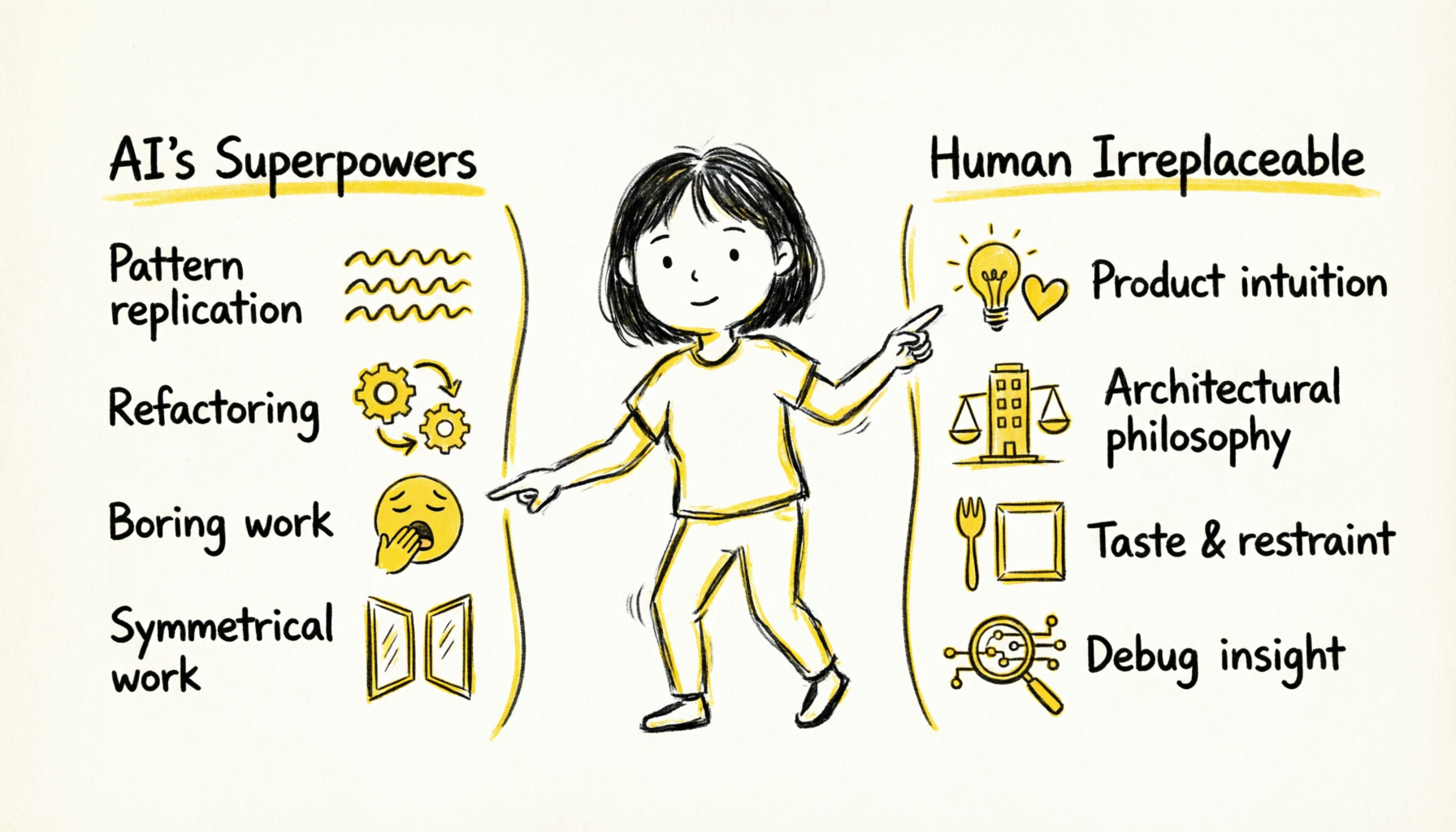


After these two weekends of practice, I've gained deeper insights into "AI-assisted development." Some things AI does better than humans, some things humans remain irreplaceable.
1. Pattern Replication
I wrote the first FileCollector, defined the abstract base class. Then told AI: "Following this pattern, generate the other 5 Collectors."
1 hour later, all 6 Collectors complete:
- Code style perfectly consistent
- Unified interfaces
- Each with corresponding test cases
- Complete documentation comments
This ability to "generate multiple variants from one sample" — AI performs exceptionally. And it never gets bored, never reduces quality due to repetitive work.
2. Refactoring & Migration
Upgrading from v0.5.6 to v0.5.7, I replaced DashScope SDK with LiteLLM. This was a major refactoring.
I only needed to tell AI: "Replace all DashScope calls with LiteLLM, keep interfaces unchanged."
30 minutes later, all code migration complete. AI found all call sites, correctly handled parameter mapping, updated test cases, all tests passed.
This type of refactoring traditionally requires carefully reading every line of code to ensure nothing is missed. AI can process the entire codebase at once, and doesn't make fatigue-induced errors.
3. Boring But Important Work
Writing test cases, writing documentation, handling edge cases — these tasks are important but tedious. AI does them well and doesn't complain.
For example, I asked AI to write test cases for the Embedder class. It automatically generated tests covering various scenarios, including normal flows, edge cases, and error handling. If I wrote them myself, I might only write two or three basic cases.
4. Symmetrical Work
If you write create_entity(), AI can auto-generate update_entity(), delete_entity(), list_entities() — because they're symmetrical.
This "complete one, auto-complete the set" ability greatly improves development efficiency.
1. Product Intuition
"What features do users actually need?" — AI can't answer this.
AI can tell you "technically feasible," but won't tell you "what users truly want." It can generate code, but can't decide "what to build."
For example, "Should we add a timeline view?" AI will say "technically doable, I'll help write the code." But the decision of "whether to add it" must be made by humans.
2. Architectural Philosophy
"Why SQLite instead of Neo4j?"
AI would suggest Neo4j is a graph database, more suitable for knowledge graphs. From an "optimal solution" perspective, it's right.
But I chose SQLite because:
- Simple deployment — no additional services needed
- Data localization — single file
- Good enough — 259 entities, 291 relationships, SQLite is more than sufficient
- Reliable — SQLite has been battle-tested for decades, minimal bugs
This is a "good enough" philosophy, not "optimal solution." This kind of trade-off, AI can't make.
3. Taste and Restraint
"Should we add a timeline view?" — this is a temptation of scope creep.
AI can help you implement any feature, but what not to add requires more restraint than what to add.
v0.6 only did 4 P0/P1 features:
- Knowledge graph (P0)
- Cross-document relations (P0)
- Topic clustering (P1)
- Smart recommendations (P1)
Timeline view, AI summary generation, knowledge gap analysis — all valuable, but pushed to v0.7.
Restraint keeps the product focused. Trying to add everything results in a jack-of-all-trades that masters nothing.
4. Debug Insight
AI-written code sometimes has bugs. When tests fail, AI might "guess" at the cause, trying back and forth:
AI: Might be a path issue, I'll add os.path.abspath()
AI: Still failing, might be encoding, I'll add encoding='utf-8'
AI: Still failing, might be a permission issue...
But the real problem might be something else entirely. Humans need to judge "where the real problem lies" and guide AI with the right approach.
Every decision has considerations — let me share a few key decision stories:
Why SQLite instead of Neo4j?
At the time, AI suggested Neo4j, reasoning "knowledge graphs are graph structures, Neo4j is a graph database, naturally a match."
I considered the following:
- Deployment complexity: Neo4j requires a separate service, SQLite is just a file
- Data migration: SQLite files can be directly copied, Neo4j needs export/import
- Learning curve: Team needs to learn Cypher query language
- Actual needs: My knowledge base currently has only a few hundred entities, SQLite is more than enough
- Reliability: SQLite has been battle-tested for decades, stable and reliable
Conclusion: Good enough is good enough, don't over-engineer. If data volume grows to need Neo4j in the future, migrate then.
Why three-tier degradation?
Because it's unreasonable for users to be unable to use the tool due to API configuration issues.
Scenario 1: User doesn't have DashScope/OpenAI API Key
- Should still be able to use keyword search
- Should still be able to manually tag
Scenario 2: User on a plane, completely offline
- Should still be able to view collected content
- Should still be able to search (keywords)
Scenario 3: User's API Quota is exhausted
- System shouldn't crash
- Should degrade gracefully
A local-first tool shouldn't depend on external services to work. This is a basic principle of reliability design.
AI doesn't replace you — it lets one person do a team's work.
In the past, a project needed N roles: product manager, architect, frontend engineer, backend engineer, QA engineer, SRE.
Now, one person + AI = a team.
But you must have the ability to "command AI" — know when to use which role, know what's an important decision, know when to exercise restraint.
LocalBrain supports three installation methods, up and running within 5 minutes.
Python Package Installation (Recommended)
Works on all platforms, no security warnings. Requires Python 3.8+.
macOS/Linux:
curl -fsSL http://localbrain.oss-cn-shanghai.aliyuncs.com/python_installer/install.sh | shWindows (PowerShell):
irm http://localbrain.oss-cn-shanghai.aliyuncs.com/python_installer/install.ps1 | iexPost-Installation Setup
localbrain doctor      # Verify installation
localbrain init setup  # Initialize with guided setup
The init command creates:
- Configuration file
~/.localbrain/config.yaml - Data directory
~/.knowledge-base/ - SQLite database for metadata
- ChromaDB storage for vector embeddings
Configure AI Services (Optional)
For smart tag extraction and semantic search, edit ~/.localbrain/config.yaml or configure in the UI below:
Test connection:
localbrain test embedding
localbrain test llm
AI services are optional. Even without them, LocalBrain still works with built-in TF-IDF and extractive algorithms.
This is the zero-friction optimal approach — daily conversation is collection.
30-Second Skill Installation
Fastest method: paste the following message in your AI programming assistant's (Qoder, OpenClaw, Copaw, etc.) chat window:
Help me install or update this knowledge collection skill: http://127.0.0.1:11201/docs/skills/localbrain-collect/SKILL.md
That's it! The AI assistant will automatically download and install the Skill. Prerequisite: LocalBrain is installed and the web server is running (localbrain web -b).
Daily Usage
You: Save this article to knowledge base https://example.com/article
XiaoQ: Saved. Title: "RAG Optimization Practice", Tags: RAG, vector database. Summary: ...

You: Help me find content about embedding I saved before
XiaoQ: Found 3 related items:
  1. "Embedding Selection Guide" - 2026-03-20
  2. "Vector Database Comparison" - 2026-03-18
  3. "Deep Learning Embedding Technology Evolution" - 2026-03-15
  Would you like me to show detailed content?

You: Help me note an idea: GIL is Python's concurrency bottleneck, but async IO can bypass it
XiaoQ: Saved. Tags: Python, concurrency, performance optimization.
Access http://127.0.0.1:11201 to view your knowledge base.
Dashboard shows:
- Total knowledge entries (32)
- Tag count (121)
- Distribution by type (files, webpages, papers, emails, bookmarks, notes)
- Recently collected content

v0.7 Plan (Next Iteration):
- Timeline View: Time dimension of knowledge, visualizing "what you focused on when"
- Knowledge Gap Analysis: Discover what your knowledge base is missing, proactively recommend areas to supplement
- AI Summary Generation: Auto-generate knowledge summaries for any topic
Long-term Vision:
- Personal AI's Memory Layer: Your knowledge base is your customized AI's context. When AI knows your knowledge base, it can provide more personalized responses.
- Open Ecosystem: More Skills, more integrations. Knowledge collection is just the beginning — future scenarios include knowledge sharing, collaboration, and monetization.
What Has AI Changed?
- Development speed: Two weekends, completing what would take a team a month. This isn't exaggeration — it's a real time comparison.
- Skill threshold: No need to master frontend/backend/database — AI will help. You only need to know "what to build."
- Iteration rhythm: Ideas can be validated faster. Think of it, implement it, if it doesn't work, switch — no heavy design cost.
What Hasn't AI Changed?
- Product judgment: Knowing what to do and what not to. AI can implement any feature, but can't tell you which feature matters more.
- Architectural decisions: Weighing pros and cons, making trade-offs. "Optimal solution" and "appropriate solution" are two different things — the latter requires human judgment.
- Taste: Code quality, user experience, documentation style. AI can generate code, but the taste of "good code" comes from humans.
The Biggest Cognitive Shift:
In the past, a project needed N roles: product manager, architect, frontend engineer, backend engineer, QA engineer, SRE. One person couldn't possibly be proficient in all domains.
Now, one person + AI = a team. You can have AI play different roles while you, as the "commander," make decisions.
But you must have the ability to "command AI" — know when to use which role, know what's an important decision, know when to exercise restraint. This ability requires practice and experience.
Knowledge management isn't about storage — it's about discovery.
Storage is easy — copy and paste, anyone can do it. Saving an article takes just a second. But "discovering things you didn't know" is hard.
LocalBrain's value isn't just in "helping you store" — it's in "helping you discover":
- Discover connections: A and B were actually discussing the same thing. When you see the connections on the knowledge graph, you'll be surprised "these two concepts are actually related."
- Discover gaps: You're investing too little in a certain area. When you see uneven topic clustering distribution, you'll realize "I need to supplement knowledge in this area."
- Discover trends: How your focus has changed over time. When you review history, you'll discover your knowledge trajectory.
The ultimate form of knowledge management is an "external brain."
Your brain is responsible for thinking and creating, the external brain for memory and association.
When you need a knowledge point, no need to search your mind — just ask the external brain. When you want to understand a domain, no need to start from scratch — just see what the external brain has already accumulated.
Ideally, the external brain should:
- Zero-friction input: Think of it, save it, no special operations needed
- Auto-organization: AI helps you tag and build connections
- Always accessible: Local-first, offline available
- Smart output: Q&A, summaries, recommendations
LocalBrain is positioned exactly this way, and continues to deepen in this direction.
Two weekends, 110 commits, an AI virtual team.
I proved: one person can do a team's work.
This doesn't mean AI is stronger than humans — it means AI lets one person possess a team's "capability coverage." You no longer need to master frontend, backend, database, testing, installation, deployment — AI can handle these for you. What you need is: product judgment, architectural decisions, taste and restraint.
"The essence of knowledge management is letting past knowledge serve your future self."
May LocalBrain become your external brain. https://github.com/agent-creativity/agentic-local-brain