Skip to content

Instantly share code, notes, and snippets.

@aitseitz
Last active January 21, 2022 13:58
Show Gist options
  • Select an option

  • Save aitseitz/5ddbdcdef827703e618bebeb04554da0 to your computer and use it in GitHub Desktop.

Select an option

Save aitseitz/5ddbdcdef827703e618bebeb04554da0 to your computer and use it in GitHub Desktop.
add-menuitem.sh - Generate Linux Mint Startmenu entry with Icon
#!/bin/bash
# This script generates an linux (mint) startmenu entry with an icon for your application
# v.1.0
# @author: Alexander Seitz
# Resolve the location of the installation.
# This includes resolving any symlinks.
PRG=$0
while [ -h "${PRG}" ]; do
ls=`ls -ld "${PRG}"`
link=`expr "$ls" : '^.*-> \(.*\)$' 2>/dev/null`
if expr "$link" : '^/' 2> /dev/null >/dev/null; then
PRG="$link"
else
PRG="`dirname "${PRG}"`/$link"
fi
done
PRG_BIN=`dirname "${PRG}"`
# absolute dir
oldPWD=`pwd`
cd "${PRG_BIN}"
PRG_BIN=`pwd`
cd "${oldPWD}"
# Application Variables
APP_NAME=VisualVM
APP_VERSION=2.11
APP_START_COMMAND=${PRG_BIN}/visualvm
APP_DESCRIPTION="${APP_NAME} Java Troubleshooting Tool"
APP_KEYWORDS=visual,jmx,java
APP_CATEGORY=Entwicklung
APP_ICON_NAME=${APP_NAME}
APP_ICON_PATH=${PRG_BIN}/${APP_ICON_NAME}.png
TMP_DIR=`mktemp --directory`
DESKTOP_FILE=${TMP_DIR}/${APP_ICON_NAME}.desktop
echo "Preparing ${APP_NAME} ${APP_VERSION} Desktop File in {TMP_DIR}/${APP_ICON_NAME}.desktop..."
cat << EOF > ${DESKTOP_FILE}
[Desktop Entry]
Version=1.0
Encoding=UTF-8
Name=${APP_NAME} ${APP_VERSION}
Keywords=${APP_KEYWORDS}
GenericName=${APP_DESCRIPTION}
Type=Application
Categories=${APP_CATEGORY}
Terminal=false
StartupNotify=true
Exec="${APP_START_COMMAND}" %u
Icon=${APP_ICON_PATH}
EOF
echo "Installing ${APP_NAME} ${APP_VERSION} Desktop File..."
xdg-desktop-menu install --novendor ${DESKTOP_FILE}
echo "Installing ${APP_NAME} ${APP_VERSION} Desktop Icon..."
xdg-icon-resource install --novendor --size 128 "${APP_ICON_PATH}" ${APP_ICON_NAME}
echo "Cleanup temp files in created ${TMP_DIR}"
#rm ${DESKTOP_FILE}
rm -R ${TMP_DIR}
echo "All complete, now check your new ${APP_NAME} Desktop Menu Item in Linux Mint Startmenu :-)"
@aitseitz
Copy link
Author

aitseitz commented Jan 21, 2022

add-menuitem.sh - Generate Linux Mint Startmenu entry

This is an example Script of how to generate a startmenu entry for VisualVM (latest version).

The Script can be modified to the application you want to see in your Linux (Mint) startmenu.

Installation Instruction

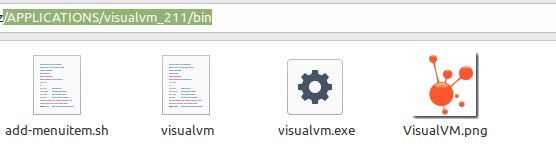
  • Place the add-menuitem.sh and the desired icon.png into the folder where you start your application.
    In the example with visualVM latest it should look like this:
    image

  • Modify the Application Variables to your needs

    APP_NAME=VisualVM
    APP_VERSION=2.11
    APP_START_COMMAND=${PRG_BIN}/visualvm
    APP_DESCRIPTION="${APP_NAME} Java Troubleshooting Tool"
    APP_KEYWORDS=visual,jmx,java
    APP_CATEGORY=Entwicklung
    APP_ICON_NAME=${APP_NAME}
    APP_ICON_PATH=${PRG_BIN}/${APP_ICON_NAME}.png
    
  • Give the Script execution rights and execute it the terminal

    chmod u+x add-menuitem.sh 
    ./add-menuitem.sh 
    

    image

Voilá:
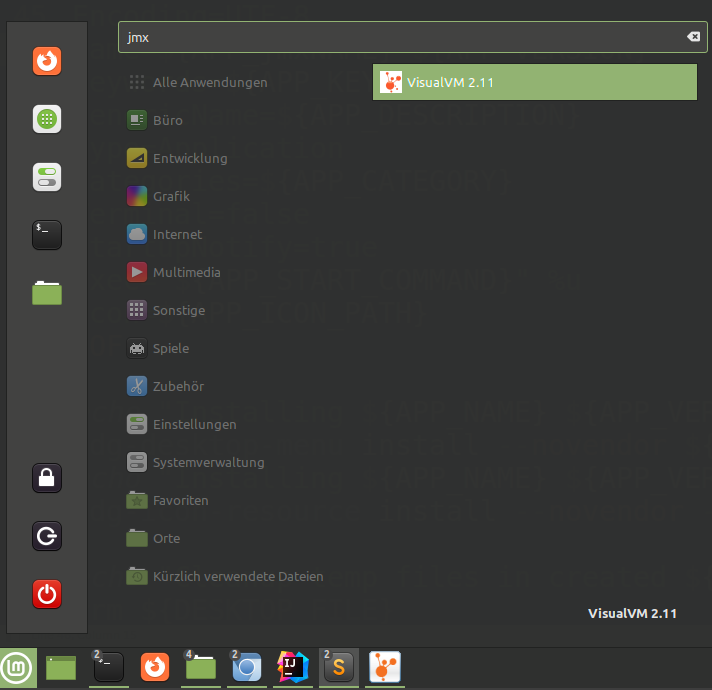
The new Startmenu entry to your application can be easily found with the application name or the keywords you've choosen with the variable APP_KEYWORDS=visual,jmx,
image

Additional notice:

The .desktop entry file you've created with the script can be found in the following folder:
/.local/share/applications/
and the icon is placed in
/.local/share/icons/hicolor/128x128/apps
in case you want to modify it manually.

Sources:

Sign up for free to join this conversation on GitHub. Already have an account? Sign in to comment