
-
-
Save atikju/a589629e144de71ce2816457da233e52 to your computer and use it in GitHub Desktop.
| $(document).ready(function(){ | |
| var boldFinder = setInterval(function(){ | |
| if($('.bold_option_swatch').length > 0){ | |
| $('.bold_option_swatch').eq(0).find('.bold_option_value').on('click', function(){ | |
| var clutch_selected = $(this).find('input.sw_607037_276033').attr('data-option_value_key'); | |
| console.log(clutch_selected); | |
| //returns url("...."); | |
| var imgUrl = $(this).find('span.bold_option_value_swatch span').css('background-image'); | |
| //replace the url(" | |
| //console.log(imgUrl.toString().slice(5)); | |
| var prosUrl = imgUrl.toString().slice(5); | |
| //delete the last two charsS | |
| var finalUrl = prosUrl.slice(0, -2); | |
| console.log(finalUrl); | |
| //var s = 'cat1234'; | |
| $('.product-main-image img').attr('src', finalUrl); | |
| //var boo = $('.bold_swatch_selected span.bold_option_value_swatch span').css('background-image'); | |
| //alert(boo.slice(0, -2)); | |
| }); | |
| } | |
| }, 1); | |
| }); |


This may be an obvious question but I am having trouble figuring out where to place this js and what file to augment.
You need to put it before the body tag closes inside a script tag.
And make sure you change the value of this .product-main-image img on line 16 based on your gallery html classes.
I have tried multiple times getting this to work.
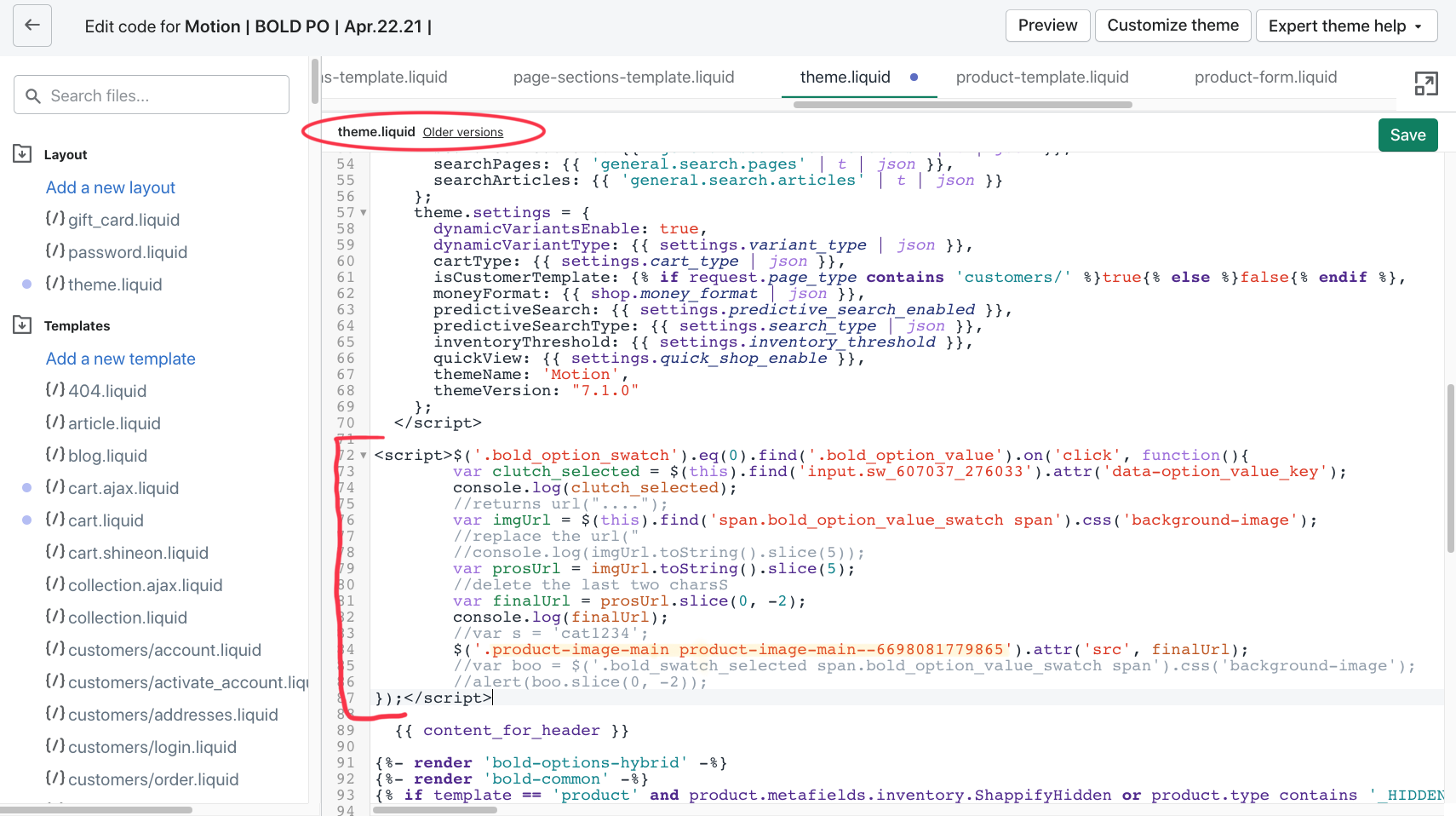
I am adding it into the theme.liquid right before the{{ content_for_header }}
I wrapped it in <script></script>
And I believe I isolated what the gallery class is but I might be wrong there so I tried several classes that might be right and had no luck.
This is what I came up
<script> $('.bold_option_swatch').eq(0).find('.bold_option_value').on('click', function(){ var clutch_selected = $(this).find('input.sw_607037_276033').attr('data-option_value_key'); console.log(clutch_selected); //returns url("...."); var imgUrl = $(this).find('span.bold_option_value_swatch span').css('background-image'); //replace the url(" //console.log(imgUrl.toString().slice(5)); var prosUrl = imgUrl.toString().slice(5); //delete the last two charsS var finalUrl = prosUrl.slice(0, -2); console.log(finalUrl); //var s = 'cat1234'; $('.product-main-image img').attr('src', finalUrl); //var boo = $('.bold_swatch_selected span.bold_option_value_swatch span').css('background-image'); //alert(boo.slice(0, -2)); });</script>
My website I am attempting to make this change to is https://david-likes-to-draw.myshopify.com/products/framed-premium-canvas-pet-portrait
I create custom pet portraits and offer 3 different styles of art that are represented in the bold swatches. Any guidance would be appreciated.
Okay David, you are doing it a little bit wrong. See the code updated.
And as I can see on your attached image, on line 84, you are missing DOM identifier. product-image-main-- I assume this is an ID. if yes, put it as #product-image-main-- or if it's a class .product-image-main--
Email me directly for any other things: ratiqur807@gmail.com
This may be an obvious question but I am having trouble figuring out where to place this js and what file to augment.