Skip to content

Instantly share code, notes, and snippets.

@bep
Last active March 30, 2026 21:01
Show Gist options
  • Select an option

  • Save bep/a0d8a26cf6b4f8bc992729b8e50b480b to your computer and use it in GitHub Desktop.

Select an option

Save bep/a0d8a26cf6b4f8bc992729b8e50b480b to your computer and use it in GitHub Desktop.
Run Hugo on an Android phone

First install Termux

Then there are two options:

Build from source

Open the Termux terminal on your Android device and copy-and-paste the commands listed below and hit ENTER:

apt update;\
apt install -y git golang make;\
export GOPATH=$HOME/go;\
export PATH=$PATH:$GOPATH/bin;\
go get -d github.com/spf13/hugo;\
cd $GOPATH/src/github.com/spf13/hugo;\
make install;\
hugo server -s docs;

Now you can point a browser at http://localhost:1313 and you should see the Hugo site with docs and all.

Use a prebuilt release binary

apt update;\
apt install curl;\
curl -L https://github.com/spf13/hugo/releases/download/v0.20/hugo_0.20_Linux_ARM.tar.gz | tar zxf -
@briannhinton
Copy link
Copy Markdown

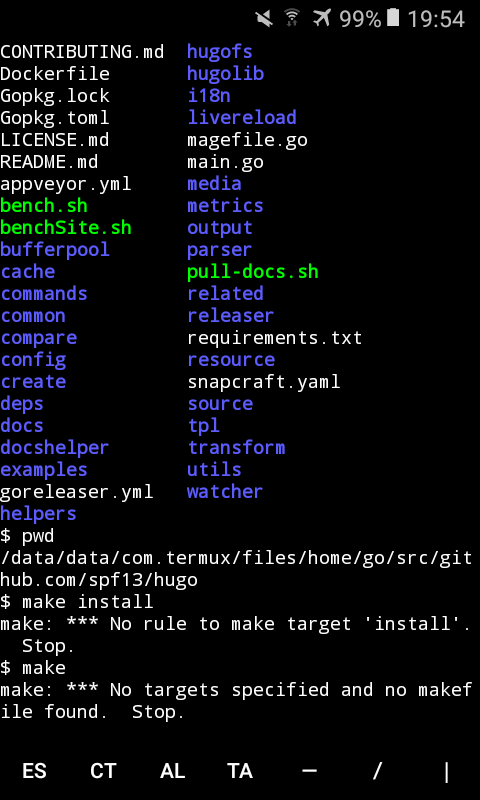
The make version fails completely, and won't "make" due to a makeinstall not being present.
The pre-built release binary downloads, but I can't seem to get it to run.

Copy link
Copy Markdown

ghost commented Jan 21, 2018

same here, this wont work.
attached is a screenshot.
screenshot_20180121-195413

@DanShrader
Copy link
Copy Markdown

@mrbrianhinton and @jerjungle,

I don't know if either of these posts will help you, but there what I did using the above gist as a base. It works with a Intel based Thinkpad Chromebook as least. I think the Samsung Chromebook Pro is also Intel based, so it 'should' work.

For Chromebooks there's a step or two extra needed and it's documented in the post. I too had the problem with the make command, but found that it was not 'needed' in my case.

@vikanezrimaya
Copy link
Copy Markdown

It tries to create /tmp on my phone. On read-only file system. Can one move hugo-cache dir somehow?

@vikanezrimaya
Copy link
Copy Markdown

$ hugo server
panic: mkdir /tmp: read-only file system

goroutine 1 [running]:
github.com/gohugoio/hugo/vendor/github.com/spf13/afero.GetTempDir(0xb26c18, 0xf1eac0, 0x8ed410, 0xa, 0x0, 0x0)
	/go/src/github.com/gohugoio/hugo/vendor/github.com/spf13/afero/util.go:128 +0x270
github.com/gohugoio/hugo/helpers.GetTempDir(0x8ed410, 0xa, 0xb26c18, 0xf1eac0, 0x0, 0x1)
	/go/src/github.com/gohugoio/hugo/helpers/path.go:540 +0x34
github.com/gohugoio/hugo/commands.(*commandeer).loadConfig(0x12acd800, 0x12acd801, 0x1, 0x1)
	/go/src/github.com/gohugoio/hugo/commands/commandeer.go:239 +0x954
github.com/gohugoio/hugo/commands.newCommandeer(0x12ba8501, 0x12ab5290, 0x12a39e28, 0x1, 0x1, 0x84f348, 0x1, 0x12ab5290)
	/go/src/github.com/gohugoio/hugo/commands/commandeer.go:113 +0x188
github.com/gohugoio/hugo/commands.InitializeConfig(0x1, 0x12ab5290, 0x12a39e28, 0x1, 0x1, 0x12a5ee00, 0x12a5f01c, 0x0)
	/go/src/github.com/gohugoio/hugo/commands/hugo.go:296 +0x3c
github.com/gohugoio/hugo/commands.server(0xf025b8, 0xf1ed1c, 0x0, 0x0, 0x0, 0x0)
	/go/src/github.com/gohugoio/hugo/commands/server.go:215 +0x138
github.com/gohugoio/hugo/vendor/github.com/spf13/cobra.(*Command).execute(0xf025b8, 0xf1ed1c, 0x0, 0x0, 0xf025b8, 0xf1ed1c)
	/go/src/github.com/gohugoio/hugo/vendor/github.com/spf13/cobra/command.go:753 +0x360
github.com/gohugoio/hugo/vendor/github.com/spf13/cobra.(*Command).ExecuteC(0xf018a8, 0x97db74, 0x1, 0x15724)
	/go/src/github.com/gohugoio/hugo/vendor/github.com/spf13/cobra/command.go:843 +0x20c
github.com/gohugoio/hugo/commands.Execute()
	/go/src/github.com/gohugoio/hugo/commands/hugo.go:182 +0x4c
main.main()
	/go/src/github.com/gohugoio/hugo/main.go:27 +0x24

@ntrrg
Copy link
Copy Markdown

ntrrg commented May 4, 2018

The problem is that Hugo doesn't use Make, it uses mage instead, so it is necessary to replace make install with:

go get -v github.com/magefile/mage
mage vendor
mage install

Copy link
Copy Markdown

ghost commented Jul 29, 2018

Users installing from the prebuilt ARM binary may want to mv hugo ../usr/bin after installation to make the binary available on path.

@pzb568
Copy link
Copy Markdown

pzb568 commented Sep 30, 2018

Where can I find a tutorial?

@cybardev
Copy link
Copy Markdown

Users installing from the prebuilt ARM binary may want to mv hugo ../usr/bin after installation to make the binary available on path.

ln -s hugo /usr/bin/hugo would probably be better

@sumit-buddy
Copy link
Copy Markdown

sumit-buddy commented Feb 8, 2021

I just tried to install hugo on android. It was pretty simple.

Here is how it can be done :

  • Install termux app
  • Update packages using pkg upgrade command
  • Then type pkg install hugo
  • You are all set
  • Type hugo new site <sitename> to create your site directory
  • cd <sitename>
  • git init
  • git submodule add <hugo-git-theme-link> themes/<theme-name>
  • Then run
    hugo server
  • open http://localhost:1313/

Hurray !

@tuanggolt
Copy link
Copy Markdown

open

@TriHydera
Copy link
Copy Markdown

TriHydera commented Jul 6, 2024

hugo server

Watching for changes in /data/data/com.termux/files/home/storage/shared/Coding/blog-with-cms/{archetypes,content,layouts,static,themes}
Watching for config changes in /data/data/com.termux/files/home/storage/shared/Coding/blog-with-cms/config.toml
Start building sites …
hugo v0.125.7+extended android/arm BuildDate=unknown

Built in 92 ms
Error: error building site: failed to acquire a build lock: Lock /data/data/com.termux/files/home/storage/shared/Coding/blog-with-cms/.hugo_build.lock: function not implemented

@bep
Copy link
Copy Markdown
Author

bep commented Jul 6, 2024

@TriHydera try hugo --noBuildLock

Sign up for free to join this conversation on GitHub. Already have an account? Sign in to comment