
-
-
Save chaodonghu/c25c7ee3e3eb85c0a0de051892e596a4 to your computer and use it in GitHub Desktop.
| // Run GOOGLE CHROME - WORKING AS OF SEPTEMBER 19 2026 | |
| // Please @ me in the comments if this stops working, I will try to get it working again within the month | |
| // | |
| // INSTRUCTIONS | |
| // 1. Open Instagram in Chrome | |
| // 2. Click on "followers" on any Instagram profile so the followers list opens | |
| // 3. Right click the page, click "INSPECT", open the "Console" tab | |
| // 4. Paste this script and press enter | |
| // 5. Keep the tab focused. Chrome throttles timers in background tabs. | |
| // Open it in its own window and leave it on screen. | |
| // 6. Run `stopFollow = true` in the console to stop early | |
| // | |
| // The script clicks Follow on the first unfollowed user in the list, confirms | |
| // the button flipped to Following or Requested, scrolls to load more when the | |
| // list runs out, and repeats. | |
| // | |
| // RATE LIMITS | |
| // Instagram does not publish its limits. Follows are policed harder than | |
| // likes or unfollows. Community-reported estimates for established accounts | |
| // are roughly 100 to 200 follows per day and 20 to 30 per hour. New or | |
| // previously flagged accounts get less. Going over triggers an action block | |
| // that can last days, so the defaults below sit under those estimates. Lower | |
| // them if you get blocked. Re-run the script each day; it remembers what it | |
| // did in the last 24 hours via localStorage. | |
| const followEveryone = (async () => { | |
| const DAILY_LIMIT = 100; // per rolling 24h. Estimate, see above. | |
| const HOURLY_LIMIT = 20; // per rolling 1h. Estimate, see above. | |
| const MIN_WAIT = 120_000; // ms between follows | |
| const MAX_WAIT = 240_000; // ~3 min avg lands right at the hourly cap | |
| const UI_TIMEOUT = 3_000; // how long to wait for the UI to update | |
| const STORAGE_KEY = "igFollowLog"; | |
| const HOUR = 60 * 60_000; | |
| const DAY = 24 * HOUR; | |
| const sleep = (ms) => new Promise((r) => setTimeout(r, ms)); | |
| const rand = (min, max) => Math.round(min + Math.random() * (max - min)); | |
| const fmt = (ms) => new Date(ms).toLocaleTimeString(); | |
| // Scope to the followers dialog so we never hit the profile header's Follow button. | |
| const scope = () => document.querySelector('div[role="dialog"]') || document; | |
| const buttons = () => [...scope().querySelectorAll("button")]; | |
| const findFollowButton = () => | |
| buttons().find((b) => ["Follow", "Follow Back"].includes(b.innerText.trim())); | |
| const waitFor = async (predicate, timeout) => { | |
| const end = Date.now() + timeout; | |
| while (Date.now() < end) { | |
| const result = predicate(); | |
| if (result) return result; | |
| await sleep(100); | |
| } | |
| return null; | |
| }; | |
| // Timestamps of follows in the last 24h, persisted across reloads. | |
| const loadLog = () => { | |
| try { | |
| const cutoff = Date.now() - DAY; | |
| return JSON.parse(localStorage.getItem(STORAGE_KEY) || "[]").filter((t) => t > cutoff); | |
| } catch { | |
| return []; | |
| } | |
| }; | |
| const saveLog = (log) => localStorage.setItem(STORAGE_KEY, JSON.stringify(log)); | |
| const inWindow = (log, ms) => log.filter((t) => t > Date.now() - ms); | |
| // The list is lazy loaded. Scroll the last row into view to fetch more. | |
| const loadMore = async () => { | |
| const all = buttons(); | |
| all[all.length - 1]?.scrollIntoView({ block: "end" }); | |
| return waitFor(findFollowButton, UI_TIMEOUT); | |
| }; | |
| window.stopFollow = false; | |
| const log = loadLog(); | |
| let sessionCount = 0; | |
| console.log(`Starting. ${log.length}/${DAILY_LIMIT} used in the last 24h.`); | |
| while (!window.stopFollow) { | |
| // Daily cap: stop and say when to come back. | |
| const today = inWindow(log, DAY); | |
| if (today.length >= DAILY_LIMIT) { | |
| console.log(`Daily limit reached. Run again after ${fmt(today[0] + DAY)}.`); | |
| break; | |
| } | |
| // Hourly cap: sleep until the oldest follow in the window ages out. | |
| const hour = inWindow(log, HOUR); | |
| if (hour.length >= HOURLY_LIMIT) { | |
| const resumeAt = hour[0] + HOUR + 1000; | |
| console.log(`Hourly limit reached. Resuming at ${fmt(resumeAt)}.`); | |
| await sleep(resumeAt - Date.now()); | |
| continue; | |
| } | |
| let followBtn = findFollowButton(); | |
| if (!followBtn) { | |
| followBtn = await loadMore(); | |
| if (!followBtn) { | |
| console.log("No more users to follow."); | |
| break; | |
| } | |
| } | |
| followBtn.scrollIntoView({ block: "center" }); | |
| followBtn.click(); | |
| // Confirm the follow registered. Public accounts flip to Following, | |
| // private ones to Requested. Only count it if the button changed. | |
| const changed = await waitFor( | |
| () => !followBtn.isConnected || !["Follow", "Follow Back"].includes(followBtn.innerText.trim()), | |
| UI_TIMEOUT | |
| ); | |
| if (!changed) { | |
| console.log("Follow did not register, retrying after a short wait."); | |
| await sleep(5000); | |
| continue; | |
| } | |
| log.push(Date.now()); | |
| saveLog(log); | |
| sessionCount++; | |
| console.log(`Followed #${sessionCount} this session (${log.length}/${DAILY_LIMIT} today)`); | |
| const wait = rand(MIN_WAIT, MAX_WAIT); | |
| console.log(`Waiting ${Math.round(wait / 1000)}s`); | |
| await sleep(wait); | |
| } | |
| console.log(`Done. Followed ${sessionCount} this session, ${log.length} in the last 24h.`); | |
| })(); |


I wanna use this script for other website but I am not sure that how can I change right things?
I tried to use this code with a few changes but ı saw this message. May u help me


Sorry this is only going to work for instagram, you'll have to change the element selectors and if you want it to adapt to other sites.

Hey! I have a 400 status response on /follow... Any chance I can fix this?

Hey! I have a 400 status response on /follow... Any chance I can fix this?
@wainaze A 400 error is a OAuthException, did you log out accidentally. I just tested it and it seems to be working fine. You can refresh the page and try again.
No, tried again. Worked like maybe 10 follows, then produced same error. I'm still logged script does error 400 and when I click the follow button manually it doesn't do anything.

can you make to cancel sent requests on Instagram
can you make to cancel sent requests on Instagram
If you change line 11
const FOLLOW_BUTTON_TEXT = 'Follow' // CHANGE "FOLLOW" TO LOCALIZED LANGUAGE AS DISPLAYED ON INSTAGRAM
to
const FOLLOW_BUTTON_TEXT = 'Requested' then it should work for your use case, to remove the requested follow request for private users.

It looks pretty interesting if you take into account the fact that now created a lot of different resources for viewing statistics on instagram and other social networks. I think you can use one of them. If you do not know where to look, I can advise you the resource that I myself use almost every day and with great success. You can find the site for Instagram stats without too much trouble, and it is an excellent tool for you. I am one hundred percent sure about that.

Hi @chaodonghu
Great code! Anyway, I have a question. How do I modify the script so it follows 40 accounts at a two-second interval and then it waits for 10 minutes before following another 40 accounts again? I'd like the loop to repeat three times. So it goes:
- Follow an account and wait for 2 seconds X40
- Wait for 10 minutes
- Follow an account and wait for 2 seconds X40
- Wait for 10 minutes
- Follow an account and wait for two seconds X40
- ---LOOP ENDS---
Thank you very much.
Hi @chaodonghu
Great code! Anyway, I have a question. How do I modify the script so it follows 40 accounts at a two-second interval and then it waits for 10 minutes before following another 40 accounts again? I'd like the loop to repeat three times. So it goes:
- Follow an account and wait for 2 seconds X40
- Wait for 10 minutes
- Follow an account and wait for 2 seconds X40
- Wait for 10 minutes
- Follow an account and wait for two seconds X40
- ---LOOP ENDS---
Thank you very much.
Hey @kevindrummond1,
The code is designed so there is only a single timeout, I think following 80 accounts within 80 seconds will probably get you rate-limit blocked by instagram.
But you can probably do something like this
// RUN WITH GOOGLE CHROME
// 1. OPEN INSTAGRAM
// 2. CLICK ON "FOLLOWERS" OR "FOLLOWING" ON A DESIRED USER'S PROFILE
// 3. OPEN DEVELOPER TOOLS BY RIGHT CLICKING ON PAGE AND CLICKING "INSPECT"
// 4. COPY FOLLOWING CODE AND PASTE IN DEVELOPER TOOLS CONSOLE AND RUN
// 5. SCRIPT WILL NOT RUN IF TAB IS NAVIGATED AWAY FROM, MINIMIZED OR UNFOCUSED
// IT IS RECOMMENDED TO OPEN A NEW CHROME WINDOW OR PUSH TAB TO THE SIDE AND LET SCRIPT RUN IN BACKGROUND

// SCRIPT WILL CLICK ON "FOLLOW" BUTTON AND THEN SCROLL THE NEXT "FOLLOW" BUTTON INTO VIEW

const FOLLOW_BUTTON_TEXT = 'Follow' // CHANGE "FOLLOW" TO LOCALIZED LANGUAGE AS DISPLAYED ON INSTAGRAM
const MAX_ATTEMPTS_PER_FOLLOW = 3 // MAXIMUM # OF ATTEMPTS

const followSomebody = () => {
    const followButton = document
        .evaluate(`//button[text()="${FOLLOW_BUTTON_TEXT}"]`, document, null, XPathResult.FIRST_ORDERED_NODE_TYPE, null)
        .singleNodeValue
    if (followButton) {
        let attempts = 1
        while (attempts < MAX_ATTEMPTS_PER_FOLLOW && !followButton) {
            console.log(`Attempted to find followButton but could not. Retry #${attempts++}`)
            followButton = document.evaluate(`//button[text()="${FOLLOW_BUTTON_TEXT}"]`, document, null, XPathResult.FIRST_ORDERED_NODE_TYPE, null).singleNodeValue
        }
        if (attempts < MAX_ATTEMPTS_PER_FOLLOW) {
            console.log('Found follow button. Scrolling and clicking ...')
            followButton.scrollIntoView(true)
            followButton.click()
        } else {
            console.log(`Retried ${MAX_ATTEMPTS_PER_FOLLOW} times and didn't succeed`)
        }
        return false
    }
    return true
}

const timeout = (ms) => new Promise(resolve => setTimeout(resolve, ms))

// INCREASE TIMEOUT IF NECESSARY TO AVOID RESTRICTIONS/LIMITS PER DAY
// 2 second intervals
const randomTimeout = () => (Math.floor((Math.random() * 10) + 1) * 2000)

const followEveryone = async () => {
    let shouldStop = false
    while (!shouldStop) {
        shouldStop = followSomebody()
        const followTimeout = randomTimeout()
        console.log(`Waiting ${followTimeout} seconds. Should stop: ${shouldStop}.`)
        await timeout(followTimeout)
    }
    console.log('You cannot follow anymore.')
}

// Run 3 times
for (let i = 0; i <= 3; i++) {
   // Wait 10 minutes between each loop
   timeout(600000)
   for (let i = 0; i <= 40; i++) {
      followEveryone()
   }
}
Just wrapping the followEveryone() function in several for loops
Hi @chaodonghu
Great code! Anyway, I have a question. How do I modify the script so it follows 40 accounts at a two-second interval and then it waits for 10 minutes before following another 40 accounts again? I'd like the loop to repeat three times. So it goes:
- Follow an account and wait for 2 seconds X40
- Wait for 10 minutes
- Follow an account and wait for 2 seconds X40
- Wait for 10 minutes
- Follow an account and wait for two seconds X40
- ---LOOP ENDS---
Thank you very much.
Hey @kevindrummond1,
The code is designed so there is only a single timeout, I think following 80 accounts within 80 seconds will probably get you rate-limit blocked by instagram.
But you can probably do something like this
// RUN WITH GOOGLE CHROME
// 1. OPEN INSTAGRAM
// 2. CLICK ON "FOLLOWERS" OR "FOLLOWING" ON A DESIRED USER'S PROFILE
// 3. OPEN DEVELOPER TOOLS BY RIGHT CLICKING ON PAGE AND CLICKING "INSPECT"
// 4. COPY FOLLOWING CODE AND PASTE IN DEVELOPER TOOLS CONSOLE AND RUN
// 5. SCRIPT WILL NOT RUN IF TAB IS NAVIGATED AWAY FROM, MINIMIZED OR UNFOCUSED
// IT IS RECOMMENDED TO OPEN A NEW CHROME WINDOW OR PUSH TAB TO THE SIDE AND LET SCRIPT RUN IN BACKGROUND

// SCRIPT WILL CLICK ON "FOLLOW" BUTTON AND THEN SCROLL THE NEXT "FOLLOW" BUTTON INTO VIEW

const FOLLOW_BUTTON_TEXT = 'Follow' // CHANGE "FOLLOW" TO LOCALIZED LANGUAGE AS DISPLAYED ON INSTAGRAM
const MAX_ATTEMPTS_PER_FOLLOW = 3 // MAXIMUM # OF ATTEMPTS

const followSomebody = () => {
    const followButton = document
        .evaluate(`//button[text()="${FOLLOW_BUTTON_TEXT}"]`, document, null, XPathResult.FIRST_ORDERED_NODE_TYPE, null)
        .singleNodeValue
    if (followButton) {
        let attempts = 1
        while (attempts < MAX_ATTEMPTS_PER_FOLLOW && !followButton) {
            console.log(`Attempted to find followButton but could not. Retry #${attempts++}`)
            followButton = document.evaluate(`//button[text()="${FOLLOW_BUTTON_TEXT}"]`, document, null, XPathResult.FIRST_ORDERED_NODE_TYPE, null).singleNodeValue
        }
        if (attempts < MAX_ATTEMPTS_PER_FOLLOW) {
            console.log('Found follow button. Scrolling and clicking ...')
            followButton.scrollIntoView(true)
            followButton.click()
        } else {
            console.log(`Retried ${MAX_ATTEMPTS_PER_FOLLOW} times and didn't succeed`)
        }
        return false
    }
    return true
}

const timeout = (ms) => new Promise(resolve => setTimeout(resolve, ms))

// INCREASE TIMEOUT IF NECESSARY TO AVOID RESTRICTIONS/LIMITS PER DAY
// 2 second intervals
const randomTimeout = () => (Math.floor((Math.random() * 10) + 1) * 2000)

const followEveryone = async () => {
    let shouldStop = false
    while (!shouldStop) {
        shouldStop = followSomebody()
        const followTimeout = randomTimeout()
        console.log(`Waiting ${followTimeout} seconds. Should stop: ${shouldStop}.`)
        await timeout(followTimeout)
    }
    console.log('You cannot follow anymore.')
}

// Run 3 times
for (let i = 0; i <= 3; i++) {
   // Wait 10 minutes between each loop
   timeout(600000)
   for (let i = 0; i <= 40; i++) {
      followEveryone()
   }
}
Just wrapping the
followEveryone()function in several for loops
Thank you @chaodonghu . I'm wondering at what condition the script stops following. Because every time it initiates a new loop, it writes 'You cannot follow anymore.'
Hi @chaodonghu
Great code! Anyway, I have a question. How do I modify the script so it follows 40 accounts at a two-second interval and then it waits for 10 minutes before following another 40 accounts again? I'd like the loop to repeat three times. So it goes:
- Follow an account and wait for 2 seconds X40
- Wait for 10 minutes
- Follow an account and wait for 2 seconds X40
- Wait for 10 minutes
- Follow an account and wait for two seconds X40
- ---LOOP ENDS---
Thank you very much.
Hey @kevindrummond1,
The code is designed so there is only a single timeout, I think following 80 accounts within 80 seconds will probably get you rate-limit blocked by instagram.
But you can probably do something like this// RUN WITH GOOGLE CHROME // 1. OPEN INSTAGRAM // 2. CLICK ON "FOLLOWERS" OR "FOLLOWING" ON A DESIRED USER'S PROFILE // 3. OPEN DEVELOPER TOOLS BY RIGHT CLICKING ON PAGE AND CLICKING "INSPECT" // 4. COPY FOLLOWING CODE AND PASTE IN DEVELOPER TOOLS CONSOLE AND RUN // 5. SCRIPT WILL NOT RUN IF TAB IS NAVIGATED AWAY FROM, MINIMIZED OR UNFOCUSED // IT IS RECOMMENDED TO OPEN A NEW CHROME WINDOW OR PUSH TAB TO THE SIDE AND LET SCRIPT RUN IN BACKGROUND // SCRIPT WILL CLICK ON "FOLLOW" BUTTON AND THEN SCROLL THE NEXT "FOLLOW" BUTTON INTO VIEW const FOLLOW_BUTTON_TEXT = 'Follow' // CHANGE "FOLLOW" TO LOCALIZED LANGUAGE AS DISPLAYED ON INSTAGRAM const MAX_ATTEMPTS_PER_FOLLOW = 3 // MAXIMUM # OF ATTEMPTS const followSomebody = () => { const followButton = document .evaluate(`//button[text()="${FOLLOW_BUTTON_TEXT}"]`, document, null, XPathResult.FIRST_ORDERED_NODE_TYPE, null) .singleNodeValue if (followButton) { let attempts = 1 while (attempts < MAX_ATTEMPTS_PER_FOLLOW && !followButton) { console.log(`Attempted to find followButton but could not. Retry #${attempts++}`) followButton = document.evaluate(`//button[text()="${FOLLOW_BUTTON_TEXT}"]`, document, null, XPathResult.FIRST_ORDERED_NODE_TYPE, null).singleNodeValue } if (attempts < MAX_ATTEMPTS_PER_FOLLOW) { console.log('Found follow button. Scrolling and clicking ...') followButton.scrollIntoView(true) followButton.click() } else { console.log(`Retried ${MAX_ATTEMPTS_PER_FOLLOW} times and didn't succeed`) } return false } return true } const timeout = (ms) => new Promise(resolve => setTimeout(resolve, ms)) // INCREASE TIMEOUT IF NECESSARY TO AVOID RESTRICTIONS/LIMITS PER DAY // 2 second intervals const randomTimeout = () => (Math.floor((Math.random() * 10) + 1) * 2000) const followEveryone = async () => { let shouldStop = false while (!shouldStop) { shouldStop = followSomebody() const followTimeout = randomTimeout() console.log(`Waiting ${followTimeout} seconds. Should stop: ${shouldStop}.`) await timeout(followTimeout) } console.log('You cannot follow anymore.') } // Run 3 times for (let i = 0; i <= 3; i++) { // Wait 10 minutes between each loop timeout(600000) for (let i = 0; i <= 40; i++) { followEveryone() } }Just wrapping the
followEveryone()function in several for loopsThank you @chaodonghu . I'm wondering at what condition the script stops following. Because every time it initiates a new loop, it writes 'You cannot follow anymore.'
If you follow the function within shouldStop it will stop if it can't find a "Follow" button or if the # of max attempts is reached which is 3.

Hi @chaodonghu,
Sorry for disturbing you but can you take a look at my case?
capture
There are still many follow buttons but the script stopped at the beginning.
I don't know if google chrome have had any updates lately, because the last time I used the script, it had still worked great.
Thank you so much
@Kynv94 Would you be able to post it as a gif or video here by dragging and dropping the capture, i'm unable to access that google drive link.
@Kynv94 Would you be able to post it as a gif or video here by dragging and dropping the capture, i'm unable to access that google drive link.
here is the picture

@Kynv94 Yeah it looks like the script is unable to obtain the "Follow" button anymore, i've replicated your error. I'll try to have a fix by this weekend I'm a bit busy with work this week but will post once I can get a fix.
@chaodonghu thank you so much
pls tag me when you're done <3 <3 <3 xoxo
have a nice week
Hey @Kynv94,
Sorry for the delay. Just modified the code to grab the follow buttons and tested it out. It should be working again.

Thank you @chaodonghu so much (y) (y) (y)

Hi is this code still working ?!
Hi is this code still working ?!
Hi @D1rtyC0de, sorry for the late reply, the code should be working as of Dec 26 2023. I just updated the code.

Hi @chaodonghu, I just can't get my settings right... it would be very cool if you could help me :)
The above script setting follows me too quickly and in my opinion there is a risk of being banned.
How I would like it:
One follower per minute > 60 in one hour (limit) > break of 10 minutes > and this until a maximum of 300 followers are reached per day.
How should I move forward? Can you please help me?
peace
@alpsn You would have to change the variables
const FOLLOW_LIMIT = 300;
const BREAK_DURATION = 10 * 60 * 1000; // 5 minutes break

const TOTAL_DURATION = 60 * 60 * 1000; // 60 minutes duration

...

const FOLLOW_INTERVAL = Math.floor(Math.random() * 10 + 1) * 60000; // Runs once every minute
The above script setting follows me too quickly and in my opinion there is a risk of being banned.
You won't get banned, instagram will usually detect that theres some scripting going on in your account and you might get locked but you will just be required to reset your password.

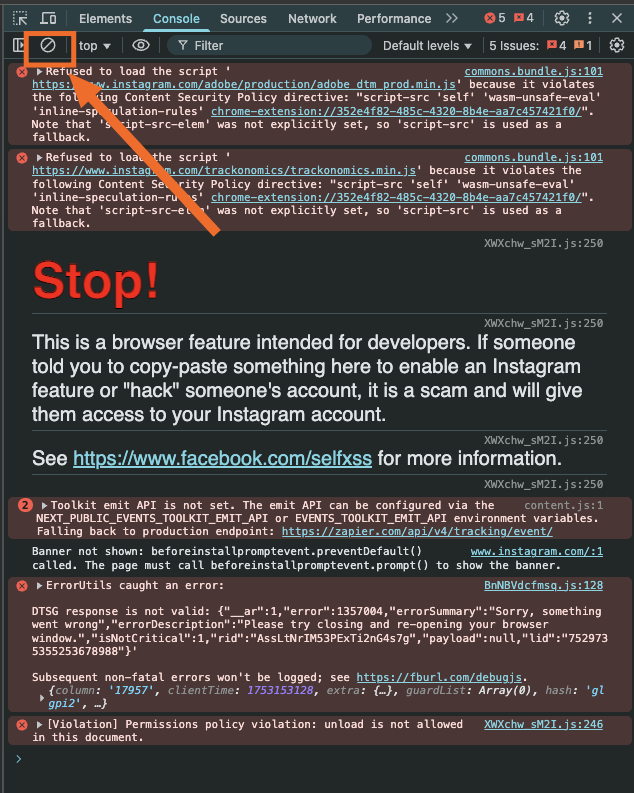
When trying to load the console, the console outputs the following error:

When trying to load the console, the console outputs the following error:

@flocked That's a warning by instagram, you can ignore that and paste the script above. Or dismiss it
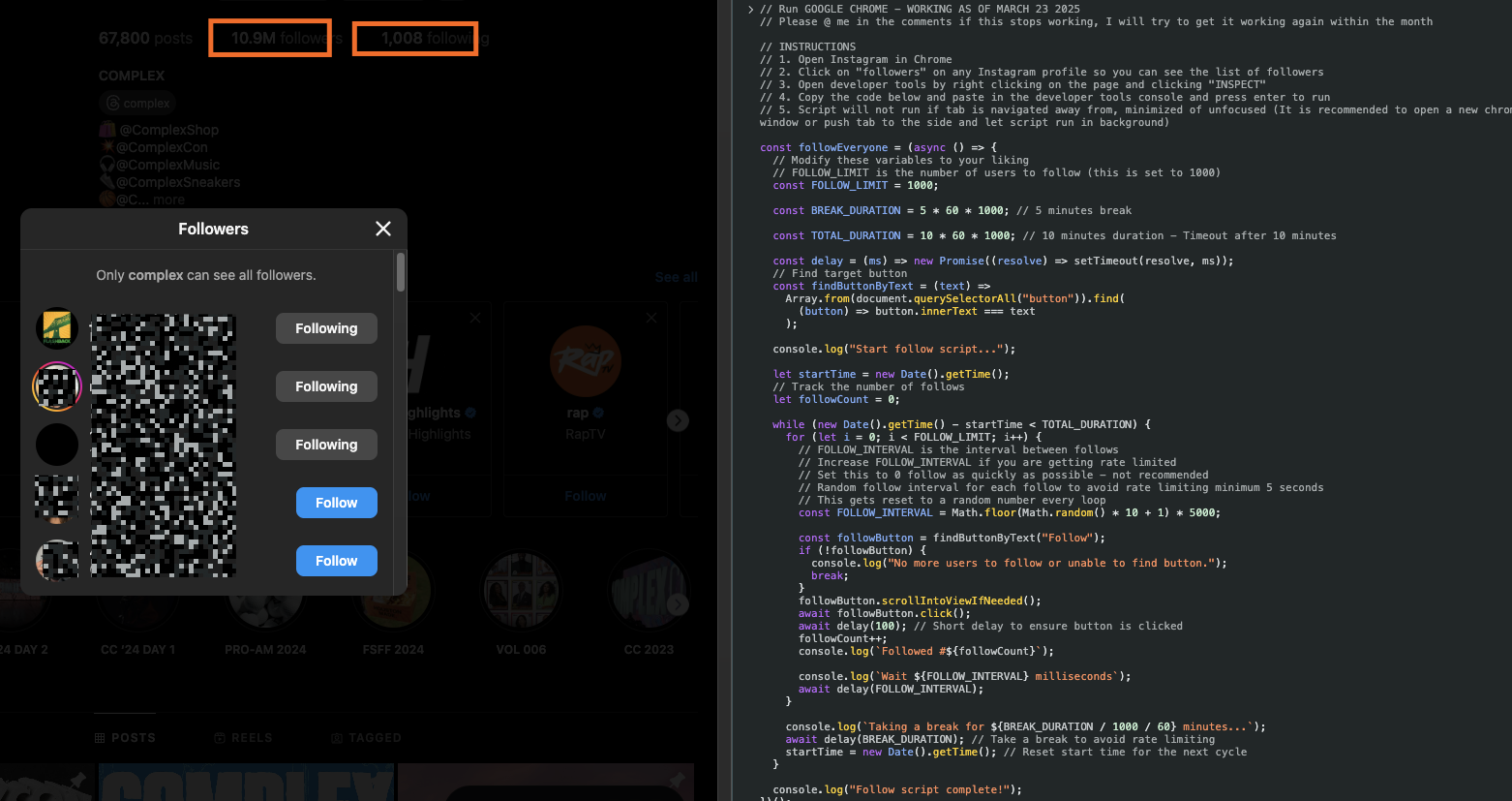
Estimado al parecer no me está andando. Me dice:
"no more users to follow or unable to find button"
"Taking a break for 5 munutes..."
Estoy en la pagina del perfil, elegi seguidores y deje la ventana flotante de seguidores. Ejecuté el script y me sale eso. Le adjuntó captura
@matiaspata You need to have the "followers" or "following" pane open. Can you confirm that they are open and there's a "Follow" button on the page? Just tested it, and it appears to work fine as long as the instructions are followed correctly.

I'm not sure if the script is still maintained but it got detected and forced to change my password which is expected yet after the password change i ran the script again and it liked one person then instagram restricted me to follow/unfollow for 7 days
I'm not sure if the script is still maintained but it got detected and forced to change my password which is expected yet after the password change i ran the script again and it liked one person then instagram restricted me to follow/unfollow for 7 days
@canberkvarli Yes, it's still being actively maintained. What you're experiencing seems more like Instagram detecting activity rather than an issue with the script itself. You may need to pause liking, following, and unfollowing for a few days, as Instagram has likely flagged your actions as unusual or bot-like.
I'm not sure if the script is still maintained but it got detected and forced to change my password which is expected yet after the password change i ran the script again and it liked one person then instagram restricted me to follow/unfollow for 7 days
@canberkvarli Yes, it's still being actively maintained. What you're experiencing seems more like Instagram detecting activity rather than an issue with the script itself. You may need to pause liking, following, and unfollowing for a few days, as Instagram has likely flagged your actions as unusual or bot-like.
Beautiful, thank you for the fast response!
For the record, instagram shuts you off after following users, thinking as spam indeed. On the phone there is an option to "Verify that's me" which fixes back things back to normal. I just did that and it's working now. I'll keep you updated if they come up with something more stricter

@chaodonghu is there anyway this code could skip following private profiles altogether? A while back i think it was updated but now its not. I'd really appreciate the help. Thanks
@bad176 Sorry for the late reply, it's possible but it would slow the script down since the followers list doesn't show whether someone is private, the script will have to look up each user up first using the same profile endpoint the Instagram site uses and we'll likely get even more rate limited if we do that. Is there a specific reason why you don't want to follow private profiles?
I've updated the script as of September 19 2026, it should still be valid and working.
I wanna use this script for other website but I am not sure that how can I change right things?


I tried to use this code with a few changes but ı saw this message. May u help me