
Last active
July 18, 2024 08:14
-
-
Save cvgarciarea/21cbccc3fd00749e40f22a294d89767f to your computer and use it in GitHub Desktop.
A Gtk+ Window with a tabs on HeaderBar.
This file contains hidden or bidirectional Unicode text that may be interpreted or compiled differently than what appears below. To review, open the file in an editor that reveals hidden Unicode characters.
Learn more about bidirectional Unicode characters
| #!/usr/bin/env python | |
| # -*- coding: utf-8 -*- | |
| import gi | |
| gi.require_versions({"Gtk": "3.0", "Gdk": "3.0"}) | |
| from gi.repository import Gtk | |
| from gi.repository import Gdk | |
| from gi.repository import GObject | |
| ICONSIZE = Gtk.IconSize.MENU | |
| get_icon = lambda name: Gtk.Image.new_from_icon_name(name, ICONSIZE) | |
| class Tab(Gtk.HBox): | |
| __gsignals__ = { | |
| "close": (GObject.SIGNAL_RUN_LAST, GObject.TYPE_NONE, []), | |
| } | |
| def __init__(self): | |
| Gtk.HBox.__init__(self) | |
| self.set_hexpand(False) | |
| self.set_vexpand(False) | |
| self._close_btn = Gtk.Button() | |
| self._close_btn.get_style_context().add_class("titlebutton") | |
| self._close_btn.get_style_context().add_class("circular") | |
| self._close_btn.set_margin_left(3) | |
| self._close_btn.add(get_icon("window-close")) | |
| self._close_btn.connect("clicked", self._close_cb) | |
| self.pack_end(self._close_btn, False, False, 0) | |
| def _close_cb(self, button): | |
| self.emit("close") | |
| class HeaderTabWindow(Gtk.Window): | |
| __gsignals__ = { | |
| "new-tab": (GObject.SIGNAL_RUN_LAST, GObject.TYPE_NONE, []), | |
| "close-tab": (GObject.SIGNAL_RUN_LAST, GObject.TYPE_NONE, [GObject.TYPE_PYOBJECT]), | |
| } | |
| def __init__(self): | |
| Gtk.Window.__init__(self) | |
| self._free_space = 100 | |
| self._maximized = False | |
| self._children = {} | |
| self._count = 0 | |
| self._bar = Gtk.HeaderBar() | |
| self._bar.set_show_close_button(False) | |
| self._bar.connect("size-allocate", self._size_allocate_cb) | |
| self.set_titlebar(self._bar) | |
| self._button_box = Gtk.HBox() | |
| self._button_box.get_style_context().add_class("right") | |
| self._bar.pack_end(self._button_box) | |
| separator = Gtk.Separator(orientation=Gtk.Orientation.VERTICAL) | |
| separator.get_style_context().add_class("titlebutton") | |
| self._button_box.pack_start(separator, False, False, 3) | |
| self._minimize_btn = Gtk.Button() | |
| self._minimize_btn.get_style_context().add_class("titlebutton") | |
| self._minimize_btn.get_style_context().add_class("minimize") | |
| self._minimize_btn.add(get_icon("window-minimize-symbolic")) | |
| self._minimize_btn.connect("clicked", self._minimize_cb) | |
| self._button_box.pack_start(self._minimize_btn, False, False, 3) | |
| self._maximize_btn = Gtk.Button() | |
| self._maximize_btn.get_style_context().add_class('titlebutton') | |
| self._maximize_btn.get_style_context().add_class('maximize') | |
| self._maximize_btn.add(get_icon('window-maximize-symbolic')) | |
| self._maximize_btn.connect('clicked', self._maximize_cb) | |
| self._button_box.pack_start(self._maximize_btn, False, False, 3) | |
| self._close_btn = Gtk.Button() | |
| self._close_btn.get_style_context().add_class("titlebutton") | |
| self._close_btn.get_style_context().add_class("close") | |
| self._close_btn.add(get_icon("window-close-symbolic")) | |
| self._close_btn.connect("clicked", self._close_cb) | |
| self._button_box.pack_start(self._close_btn, False, False, 3) | |
| self._notebook = Gtk.Notebook() | |
| self._notebook.set_scrollable(True) | |
| self._notebook.set_valign(Gtk.Align.END) | |
| self._notebook.set_show_border(False) | |
| self._notebook.set_size_request(20, 1) | |
| self._notebook.connect("switch-page", self._switch_page_cb) | |
| self._notebook.connect("page-removed", self._page_removed_cb) | |
| self._bar.pack_start(self._notebook) | |
| self._hbox = Gtk.HBox() | |
| self._notebook.set_action_widget(self._hbox, Gtk.PackType.END) | |
| self._newtab_btn = Gtk.Button() | |
| self._newtab_btn.add(get_icon("tab-new")) | |
| self._newtab_btn.get_style_context().add_class("titlebutton") | |
| self._newtab_btn.connect("clicked", self._new_tab_cb) | |
| self._hbox.pack_start(self._newtab_btn, False, False, 0) | |
| self._hbox.show_all() | |
| self._canvas = Gtk.VBox() | |
| self.add(self._canvas) | |
| def _size_allocate_cb(self, window, rect): | |
| required = self._free_space + self._button_box.get_allocation().width + self._newtab_btn.get_allocation().width | |
| if rect.width < required: | |
| return | |
| children = self._notebook.get_children() | |
| newtab_alloc = self._newtab_btn.get_allocation() | |
| min_width = newtab_alloc.width | |
| if children: | |
| cwidget = self._notebook.get_nth_page(self._notebook.get_current_page()) | |
| min_width += cwidget.get_allocation().width | |
| hrect = self._bar.get_allocation() | |
| nrect = Gdk.Rectangle() | |
| nrect.x = hrect.x | |
| nrect.y = hrect.y | |
| nrect.width = max(rect.width - required, min_width) | |
| nrect.height = self._bar.get_allocation().height | |
| Gtk.Widget.size_allocate(self._notebook, nrect) | |
| showing_arrows = False | |
| if children: | |
| last_tab = self._notebook.get_tab_label(self._notebook.get_children()[-1]) | |
| lrect = self._notebook.get_tab_label(self._notebook.get_children()[-1]).get_allocation() | |
| tabs_width = 0 | |
| for child in children: | |
| tab = self._notebook.get_tab_label(child) | |
| tabs_width += tab.get_allocation().width | |
| showing_arrows = (tabs_width >= self._notebook.get_allocation().width) | |
| _x = lrect.x + lrect.width | |
| if _x <= 0 or _x > nrect.width - newtab_alloc.width: | |
| _x = nrect.width - newtab_alloc.width | |
| else: | |
| _x += 10 | |
| else: | |
| _x = hrect.x | |
| if showing_arrows: | |
| _x += 5 | |
| hrect = Gdk.Rectangle() | |
| hrect.y = nrect.y + nrect.height - newtab_alloc.height | |
| hrect.x = _x | |
| hrect.width = nrect.width | |
| hrect.height = newtab_alloc.height | |
| Gtk.Widget.size_allocate(self._hbox, hrect) | |
| def _close_cb(self, widget): | |
| self.close() | |
| def _minimize_cb(self, widget): | |
| self.iconify() | |
| def _maximize_cb(self, widget): | |
| self.unmaximize() if self._maximized else self.maximize() | |
| def _window_state_cb(self, widget, event): | |
| self._maximized = bool(event.new_window_state & Gdk.WindowState.MAXIMIZED) | |
| def _switch_page_cb(self, notebook, widget, num): | |
| if self._canvas.get_children(): | |
| self._canvas.remove(self._canvas.get_children()[0]) | |
| walloc = self._notebook.get_tab_label(widget).get_allocation() | |
| balloc = self._newtab_btn.get_allocation() | |
| self._notebook.set_size_request(walloc.width + balloc.width, 1) | |
| self._canvas.pack_start(self._children[widget.id].child, True, True, 0) | |
| self._children[widget.id].child.show() | |
| def _page_removed_cb(self, notebook, widget, num): | |
| if num == self._notebook.get_current_page(): | |
| self._canvas.remove(self._children[widget.id].child) | |
| elif self._notebook.get_children() == [] and self._canvas.get_children() != []: | |
| self._canvas.remove(self._canvas.get_children()[0]) | |
| self._children.pop(widget.id) | |
| def _new_tab_cb(self, button): | |
| self.emit("new-tab") | |
| def append_page(self, tab): | |
| box = Gtk.Box() | |
| box.id = self._count | |
| self._children[box.id] = tab | |
| self._count += 1 | |
| tab.connect("close", lambda t: self.emit("close-tab", tab)) | |
| self._notebook.append_page(box, tab) | |
| self._notebook.set_tab_reorderable(box, True) | |
| tab.show_all() | |
| self.show_all() | |
| def get_nth_page(self, widget): | |
| return self._notebook.get_nth_page(widget) | |
| def page_num(self, widget): | |
| return self._notebook.page_num(widget) | |
| def remove_page(self, idx): | |
| self._notebook.remove_page(idx) | |
| if __name__ == "__main__": | |
| import signal, sys | |
| signal.signal(signal.SIGINT, signal.SIG_DFL) | |
| def _re(win, *args): | |
| tab = Tab() | |
| _id = str(len(win._notebook.get_children())) | |
| tab.pack_start(Gtk.Label("Tab " + _id), False, False, 0) | |
| tab.child = Gtk.Label("Child test " + _id) | |
| win.append_page(tab) | |
| tab.show_all() | |
| def _cl(win, tab): | |
| win.remove_page(win.page_num(tab.child)) | |
| win = HeaderTabWindow() | |
| win.connect("destroy", Gtk.main_quit) | |
| win.connect("realize", _re) | |
| win.connect("new-tab", _re) | |
| win.connect("close-tab", _cl) | |
| win.show_all() | |
| win._notebook.show_all() | |
| Gtk.main() | |
| sys.exit(1) |

Author

Hello. Application priority styles can make it look nicer with GTK defaults. Here's what I have in a JS app.
const css = new CssProvider();
css.load_from_data(`
  headerbar { min-height: 0; padding: 0; }
  headerbar button { margin: 0; }
  notebook box button { color: inherit; }
  notebook box label { padding-top: 0.275em; }
`);
StyleContext.add_provider_for_screen(
  win.get_screen(),
  css,
  STYLE_PROVIDER_PRIORITY_APPLICATION
);
That, and ReliefStyle.NONE for buttons with symbolic icons.
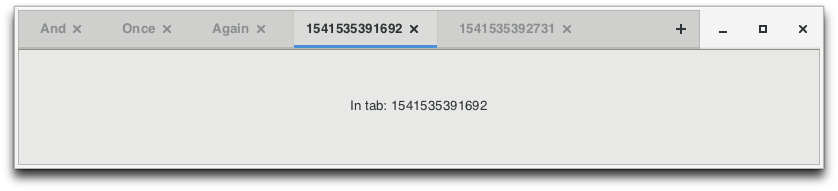
But how do you let the user reorder tabs? I'm trying your example with Gtk 3.22, and like in my app, dragging moves the whole window, as if there wasn't any notebook. Only when I place the notebook outside of the window titlebar, reorderable starts working as I expect and emits my page-reordered signal callback.
Sign up for free
to join this conversation on GitHub.
Already have an account?
Sign in to comment
Don't judge me! All with Adwaita looks horrible :P
