
This is my series of articles covering short "Today I learned" topics as I work with CockroachDB. Today, we're covering CLI query stats, clone schemas quickly, distinguish which table IDs correspond to which table names, connect to non-default databases and copy columns between column families.
- Topic 1: SHOW LAST QUERY STATISTICS
- Topic 2: Clone table definitions in bulk across schemas
- Topic 3: Quick way to map a table name to a table ID
- Topic 4: Changing default database for sql client
- Topic 5: Quick way to move a column from one Column Family to another
CockroachDB has a very user-friendly and helpful UI called DB Console. I like to refer to it when I debug query performance. We have a very useful Statements page which shows a statement overview, explain plan and execution stats.
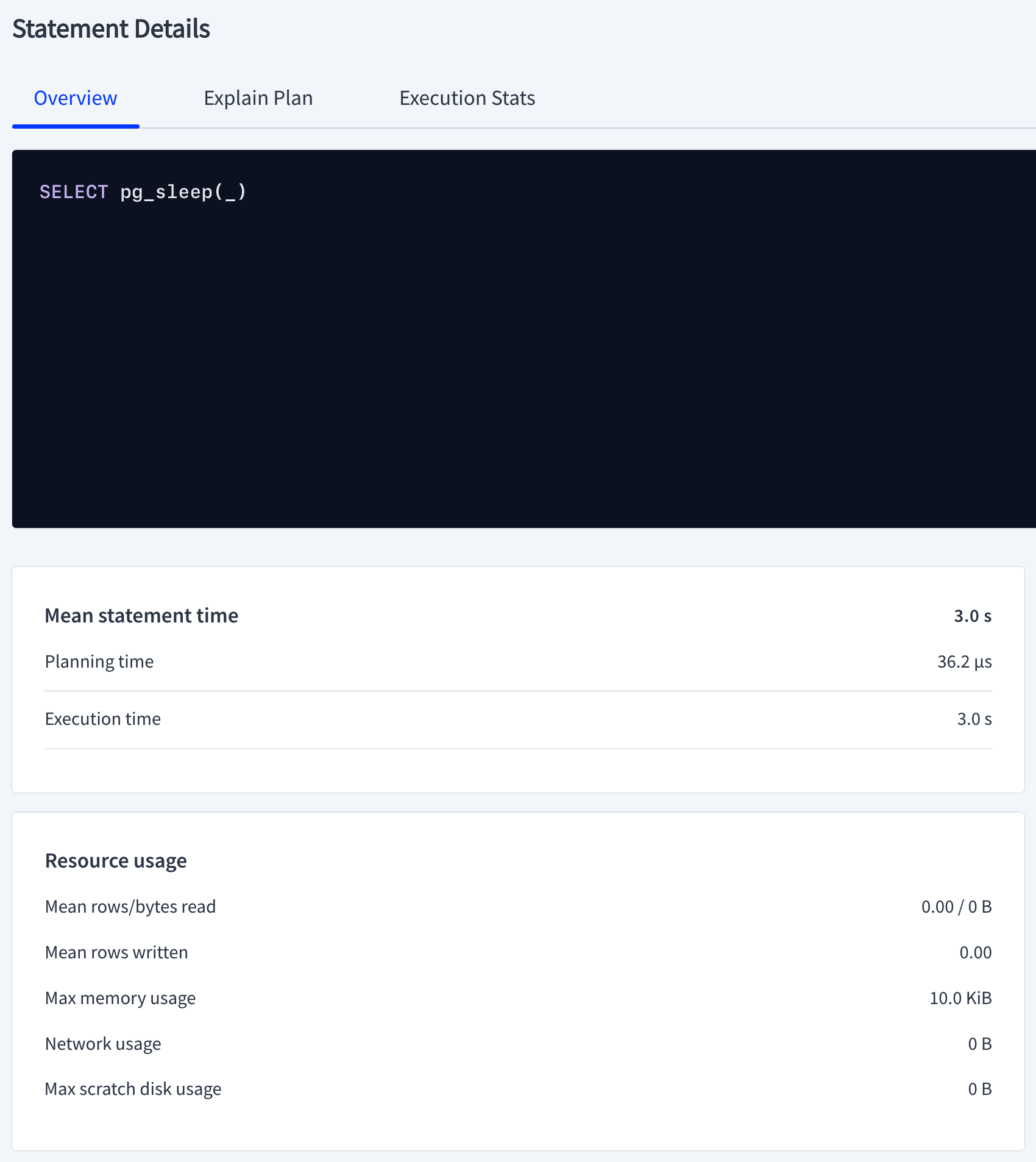

Little did I know CockroachDB has an undocumented CLI equivalent: SHOW LAST QUERY STATISTICS;. In case accessing the DB Console is not feasible or you need a quick access to the query latencies, you can execute your query followed by SHOW LAST QUERY STATISTICS; separated with a semicolon to get the same information as the image above.
artem@free-tier14.aws-us-east-1.cockroachlabs.cloud:26257/defaultdb> SELECT pg_sleep(3); SHOW LAST QUERY STATISTICS;
  pg_sleep
------------
    true
(1 row)

Note: timings for multiple statements on a single line are not supported. See https://go.crdb.dev/issue-v/48180/v21.2.

   parse_latency  |  plan_latency   |  exec_latency   | service_latency | post_commit_jobs_latency
------------------+-----------------+-----------------+-----------------+---------------------------
  00:00:00.000042 | 00:00:00.000036 | 00:00:03.000609 | 00:00:03.001111 | 00:00:00
notice the timings align with the UI version.
I came across the following question and I found it interesting as I've not been aware of this capability before. It was answered by one of our engineers but I felt I need to see it for myself and provide an end to end example. One thing to remember is that this approach does not copy the data from the source to the destination tables. The gist of the question is to clone table definitions from source schema to destination schema in bulk.
Considering the following table definition:
CREATE TABLE tbl1 (
    key UUID DEFAULT gen_random_uuid() PRIMARY KEY,
    val INT
);
Copying the table schema can be done like so:
CREATE TABLE tbl2 (LIKE tbl1 INCLUDING ALL);SHOW CREATE TABLE tbl1;
SHOW CREATE TABLE tbl2; table_name | create_statement
-------------+---------------------------------------------------
tbl1 | CREATE TABLE public.tbl1 (
| key UUID NOT NULL DEFAULT gen_random_uuid(),
| val INT8 NULL,
| CONSTRAINT "primary" PRIMARY KEY (key ASC),
| FAMILY "primary" (key, val)
| )
(1 row)
Time: 8ms total (execution 8ms / network 0ms)
table_name | create_statement
-------------+---------------------------------------------------
tbl2 | CREATE TABLE public.tbl2 (
| key UUID NOT NULL DEFAULT gen_random_uuid(),
| val INT8 NULL,
| CONSTRAINT "primary" PRIMARY KEY (key ASC),
| FAMILY "primary" (key, val)
| )
(1 row)The table DDL looks identical.
Let's now demonstrate the same across schemas
CREATE SCHEMA example;

CREATE TABLE example.tbl1 (LIKE tbl1 INCLUDING ALL);
CREATE TABLE example.tbl2 (LIKE tbl2 INCLUDING ALL);
SHOW TABLES; schema_name | table_name | type | owner | estimated_row_count | locality
--------------+------------+-------+-------+---------------------+-----------
example | tbl1 | table | demo | 0 | NULL
example | tbl2 | table | demo | 0 | NULL
public | tbl1 | table | demo | 0 | NULL
public | tbl2 | table | demo | 0 | NULL
(4 rows)SHOW CREATE TABLE example.tbl1;
SHOW CREATE TABLE example.tbl2; table_name | create_statement
---------------+---------------------------------------------------
example.tbl1 | CREATE TABLE example.tbl1 (
| key UUID NOT NULL DEFAULT gen_random_uuid(),
| val INT8 NULL,
| CONSTRAINT "primary" PRIMARY KEY (key ASC),
| FAMILY "primary" (key, val)
| )
(1 row)
Time: 7ms total (execution 7ms / network 0ms)
table_name | create_statement
---------------+---------------------------------------------------
example.tbl2 | CREATE TABLE example.tbl2 (
| key UUID NOT NULL DEFAULT gen_random_uuid(),
| val INT8 NULL,
| CONSTRAINT "primary" PRIMARY KEY (key ASC),
| FAMILY "primary" (key, val)
| )
(1 row)This is an immense productivity enhancement and I imagine it will be a useful addition to my toolbelt.
Commonly when we work with ranges and replicas in CockroachDB, we refer to range_id, table_id and table_names. Sometimes it gets overwhelming to map a table_id to a table_name unless you're doing this constantly. This question has come up in our community Slack. I figured it's a good shortcut to identify table IDs from table names and document for the future.
The quickest and easiest ways to do it are the following:
Consider the Movr database with the following tables
demo@127.0.0.1:26257/movr> show tables;
  schema_name |         table_name         | type  | owner | estimated_row_count | locality
--------------+----------------------------+-------+-------+---------------------+-----------
  public      | promo_codes                | table | demo  |                   0 | NULL
  public      | rides                      | table | demo  |                   0 | NULL
  public      | user_promo_codes           | table | demo  |                   0 | NULL
  public      | users                      | table | demo  |                   0 | NULL
  public      | vehicle_location_histories | table | demo  |                   0 | NULL
  public      | vehicles                   | table | demo  |                   0 | NULL
To get the table_id for the table rides, you'd do the following
SELECT * FROM system.namespace WHERE name = 'rides'; parentID | parentSchemaID | name | id
-----------+----------------+-------+-----
52 | 29 | rides | 55This works in reverse as well, say you have the table_id and need a table_name.
Another interesting approach is the following:
SELECT 'rides'::regclass::oid; oid
-------
55I think the second approach is easier to remember but your mileage may vary.
This is small usability trick which is probably not new to most but something I didn't think about before. If you want to connect to CockroachDB and not default to the defaultdb database every time, you can do it in a few ways:
I used to just change the database name in the connection string provided by --url, i.e. cockroach sql --url "postgresql://localhost:26257/test?sslmode=disable" where test is the non-default database. Another way to pass the database to connect to is with the -d argument
cockroach sql --insecure -d test
#
# Welcome to the CockroachDB SQL shell.
# All statements must be terminated by a semicolon.
# To exit, type: \q.
#
# Server version: CockroachDB CCL v21.2.9 (x86_64-apple-darwin19, built 2022/04/12 17:08:15, go1.16.6) (same version as client)
# Cluster ID: dd8931c0-6952-432f-a682-8c5e05e4f485
#
# Enter \? for a brief introduction.
#
root@:26257/test>
There's another way which I've not payed attention to before. CockroachDB, similar to Postgres support reading environment variables. You're maybe familiar with PGDATABASE environment variable in Postgres, similarly in CockroachDB, there's COCKROACH_DATABASE that can be used.
export COCKROACH_DATABASE=testcockroach sql --insecure
#
# Welcome to the CockroachDB SQL shell.
# All statements must be terminated by a semicolon.
# To exit, type: \q.
#
# Server version: CockroachDB CCL v21.2.9 (x86_64-apple-darwin19, built 2022/04/12 17:08:15, go1.16.6) (same version as client)
# Cluster ID: dd8931c0-6952-432f-a682-8c5e05e4f485
#
# Enter \? for a brief introduction.
#
root@:26257/test> If we unset the variable
unset COCKROACH_DATABASEcockroach sql --insecure
#
# Welcome to the CockroachDB SQL shell.
# All statements must be terminated by a semicolon.
# To exit, type: \q.
#
# Server version: CockroachDB CCL v21.2.9 (x86_64-apple-darwin19, built 2022/04/12 17:08:15, go1.16.6) (same version as client)
# Cluster ID: dd8931c0-6952-432f-a682-8c5e05e4f485
#
# Enter \? for a brief introduction.
#
root@:26257/defaultdb>The PGDATABASE flag also works with CockroachDB
export PGDATABASE=testcockroach sql --insecure
#
# Welcome to the CockroachDB SQL shell.
# All statements must be terminated by a semicolon.
# To exit, type: \q.
#
# Server version: CockroachDB CCL v21.2.9 (x86_64-apple-darwin19, built 2022/04/12 17:08:15, go1.16.6) (same version as client)
# Cluster ID: dd8931c0-6952-432f-a682-8c5e05e4f485
#
# Enter \? for a brief introduction.
#
root@:26257/test>This particular issue is a pet peeve of mine as one would think it should be obviously easy to move a column from one CF to another but apparently it is not intuitive and difficult, until today... The mechanics of this operation requires physically moving data from one location to another and can be quite expensive. My original thoughts was to copy data in batches from a column in cf1 to a col in cf2 but my earlier tests have never completed because it took too long. Apparently there's a much easier and faster way that one of our schema engineers suggested and it seems to work well.
Considering the following schema
CREATE TABLE tbl (
    id UUID DEFAULT gen_random_uuid() PRIMARY KEY,
    col INT
);
SHOW CREATE TABLE tbl; table_name | create_statement
-------------+--------------------------------------------------
tbl | CREATE TABLE public.tbl (
| id UUID NOT NULL DEFAULT gen_random_uuid(),
| col INT8 NULL,
| CONSTRAINT "primary" PRIMARY KEY (id ASC),
| FAMILY "primary" (id, col)
| )Let's load some data
INSERT INTO tbl (col) SELECT generate_series(1, 100000);Let's add a new column which is a stored computed column of the existing column in the primary column family but in a new column family
ALTER TABLE tbl ADD COLUMN new_col INT AS (col) STORED CREATE FAMILY "new"; table_name | create_statement
-------------+--------------------------------------------------
tbl | CREATE TABLE public.tbl (
| id UUID NOT NULL DEFAULT gen_random_uuid(),
| col INT8 NULL,
| new_col INT8 NULL AS (col) STORED,
| CONSTRAINT "primary" PRIMARY KEY (id ASC),
| FAMILY "primary" (id, col),
| FAMILY new (new_col)
| )Let's see what the data looks like now
SELECT * FROM tbl LIMIT 10; id | col | new_col
---------------------------------------+-------+----------
0000ae6d-effc-48c0-bac5-230ff3801b73 | 42392 | 42392
00016ba9-8952-45aa-96d2-54f3d7a05190 | 46191 | 46191
00038fd1-1257-4602-9484-ef8cbf31e002 | 93379 | 93379
0004d3ef-2ff5-48b8-a9bb-ededea8d10d4 | 74451 | 74451
000526b7-b450-4a7c-8c83-790452a01fb6 | 11719 | 11719
0005cd9d-4520-4b48-8811-fb74ecabd832 | 84447 | 84447
0007868b-cdbc-449c-aa48-df45e21cdf75 | 50225 | 50225
000790b2-7e13-40ef-b5bd-449449db788e | 93878 | 93878
0008182d-a768-47bb-8fa8-3a6ccbb44c46 | 58163 | 58163
0009389c-5ba2-41d3-a08e-eced602875f7 | 58559 | 58559This is a simplistic example, tests with much larger datasets needed to make sure this works at scale.
Let's convert this column to a regular column by dropping STORED.
ALTER TABLE tbl ALTER COLUMN new_col DROP STORED; table_name | create_statement
-------------+--------------------------------------------------
tbl | CREATE TABLE public.tbl (
| id UUID NOT NULL DEFAULT gen_random_uuid(),
| col INT8 NULL,
| new_col INT8 NULL,
| CONSTRAINT "primary" PRIMARY KEY (id ASC),
| FAMILY "primary" (id, col),
| FAMILY new (new_col)
| )Let's rename the current column to an old column
ALTER TABLE tbl RENAME COLUMN col TO old_col; table_name | create_statement
-------------+--------------------------------------------------
tbl | CREATE TABLE public.tbl (
| id UUID NOT NULL DEFAULT gen_random_uuid(),
| old_col INT8 NULL,
| new_col INT8 NULL,
| CONSTRAINT "primary" PRIMARY KEY (id ASC),
| FAMILY "primary" (id, old_col),
| FAMILY new (new_col)
| )Let's rename the new column to the desired column name
ALTER TABLE tbl RENAME COLUMN new_col TO col; table_name | create_statement
-------------+--------------------------------------------------
tbl | CREATE TABLE public.tbl (
| id UUID NOT NULL DEFAULT gen_random_uuid(),
| old_col INT8 NULL,
| col INT8 NULL,
| CONSTRAINT "primary" PRIMARY KEY (id ASC),
| FAMILY "primary" (id, old_col),
| FAMILY new (col)
| )Finally, let's drop the old column
SET sql_safe_updates = false;
ALTER TABLE tbl DROP COLUMN old_col;
table_name | create_statement
-------------+--------------------------------------------------
tbl | CREATE TABLE public.tbl (
| id UUID NOT NULL DEFAULT gen_random_uuid(),
| col INT8 NULL,
| CONSTRAINT "primary" PRIMARY KEY (id ASC),
| FAMILY "primary" (id),
| FAMILY new (col)
| )We now have a column in the next column family with the existing data
                   id                  |  col
---------------------------------------+--------
  0000ae6d-effc-48c0-bac5-230ff3801b73 | 42392
  00016ba9-8952-45aa-96d2-54f3d7a05190 | 46191
  00038fd1-1257-4602-9484-ef8cbf31e002 | 93379
  0004d3ef-2ff5-48b8-a9bb-ededea8d10d4 | 74451
  000526b7-b450-4a7c-8c83-790452a01fb6 | 11719
  0005cd9d-4520-4b48-8811-fb74ecabd832 | 84447
  0007868b-cdbc-449c-aa48-df45e21cdf75 | 50225
  000790b2-7e13-40ef-b5bd-449449db788e | 93878
  0008182d-a768-47bb-8fa8-3a6ccbb44c46 | 58163
  0009389c-5ba2-41d3-a08e-eced602875f7 | 58559
Finally, set the guardrails back to default
SET sql_safe_updates = true;You might be wondering why you'd want to do this. Considering the situation where your original schema design included a single column family and with more volume, you'd want to move some of the less or more frequently data in a row to a net new CF to reduce write latency, this is probably the best way without defaulting to a more involved approach.