
In today's tutorial we are going to step away from the world of Postgres and production readiness topics and have some NoSQL fun using MongoDB API to persist data in CockroachDB.
You can check out my previous articles here
I've first heard of FerretDB formely known as MangoDB in 2021, right around the time CockroachDB 21.1 was available. FerretDB is an open source alternative to MongoDB. It serves as a proxy, converting MongoDB protocol queries to SQL. The storage backend in FerretDB is Postgresql and naturally I had to try swapping Postgresql with CockroachDB. It didn't work the last time I tried it last year; now that FerretDB has had time to mature, I am going to attempt it again.
This is where it used to break:
test> db.test.insert({name: "Ada Lovelace", age: 205})
DeprecationWarning: Collection.insert() is deprecated. Use insertOne, insertMany, or bulkWrite.
Uncaught:
MongoBulkWriteError: connection 3 to 172.23.0.4:27017 closed
Result: BulkWriteResult {
  result: {
    ok: 1,
    writeErrors: [],
    writeConcernErrors: [],
    insertedIds: [ { index: 0, _id: ObjectId("6182e88d9e28440843d37de8") } ],
    nInserted: 0,
    nUpserted: 0,
    nMatched: 0,
    nModified: 0,
    nRemoved: 0,
    upserted: []
  }
}
test>
I didn't spend too much time investigating the problem then as I was just experimenting. Today is no different but considering there are a number of MongoDB customers looking at CockroachDB, I figured it is worth a shot. By the way, I do not claim CockroachDB is a direct replacement for MongoDB, they both serve different use cases and today's topic is just an exploration.
- Start FerretDB example with CockroachDB
- Open the sample app in a web browser
- Explore the data with Mongosh and CockroachDB
- Clean up
I am going to pull an existing FerretDB docker compose repo from the FerretDB Github. I will replace the Postgresql service with CockroachDB, add a load balancer as we're using three nodes and also add a Mongosh client service for exploration. You can find the finished product here. But below I am going to cover the basics:
version: "3"
services:
  client:
    build: ./app/client
    hostname: 'todo_client'
    container_name: 'todo_client'
    stdin_open: true
  api:
    build: ./app/api
    hostname: 'todo_api'
    container_name: 'todo_api'
  nginx:
    image: nginx
    hostname: 'nginx'
    container_name: 'nginx'
    ports:
      - 8888:8888
    volumes:
      - ./nginx.conf:/etc/nginx/conf.d/default.conf
  ferretdb:
    image: ghcr.io/ferretdb/ferretdb:latest
    hostname: 'ferretdb'
    container_name: 'ferretdb'
    restart: 'on-failure'
    command:
      [
        '-listen-addr=:27017',
        '-postgresql-url=postgres://root@lb:26257/ferretdb?sslmode=disable',
      ]
    ports:
      - 27017:27017

  roach-0:
    container_name: roach-0
    hostname: roach-0
    image: cockroachdb/cockroach:latest-v22.1
    command: start --logtostderr=WARNING --log-file-verbosity=WARNING --insecure --join=roach-0,roach-1,roach-2 --listen-addr=roach-0:26257 --advertise-addr=roach-0:26257 --max-sql-memory=.25 --cache=.25
    environment:
      - 'ALLOW_EMPTY_PASSWORD=yes'

  roach-1:
    container_name: roach-1
    hostname: roach-1
    image: cockroachdb/cockroach:latest-v22.1
    command: start --logtostderr=WARNING --log-file-verbosity=WARNING --insecure --join=roach-0,roach-1,roach-2 --listen-addr=roach-1:26257 --advertise-addr=roach-1:26257 --max-sql-memory=.25 --cache=.25
    environment:
      - 'ALLOW_EMPTY_PASSWORD=yes'

  roach-2:
    container_name: roach-2
    hostname: roach-2
    image: cockroachdb/cockroach:latest-v22.1
    command: start --logtostderr=WARNING --log-file-verbosity=WARNING --insecure --join=roach-0,roach-1,roach-2 --listen-addr=roach-2:26257 --advertise-addr=roach-2:26257 --max-sql-memory=.25 --cache=.25
    environment:
      - 'ALLOW_EMPTY_PASSWORD=yes'

  init:
    container_name: init
    image: cockroachdb/cockroach:latest-v22.1
    command: init --host=roach-0 --insecure
    depends_on:
      - roach-0

  lb:
    container_name: lb
    hostname: lb
    build: haproxy
    ports:
      - "26257:26257"
      - "8080:8080"
      - "8081:8081"
    depends_on:
      - roach-0
      - roach-1
      - roach-2

  mongosh:
    container_name: mongosh
    image: mongo
    entrypoint: ["/usr/bin/tail", "-f", "/dev/null"]
    hostname: mongosh
Notice I am using a load balanced connection to FerretDB using -postgresql-url=postgres://root@lb:26257/ferretdb?sslmode=disable. Since I am using a three node cluster, I would like to leverage HAProxy to connect instead of using an arbitrary node.
I also have a helper script called up.sh which will start Docker compose environment and issue some necessary schema changes for this to work.
Once you pull down the repo and execute the up.sh script, you will find a number of running containers.
⠿ Container nginx                     Started                                                            1.4s
 ⠿ Container roach-0                   Started                                                            1.1s
 ⠿ Container todo_api                  Started                                                            0.8s
 ⠿ Container mongosh                   Started                                                            1.0s
 ⠿ Container roach-2                   Started                                                            0.9s
 ⠿ Container ferretdb                  Started                                                            1.3s
 ⠿ Container todo_client               Started                                                            0.8s
 ⠿ Container roach-1                   Started                                                            0.7s
 ⠿ Container init                      Started                                                            1.4s
⠿ Container lb Started 1.5sAt this point, you can start the sample web browser application at http://localhost:8888.
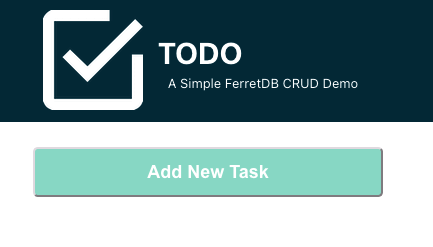
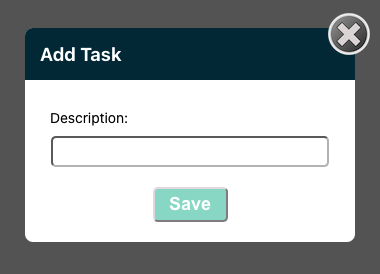
This is a TODO app, at this point, feel free to enter sample tasks.
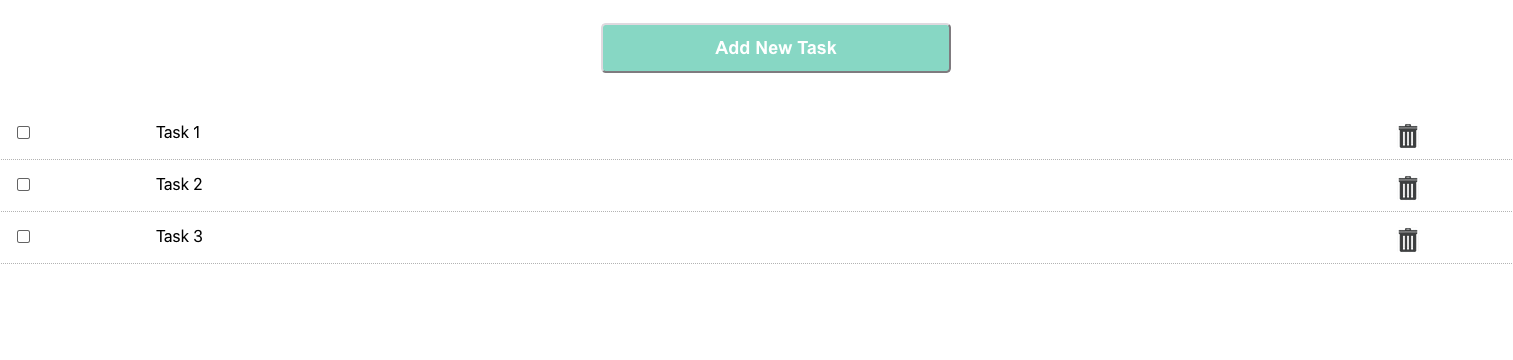
After you have a few tasks, we can explore the data using Mongosh and CockroachDB clients
Since I have a Mongosh client in the Docker compose, we can use the following command to connect to FerretDB:
docker exec -it mongosh mongosh mongodb://ferretdb/Current Mongosh Log ID: 62fe4c78c607702c3faa398f
Connecting to: mongodb://ferretdb/?directConnection=true&appName=mongosh+1.5.4
Using MongoDB: 5.0.42
Using Mongosh: 1.5.4
For mongosh info see: https://docs.mongodb.com/mongodb-shell/
To help improve our products, anonymous usage data is collected and sent to MongoDB periodically (https://www.mongodb.com/legal/privacy-policy).
You can opt-out by running the disableTelemetry() command.
------
The server generated these startup warnings when booting
2022-08-18T14:28:08.358Z: Powered by 🥭 FerretDB v0.5.2 and PostgreSQL 13.0.0.
2022-08-18T14:28:08.358Z: Please star us on GitHub: https://github.com/FerretDB/FerretDB
------
test>We are able to connect, let's attempt to issue the same command that failed for me last year:
db.test.insert({name: "Ada Lovelace", age: 205})DeprecationWarning: Collection.insert() is deprecated. Use insertOne, insertMany, or bulkWrite.
{
acknowledged: true,
insertedIds: { '0': ObjectId("62fe4ced538caff0fbcadd44") }
}
test> Would you look at that? It worked! Let's see what it looks like in CockroachDB:
docker exec -it roach-0 cockroach sql --insecure --host=lb --database=ferretdbroot@lb:26257/ferretdb> show tables;
schema_name | table_name | type | owner | estimated_row_count | locality
--------------+--------------------+-------+-------+---------------------+-----------
test | _ferretdb_settings | table | root | 1 | NULL
test | test_afd071e5 | table | root | 1 | NULL
todo | _ferretdb_settings | table | root | 1 | NULL
todo | tasks_ad2e48cd | table | root | 3 | NULL
(4 rows)We see a few tables, the tables with an underscore I take are metadata about collections in FerretDB. Since my previous insert command used a test collection, the associated data will reside in the test schema in CockroachDB. Let's look at that:
oot@lb:26257/ferretdb> select * from test.test_afd071e5;
                                                     _jsonb
-----------------------------------------------------------------------------------------------------------------
  {"$k": ["name", "age", "_id"], "_id": {"$o": "62fe4ced538caff0fbcadd44"}, "age": 205, "name": "Ada Lovelace"}
(1 row)
That's our data and it's accessible via SQL and Mongosh! Let's switch back to our TODO app for a minute before we come back to explore additional MongoDB CRUD operations.
I entered three tasks into the web browser TODO app and I expect to see three records
root@lb:26257/ferretdb> select * from todo.tasks_ad2e48cd;
                                                                _jsonb
---------------------------------------------------------------------------------------------------------------------------------------
  {"$k": ["description", "completed", "_id"], "_id": {"$o": "62fe4aa255aa8a9a9b29ecbc"}, "completed": false, "description": "Task 1"}
  {"$k": ["description", "completed", "_id"], "_id": {"$o": "62fe4aa755aa8a9a9b29ecbd"}, "completed": false, "description": "Task 2"}
  {"$k": ["description", "completed", "_id"], "_id": {"$o": "62fe4aad55aa8a9a9b29ecbe"}, "completed": false, "description": "Task 3"}
(3 rows)
That's awesome! Let's delete a task in the browser. I am going to delete task 2.

Let's validate in CockroachDB
root@lb:26257/ferretdb> select * from todo.tasks_ad2e48cd;
                                                                _jsonb
---------------------------------------------------------------------------------------------------------------------------------------
  {"$k": ["description", "completed", "_id"], "_id": {"$o": "62fe4aa255aa8a9a9b29ecbc"}, "completed": false, "description": "Task 1"}
  {"$k": ["description", "completed", "_id"], "_id": {"$o": "62fe4aad55aa8a9a9b29ecbe"}, "completed": false, "description": "Task 3"}
(2 rows)
We confirmed insert, delete work. Let's switch back to Mongosh and run some other CRUD operations
db.inventory.insertMany( [
   { item: "journal", qty: 25, size: { h: 14, w: 21, uom: "cm" }, status: "A" },
   { item: "notebook", qty: 50, size: { h: 8.5, w: 11, uom: "in" }, status: "P" },
   { item: "paper", qty: 100, size: { h: 8.5, w: 11, uom: "in" }, status: "D" },
   { item: "planner", qty: 75, size: { h: 22.85, w: 30, uom: "cm" }, status: "D" },
   { item: "postcard", qty: 45, size: { h: 10, w: 15.25, uom: "cm" }, status: "A" },
] );
{
acknowledged: true,
insertedIds: {
'0': ObjectId("62fe4f23538caff0fbcadd45"),
'1': ObjectId("62fe4f23538caff0fbcadd46"),
'2': ObjectId("62fe4f23538caff0fbcadd47"),
'3': ObjectId("62fe4f23538caff0fbcadd48"),
'4': ObjectId("62fe4f23538caff0fbcadd49")
}
}Bulk insert works as well! What about bulk delete?
db.inventory.deleteMany({}){ acknowledged: true, deletedCount: 5 }Deleting all documents matching a condition, (I will re-run insertMany command prior to this)
db.inventory.deleteMany({ status : "A" }){ acknowledged: true, deletedCount: 2 }Let's look at the inventory collection and confirm there are no records matching Status A
test> db.inventory.find()
[
  {
    _id: ObjectId("62fe4f7c538caff0fbcadd4b"),
    item: 'notebook',
    qty: 50,
    size: { h: 8.5, w: 11, uom: 'in' },
    status: 'P'
  },
  {
    _id: ObjectId("62fe4f7c538caff0fbcadd4c"),
    item: 'paper',
    qty: 100,
    size: { h: 8.5, w: 11, uom: 'in' },
    status: 'D'
  },
  {
    _id: ObjectId("62fe4f7c538caff0fbcadd4d"),
    item: 'planner',
    qty: 75,
    size: { h: 22.85, w: 30, uom: 'cm' },
    status: 'D'
  }
]
Let's attempt to update a record, we're going to change the notebook record with quantity 100:
try {
   db.inventory.updateOne(
      { "item" : "notebook" },
      { $set: { "qty" : 100 } }
   );
} catch (e) {
   print(e);
}
{
acknowledged: true,
insertedId: null,
matchedCount: 1,
modifiedCount: 1,
upsertedCount: 0
}Let's confirm by inspecting the record
test> db.inventory.find({ "item" : "notebook" })
[
  {
    _id: ObjectId("62fe4f7c538caff0fbcadd4b"),
    item: 'notebook',
    qty: 100,
    size: { h: 8.5, w: 11, uom: 'in' },
    status: 'P'
  }
]
For completeness, let's look at the quantity in CockroachDB. Since we created an inventory collection, we now have three
root@lb:26257/ferretdb> show tables;
  schema_name |     table_name     | type  | owner | estimated_row_count | locality
--------------+--------------------+-------+-------+---------------------+-----------
  test        | _ferretdb_settings | table | root  |                   1 | NULL
  test        | inventory_fcfdc43f | table | root  |                   5 | NULL
  test        | test_afd071e5      | table | root  |                   1 | NULL
  todo        | _ferretdb_settings | table | root  |                   1 | NULL
todo | tasks_ad2e48cd | table | root | 3 | NULLroot@lb:26257/ferretdb> select * from test.inventory_fcfdc43f;
_jsonb
-------------------------------------------------------------------------------------------------------------------------------------------------------------------------------------------------------------------------
{"$k": ["_id", "item", "qty", "size", "status"], "_id": {"$o": "62fe4f7c538caff0fbcadd4b"}, "item": "notebook", "qty": 100, "size": {"$k": ["h", "w", "uom"], "h": {"$f": 8.5}, "uom": "in", "w": 11}, "status": "P"}
{"$k": ["item", "qty", "size", "status", "_id"], "_id": {"$o": "62fe4f7c538caff0fbcadd4c"}, "item": "paper", "qty": 100, "size": {"$k": ["h", "w", "uom"], "h": {"$f": 8.5}, "uom": "in", "w": 11}, "status": "D"}
{"$k": ["item", "qty", "size", "status", "_id"], "_id": {"$o": "62fe4f7c538caff0fbcadd4d"}, "item": "planner", "qty": 75, "size": {"$k": ["h", "w", "uom"], "h": {"$f": 22.85}, "uom": "cm", "w": 30}, "status": "D"}
(3 rows)Since the records are in JSON format, let's use the native CockroachDB JSONB operators to query them.
root@lb:26257/ferretdb> select jsonb_pretty(_jsonb) from test.inventory_fcfdc43f;
                jsonb_pretty
--------------------------------------------
  {
      "$k": [
          "_id",
          "item",
          "qty",
          "size",
          "status"
      ],
      "_id": {
          "$o": "62fe4f7c538caff0fbcadd4b"
      },
      "item": "notebook",
      "qty": 100,
      "size": {
          "$k": [
              "h",
              "w",
              "uom"
          ],
          "h": {
              "$f": 8.5
          },
          "uom": "in",
          "w": 11
      },
      "status": "P"
  }
  {
      "$k": [
          "item",
          "qty",
          "size",
          "status",
          "_id"
      ],
      "_id": {
          "$o": "62fe4f7c538caff0fbcadd4c"
      },
      "item": "paper",
      "qty": 100,
      "size": {
          "$k": [
              "h",
              "w",
              "uom"
          ],
          "h": {
              "$f": 8.5
          },
          "uom": "in",
          "w": 11
      },
      "status": "D"
  }
  {
      "$k": [
          "item",
          "qty",
          "size",
          "status",
          "_id"
      ],
      "_id": {
          "$o": "62fe4f7c538caff0fbcadd4d"
      },
      "item": "planner",
      "qty": 75,
      "size": {
          "$k": [
              "h",
              "w",
              "uom"
          ],
          "h": {
              "$f": 22.85
          },
          "uom": "cm",
          "w": 30
      },
      "status": "D"
  }
(3 rows)
Our operators work, but we still return all of the records, we can do better
SELECT _jsonb->'item' AS record, _jsonb->'qty' AS quantity FROM test.inventory_fcfdc43f WHERE _jsonb @> '{"item":"notebook"}'; record | quantity
-------------+-----------
"notebook" | 100
(1 row)Well, this was a lot of fun and gives me some confidence using this project in the future. I leave it to the reader to continue exploration.
You may tear down the environment using the included down.sh script.