
Last active
February 10, 2018 10:28
-
-
Save desinas/3f5fb49e5e789effe109b12a7316ae3d to your computer and use it in GitHub Desktop.
try jQuery by Code school / Listening to DOM events / Link Layover
This file contains hidden or bidirectional Unicode text that may be interpreted or compiled differently than what appears below. To review, open the file in an editor that reveals hidden Unicode characters.
Learn more about bidirectional Unicode characters
| //4.18 Link Events I, 4.19 Link Events II | |
| // 4.20 Event Parameter I, 4.21 Event Parameter II | |
| $(document).ready(function() { | |
| $('.see-photos').on('click', function(event) { | |
| event.stopPropagation(); //use that event to stop the second event handler from being called | |
| event.preventDefault(); //prevent the browser from jumping to the top of the page when the link is clicked | |
| $(this).closest('.tour').find('.photos').slideToggle(); | |
| }); | |
| $('.tour').on('click', function() { | |
| alert('This event handler should not be called.'); | |
| }); | |
| }); |
This file contains hidden or bidirectional Unicode text that may be interpreted or compiled differently than what appears below. To review, open the file in an editor that reveals hidden Unicode characters.
Learn more about bidirectional Unicode characters
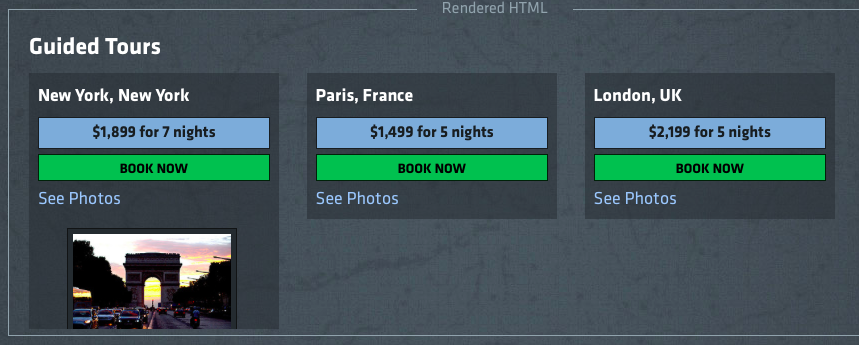
| <div id="all-tours" class="links"> | |
| <h1>Guided Tours</h1> | |
| <ul> | |
| <li class="tour usa" data-discount="199"> | |
| <h2>New York, New York</h2> | |
| <span class="details">$1,899 for 7 nights</span> | |
| <button class="book">Book Now</button> | |
| <a href="#" class="see-photos">See Photos</a> | |
| <ul class="photos"> | |
| <li> | |
| <img src="/assets/photos/paris1.jpg"> | |
| <span>Arc de Triomphe</span> | |
| </li> | |
| <li> | |
| <img src="/assets/photos/paris2.jpg"> | |
| <span>The Eiffel Tower</span> | |
| </li> | |
| <li> | |
| <img src="/assets/photos/paris3.jpg"> | |
| <span>Notre Dame de Paris</span> | |
| </li> | |
| </ul> | |
| </li> | |
| <li class="tour france" data-discount="99"> | |
| <h2>Paris, France</h2> | |
| <span class="details">$1,499 for 5 nights</span> | |
| <button class="book">Book Now</button> | |
| <a href="#" class="see-photos">See Photos</a> | |
| <ul class="photos"> | |
| <li> | |
| <img src="/assets/photos/paris1.jpg"> | |
| <span>Arc de Triomphe</span> | |
| </li> | |
| <li> | |
| <img src="/assets/photos/paris2.jpg"> | |
| <span>The Eiffel Tower</span> | |
| </li> | |
| <li> | |
| <img src="/assets/photos/paris3.jpg"> | |
| <span>Notre Dame de Paris</span> | |
| </li> | |
| </ul> | |
| </li> | |
| <li class="tour uk" data-discount="149"> | |
| <h2>London, UK</h2> | |
| <span class="details">$2,199 for 5 nights</span> | |
| <button class="book">Book Now</button> | |
| <a href="#" class="see-photos">See Photos</a> | |
| <ul class="photos"> | |
| <li> | |
| <img src="/assets/photos/paris1.jpg"> | |
| <span>Arc de Triomphe</span> | |
| </li> | |
| <li> | |
| <img src="/assets/photos/paris2.jpg"> | |
| <span>The Eiffel Tower</span> | |
| </li> | |
| <li> | |
| <img src="/assets/photos/paris3.jpg"> | |
| <span>Notre Dame de Paris</span> | |
| </li> | |
| </ul> | |
| </li> | |
| </ul> | |
| </div> |

Author
desinas
commented
Feb 10, 2018
- Write an event handler that will target all links with a class of .see-photos on click.
- When this link is clicked, show the photos for the clicked tour by traversing to it using closest() and find() then sliding it down by using slideToggle().
- Change the first event handler so that the function takes an event parameter. Then use that event to stop the second event handler from being called.
- Let's add to this so that we prevent the browser from jumping to the top of the page when the link is clicked as well.
Author
Sign up for free
to join this conversation on GitHub.
Already have an account?
Sign in to comment