
Last active
February 10, 2018 11:59
-
-
Save desinas/583c6462c8d2e2b6dcc0c5db4a150d3d to your computer and use it in GitHub Desktop.
try jQuery by Code school / Styling / Taming CSS
This file contains hidden or bidirectional Unicode text that may be interpreted or compiled differently than what appears below. To review, open the file in an editor that reveals hidden Unicode characters.
Learn more about bidirectional Unicode characters
| //5.3 CSS I, 5.4 CSS II, 5.5 Show Photo, 5.6 Refactoring to CSS | |
| $(document).ready(function() { | |
| $('.tour').on('mouseenter', function() { | |
| $(this).addClass('highlight'); //We've extracted out our styles into a new CSS class called highlight. | |
| $(this).find('.photos').show(); | |
| }); | |
| $('.tour').on('mouseleave', function() { | |
| $(this).removeClass('highlight'); | |
| }); | |
| }); |
This file contains hidden or bidirectional Unicode text that may be interpreted or compiled differently than what appears below. To review, open the file in an editor that reveals hidden Unicode characters.
Learn more about bidirectional Unicode characters
| <div id="all-tours"> | |
| <h1>Guided Tours</h1> | |
| <ul> | |
| <li class="tour usa"> | |
| <h2>New York, New York</h2> | |
| <span class="details">$1,899 for 7 nights</span> | |
| <span class="per-night"><span class="price">$275</span>/night</span> | |
| <button class="book">Book Now</button> | |
| <ul class="photos"> | |
| <li> | |
| <img src="/assets/photos/newyork1.jpg"> | |
| <span>Notre Dame de Paris</span> | |
| </li> | |
| </ul> | |
| </li> | |
| <li class="tour france" data-discount="99"> | |
| <h2>Paris, France</h2> | |
| <span class="details">$1,499 for 5 nights</span> | |
| <span class="per-night"><span class="price">$300</span>/night</span> | |
| <button class="book">Book Now</button> | |
| <ul class="photos"> | |
| <li> | |
| <img src="/assets/photos/paris3.jpg"> | |
| <span>Brooklyn Bridge</span> | |
| </li> | |
| </ul> | |
| </li> | |
| <li class="tour uk" data-discount="149"> | |
| <h2>London, UK</h2> | |
| <span class="details">$2,199 for 5 nights</span> | |
| <span class="per-night"><span class="price">$440</span>/night</span> | |
| <button class="book">Book Now</button> | |
| <ul class="photos"> | |
| <li> | |
| <img src="/assets/photos/london.jpg"> | |
| <span>Tower of London</span> | |
| </li> | |
| </ul> | |
| </li> | |
| </ul> | |
| </div> |

Author
desinas
commented
Feb 10, 2018
- Let's try to make the .tour elements on this page stand out a bit more. Inside our event handler for the mouseenter event, set the background-color to #252b30 using the css() method.
Author
- Let's set the font-weight to bold as well by passing in a JavaScript object to the css() method.
Author
- Let's see what the tour page would look like if we showed the .photos on mouseenter as well. Try using the show() method here to make it visible.
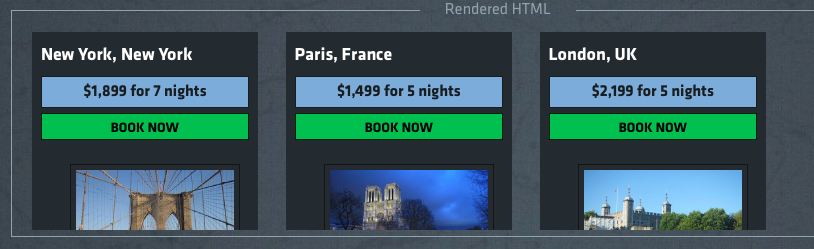
Author
- We've extracted out our styles into a new CSS class called highlight. Go ahead and add this class when the .tour is moused over instead of using the css() method. Also, add another event handler for when the mouse leaves the .tour element to remove this class by watching for mouseleave.
Sign up for free
to join this conversation on GitHub.
Already have an account?
Sign in to comment