
Last active
January 30, 2018 11:02
-
-
Save desinas/6c3649cf73bbaf3d9ec7a5c4f9ca945f to your computer and use it in GitHub Desktop.
try jQuery by Code school / Listening to DOM events / expanding on on()
This file contains hidden or bidirectional Unicode text that may be interpreted or compiled differently than what appears below. To review, open the file in an editor that reveals hidden Unicode characters.
Learn more about bidirectional Unicode characters
| //chapt4.8 Mouseover I, 4.9 Mouseover II, 4.10 Mouseleave, 4.11 Named Functions | |
| $(document).ready(function() { | |
| $('#tour').on('click', 'button', function() { | |
| $('.photos').slideToggle(); | |
| }); | |
| function showPhotos() { | |
| $(this).find('span').slideToggle(); | |
| } | |
| $('.photos').on('mouseenter', 'li', showPhotos); | |
| $('.photos').on('mouseleave', 'li', showPhotos); | |
| }); |
This file contains hidden or bidirectional Unicode text that may be interpreted or compiled differently than what appears below. To review, open the file in an editor that reveals hidden Unicode characters.
Learn more about bidirectional Unicode characters
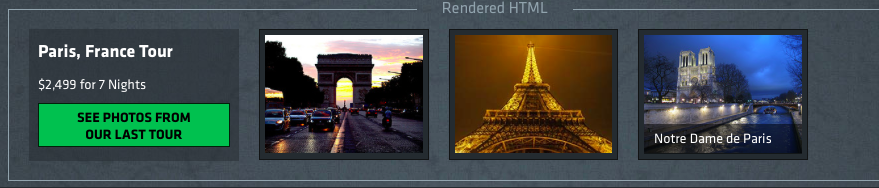
| <div id="tour"> | |
| <h2>Paris, France Tour</h2> | |
| <p>$2,499 for 7 Nights</p> | |
| <button>See photos from our last tour</button> | |
| <ul class="photos"> | |
| <li> | |
| <img src="/assets/photos/paris1.jpg"> | |
| <span>Arc de Triomphe</span> | |
| </li> | |
| <li> | |
| <img src="/assets/photos/paris2.jpg"> | |
| <span>The Eiffel Tower</span> | |
| </li> | |
| <li> | |
| <img src="/assets/photos/paris3.jpg"> | |
| <span>Notre Dame de Paris</span> | |
| </li> | |
| </ul> | |
| </div> |

Author
desinas
commented
Jan 30, 2018
- Write an event handler that watches for mouseenter on any li elements within our .photos elements and runs an empty function. We'll implement the function later on.
- Inside our new mouseenter event handler, call the slideToggle() method on the span tag within the picture description. You'll need to traverse down from the current element, $(this), and then find() the span tag.
- When the mouse leaves the li element, we'll want to hide the description of the photo as well. Write another event handler that targets the same elements, but calls slideToggle() only on the mouseleave event.
- It looks like both of our event handlers on the .photos li elements are exactly the same! Let's go ahead and refactor these into a new function named showPhotos() and change our event handlers to reference that instead.
Author
Sign up for free
to join this conversation on GitHub.
Already have an account?
Sign in to comment