
Last active
February 10, 2018 12:36
-
-
Save desinas/b5ee8d7b6aa766f6d0497a358d1883c2 to your computer and use it in GitHub Desktop.
try jQuery by Code school / Styling / Animation
This file contains hidden or bidirectional Unicode text that may be interpreted or compiled differently than what appears below. To review, open the file in an editor that reveals hidden Unicode characters.
Learn more about bidirectional Unicode characters
| //5.8 Animate I, 5.9 Animate II, 5.10 Animation Speed, 5.11 Animate III | |
| $(document).ready(function() { | |
| $('.tour').on('mouseenter', function() { | |
| $(this).addClass('highlight'); | |
| $(this).find('.per-night').animate({'top': '-14px', 'opacity': '1'}, 'fast'); //adding one more key/value to this object representing a top of -14px | |
| }); | |
| $('.tour').on('mouseleave', function() { | |
| $(this).removeClass('highlight'); | |
| $(this).find('.per-night').animate({'top': '0px', 'opacity': '0'}, 'fast'); | |
| }); | |
| }); |
This file contains hidden or bidirectional Unicode text that may be interpreted or compiled differently than what appears below. To review, open the file in an editor that reveals hidden Unicode characters.
Learn more about bidirectional Unicode characters
| <div id="all-tours"> | |
| <h1>Guided Tours</h1> | |
| <ul> | |
| <li class="tour usa"> | |
| <h2>New York, New York</h2> | |
| <span class="details">$1,899 for 7 nights</span> | |
| <span class="per-night"><span class="price">$275</span>/night</span> | |
| <button class="book">Book Now</button> | |
| <ul class="photos"> | |
| <li> | |
| <img src="/assets/photos/newyork1.jpg"> | |
| <span>Notre Dame de Paris</span> | |
| </li> | |
| </ul> | |
| </li> | |
| <li class="tour france" data-discount="99"> | |
| <h2>Paris, France</h2> | |
| <span class="details">$1,499 for 5 nights</span> | |
| <span class="per-night"><span class="price">$300</span>/night</span> | |
| <button class="book">Book Now</button> | |
| <ul class="photos"> | |
| <li> | |
| <img src="/assets/photos/paris3.jpg"> | |
| <span>Brooklyn Bridge</span> | |
| </li> | |
| </ul> | |
| </li> | |
| <li class="tour uk" data-discount="149"> | |
| <h2>London, UK</h2> | |
| <span class="details">$2,199 for 5 nights</span> | |
| <span class="per-night"><span class="price">$440</span>/night</span> | |
| <button class="book">Book Now</button> | |
| <ul class="photos"> | |
| <li> | |
| <img src="/assets/photos/london.jpg"> | |
| <span>Tower of London</span> | |
| </li> | |
| </ul> | |
| </li> | |
| </ul> | |
| </div> |

Author
desinas
commented
Feb 10, 2018
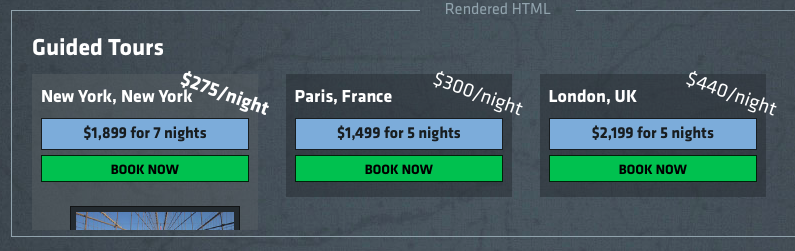
- Let's continue seeing what we can do to add more flavor to our tours page. When the mouse first goes over the .tour element, we need to show the price per night, .per-night, and to make it stand out. Let's animate() the opacity to be 1 in our same event handler. This allows us to fade the element in.
Author
- The price per night will now fade, but let's make it move a little as well. We can't use slideDown() for this with our animate() call, though. When the mouseenter event is triggered, animate() the top property to -14px in order to move it up a bit.
Author
- This animation lacks the pop we're looking for. Let's speed it up to run in 200ms using the 'fast' shorthand.
Author
- Let's update our mouseleave handler to remove the .per-night price with a little style. Animate the price to a top of 0px and an opacity of 0 when the mouse leaves the .tour element, and make it happen with a 'fast' duration.
Sign up for free
to join this conversation on GitHub.
Already have an account?
Sign in to comment