
/.zshrc Secret
-
Star
(187)
You must be signed in to star a gist -
Fork
(26)
You must be signed in to fork a gist
-
-
Save elijahmanor/b279553c0132bfad7eae23e34ceb593b to your computer and use it in GitHub Desktop.
| alias nvim-lazy="NVIM_APPNAME=LazyVim nvim" | |
| alias nvim-kick="NVIM_APPNAME=kickstart nvim" | |
| alias nvim-chad="NVIM_APPNAME=NvChad nvim" | |
| alias nvim-astro="NVIM_APPNAME=AstroNvim nvim" | |
| function nvims() { | |
| items=("default" "kickstart" "LazyVim" "NvChad" "AstroNvim") | |
| config=$(printf "%s\n" "${items[@]}" | fzf --prompt=" Neovim Config " --height=~50% --layout=reverse --border --exit-0) | |
| if [[ -z $config ]]; then | |
| echo "Nothing selected" | |
| return 0 | |
| elif [[ $config == "default" ]]; then | |
| config="" | |
| fi | |
| NVIM_APPNAME=$config nvim $@ | |
| } | |
| bindkey -s ^a "nvims\n" |


in terminal input nvims and enter not a valid number: ~50 nothing selected what's wrong?
any news on this? I do have the same error while just using nvims without any argument. Using WSL2 - bash
I had the same error.
Fix was to make height=50% NOT height=~50%


Due to some changes on Nerd Font you may want to update the glyphs to: " Neovim Config "

For zsh, I refactored the function so you don't need to hardcode the options; it finds any folder in ~/.config with an init.lua file in it and considers it a nvim config folder. Additionally, it adds a preview using lsd to display the folder contents.
function nvims() {
  items=$(find $HOME/.config -maxdepth 2 -name "init.lua" -type f -execdir sh -c 'pwd | xargs basename' \;)
  selected=$(printf "%s\n" "${items[@]}" | FZF_DEFAULT_OPTS="${FZF_DEFAULT_OPTS-} --preview-window 'right:border-left:50%:<40(right:border-left:50%:hidden)' --preview 'lsd -l -A --tree --depth=1 --color=always --blocks=size,name ~/.config/{} | head -200'" fzf )
  if [[ -z $selected ]]; then
    return 0
  elif [[ $selected == "nvim" ]]; then
    selected=""
  fi
  NVIM_APPNAME=$selected nvim "$@"
}
alias nvs=nvims
Preview:
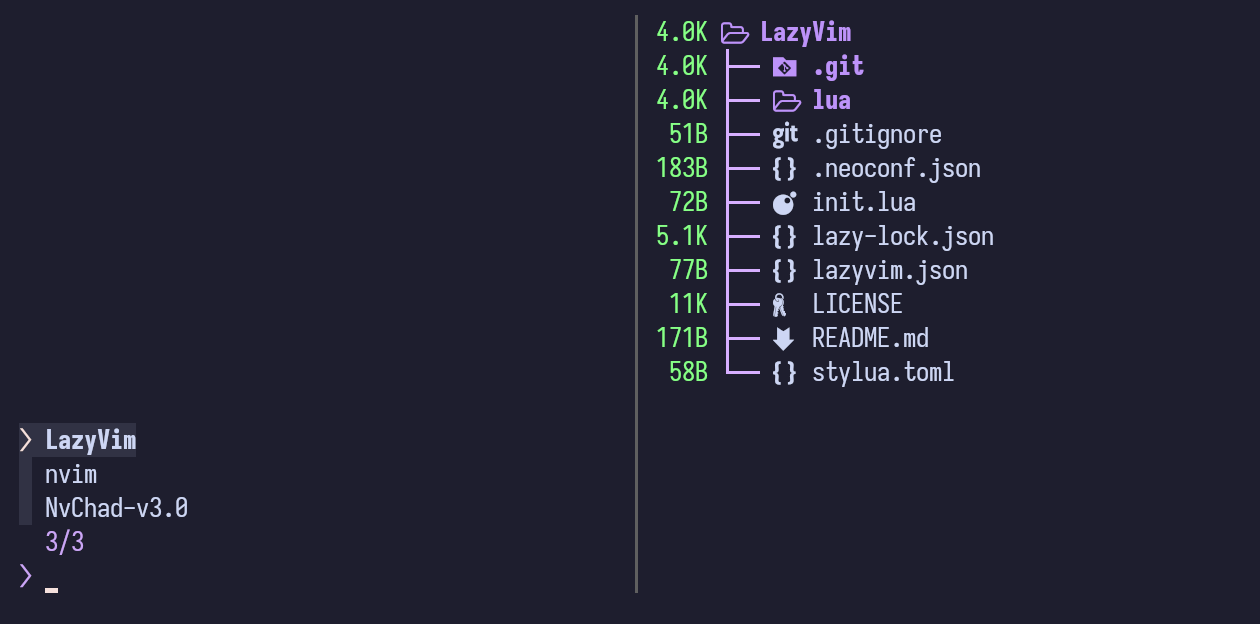

For zsh, I refactored the function so you don't need to hardcode the options;
Nice, works well with eza too.

@wochap I tried your script on my setup and it doesn't seem to detect symlinks. I store all my configs under ~/.dotfiles and generate respective symlinks using Stow. To work around it, I simply added an extra folder to search.
	items=$(
		find $HOME/.config -maxdepth 2 -name "init.lua" -type f -execdir sh -c 'pwd | xargs basename' \;
		find $HOME/.dotfiles -maxdepth 5 -name "init.lua" -type f -execdir sh -c 'pwd | xargs basename' \;
	)
Rather than adding an extra folder to search, the find command can be altered either with:
find $HOME/.config -maxdepth 2 -name "init.lua" "(" -type f -o -type l ")" -execdir sh -c 'pwd | xargs basename' \;or
find -L $HOME/.config -maxdepth 2 -name "init.lua" -type f -execdir sh -c 'pwd | xargs basename' \;Either of those will pickup both plain files and symbolic links.
I also ran into a problem on an Ubuntu 20.04 system with the older version of fzf in their repo. It did not understand the preview options:
invalid preview window layout: right:border-left:50%:<40(right:border-left:50%:hidden)
I simplified the preview options to get it to work on that system:
selected=$(printf "%s\n" "${items[@]}" | FZF_DEFAULT_OPTS="${FZF_DEFAULT_OPTS-} --preview-window=right:50% --preview 'lsd -l -A --tree --depth=1 --color=always --blocks=size,name ~/.config/{} | head -200'" fzf )
My turn.
This uses the directory names of existing configurations. Someone else did the same, but my flavor is slightly shorter. Follows symlinks.
function nvims() {
    find -L "${XDG_CONFIG_HOME:-$HOME/.config}" -mindepth 2 -maxdepth 2 -name init.lua -o -name init.vim | \
        awk -F/ '{print $(NF-1)}' | \
        fzf --prompt 'Neovim config' --layout=reverse --border --exit-0 |\
        xargs -d$'\n' -n1 bash -c 'NVIM_APPNAME="$1" nvim' --
}
Slightly more readable update:
function nvims() {
    NVIM_APPNAME="$(
        find -L "${XDG_CONFIG_HOME:-$HOME/.config}" -mindepth 2 -maxdepth 2 -name init.lua -o -name init.vim \
        | awk -F/ '{print $(NF-1)}' \
        | fzf --prompt 'Neovim config' --layout=reverse --border)" \
    nvim
}
can anyone give the snippet for nushell please

For anyone who uses the Fish shell.
function nvim-chad env NVIM_APPNAME=nvim-chad nvim end function nvim-yum env NVIM_APPNAME=nvim-yum nvim end function nvims set items nvim-yum nvim-chad set config (printf "%s\n" $items | fzf --prompt=" Neovim Config " --height=~50% --layout=reverse --border --exit-0) if [ -z $config ] echo "Nothing selected" return 0 else if [ $config = "default" ] set config "" end env NVIM_APPNAME=$config nvim $argv end bind \ca 'nvims\n'```
You should consider changing this to pass $argv to nvim in each of those functions so you can pass arguments. Otherwise you can't even use those aliases to open files from the CLI but have to use a picker from within neovim.

I just set the NVIM_APPNAME env variable to the directory name as per the commit. And so I just use the nvims function to set the desired config as environment variable. After this I can just use the regular nvim command to start the neovim in my desired config:
-- .zshrc
export DEFAULT_NVIM=<Your default conf directory within .config>
export NVIM_APPNAME=${DEFAULT_NVIM}
# Function to dynamically find and select Neovim configurations
function nvims() {
local config_dirs
config_dirs=$(find -L "${XDG_CONFIG_HOME:-$HOME/.config}" -mindepth 2 -maxdepth 2 -name init.lua -o -name init.vim | awk -F/ '{print $(NF-1)}')
local config
config=$(printf "%s\n" "default" $config_dirs | fzf --prompt=" Neovim Config " --height=~50% --layout=reverse --border --exit-0)
if [[ -z $config ]]; then
echo "Nothing selected"
return 0
elif [[ $config == "default" ]]; then
config=${DEFAULT_NVIM:-""}
fi
export NVIM_APPNAME=$config
}
You can set the default to your most frequently used

bind \ca 'nvims\n'
Pressingctrl+Ashows:
❯ nvims
: command not found

I personally prefer to put the default config inside ~/.config/nvim and the other configs inside ~/.config/nvims/<config_or_distro_name> so here's my version of nvims (renamed to nvim_switch_configuration) which combines andyantrim's and mikeslattery's approaches which might be useful for some:
alias nv='nvim'
alias nvs='nvim_switch_configuration'
nvim_switch_configuration () {
config="$(
find -L "${XDG_CONFIG_HOME:-$HOME/.config}" -maxdepth 3 -mindepth 2 -name "init.lua" -o -name "init.vim" \
| awk -F"${XDG_CONFIG_HOME:-$HOME/.config}/" '{sub(/nvims\//, ""); sub(/nvim/, "default"); sub(/\/init.*/, ""); print $NF}' \
| fzf --border --exit-0 --height=~50% --layout=reverse --prompt ' Neovim configuration switcher ')"
if [[ -z $config ]]; then
printf "%s\n" "No configuration selected."
return 0
elif [[ $config == "default" ]]; then
config=""
else
config="nvims/$config"
alias nv="NVIM_APPNAME=$config nvim"
fi
NVIM_APPNAME=$config nvim "$@"
}Here's also a version using fd instead of find:
alias nv='nvim'
alias nvs='nvim_switch_configuration'
nvim_switch_configuration () {
config="$(
fd -d 3 -L --min-depth 2 --regex "init\.(lua|vim)" -p "${XDG_CONFIG_HOME:-$HOME/.config}" \
| awk -F"${XDG_CONFIG_HOME:-$HOME/.config}/" '{sub(/nvims\//, ""); sub(/nvim/, "default"); sub(/\/init.*/, ""); print $NF}' \
| fzf --border --exit-0 --height=~50% --layout=reverse --prompt ' Neovim configuration switcher ')"
if [[ -z $config ]]; then
printf "%s\n" "No configuration selected."
return 0
elif [[ $config == "default" ]]; then
config=""
else
config="nvims/$config"
alias nv="NVIM_APPNAME=$config nvim"
fi
NVIM_APPNAME=$config nvim "$@"
}
thanks a lot!
my configuration of zshrc for nvims here. made in macOS.