
| Assignment | |
|---|---|
Assign value to variable if variable is not already set. Value will be returned.Couple with : no-op if return value is to be discarded. |
${variable="value"}: ${variable="value"} |

etheleon
/ set_s3_keys.r
Created
February 19, 2019 09:57
This file contains hidden or bidirectional Unicode text that may be interpreted or compiled differently than what appears below. To review, open the file in an editor that reveals hidden Unicode characters.
Learn more about bidirectional Unicode characters
| jsc <- invoke_static(sc, "org.apache.spark.api.java.JavaSparkContext", "fromSparkContext", spark_context(sc)) | |
| hconf <- jsc %>% invoke("hadoopConfiguration") | |
| # set the keys | |
| hconf %>% invoke("set","fs.s3a.access.key", AWS_ACCESS_KEY) | |
| hconf %>% invoke("set","fs.s3a.secret.key", AWS_SECRET_KEY) |
This file contains hidden or bidirectional Unicode text that may be interpreted or compiled differently than what appears below. To review, open the file in an editor that reveals hidden Unicode characters.
Learn more about bidirectional Unicode characters
| # API KEY for accessing it's service | |
| QUBOLE_API="MY_QUBOLE_API_ID" | |
| # This is the ID which is set by Qubole | |
| CLUSTER_ID=12830 | |
| conf <- livy_config("custom_headers" = list(`X-AUTH-TOKEN`=QUBOLE_API)) | |
| sc <- spark_connect( | |
| master = sprintf("https://us.qubole.com/livy-spark-%s", CLUSTER_ID), | |
| method = "livy", | |
| config = conf |
etheleon
/ README.md
Created
September 8, 2018 14:43
— forked from magnetikonline/README.md
Bash string manipulation cheatsheet.
etheleon
/ helm-cheatsheet.md
Last active
February 21, 2022 04:31
— forked from tuannvm/argo.md
#Helm #Kubernetes #cheatsheet, happy helming!
This file contains hidden or bidirectional Unicode text that may be interpreted or compiled differently than what appears below. To review, open the file in an editor that reveals hidden Unicode characters.
Learn more about bidirectional Unicode characters
| from rpy2.robjects.packages import importr | |
| import rpy2.robjects.lib.ggplot2 as ggplot2 # don't use importr cause the ggplot2 here has the .plot() function | |
| grdevices = importr('grDevices') | |
| cowplot = importr('cowplot') #cause i love cowplot | |
| rfeather = importr("feather", on_conflict="warn") | |
| # Out[57]: | |
| # country variable value | |
| # 0 H random 15.872105 |
etheleon
/ dataframes-R-py.ipynb
Created
March 17, 2018 10:46
ipython notebook showing common idioms used when manipulating tables in either R or pandas
Loading
Sorry, something went wrong. Reload?
Sorry, we cannot display this file.
Sorry, this file is invalid so it cannot be displayed.
etheleon
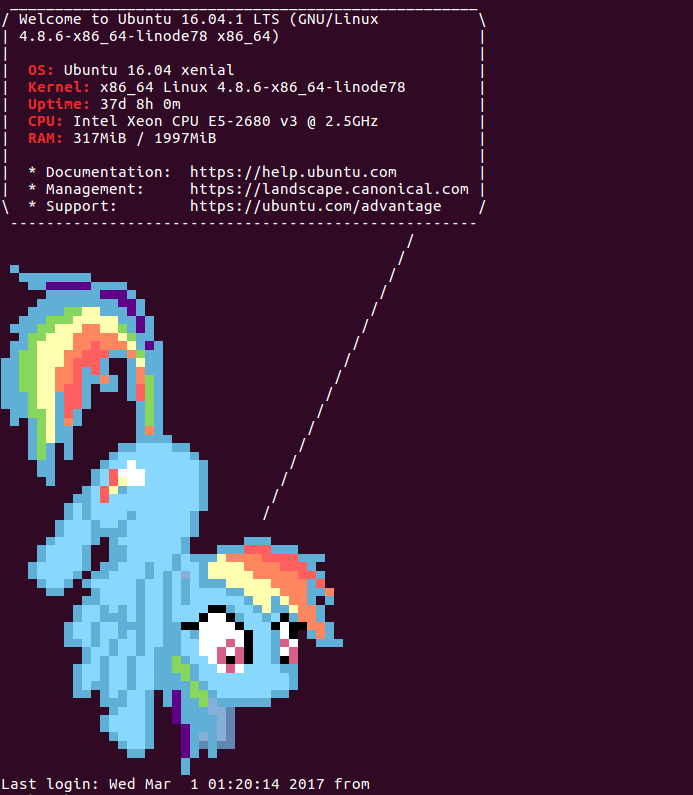
/ ponysay_motd.md
Created
November 8, 2017 03:33
— forked from Tschrock/ponysay_motd.md
A ponysay MOTD for Ubuntu 16.04
Loading
Sorry, something went wrong. Reload?
Sorry, we cannot display this file.
Sorry, this file is invalid so it cannot be displayed.
etheleon
/ download.py
Created
August 11, 2017 07:55
— forked from o11c/download.py
This file contains hidden or bidirectional Unicode text that may be interpreted or compiled differently than what appears below. To review, open the file in an editor that reveals hidden Unicode characters.
Learn more about bidirectional Unicode characters
| import os | |
| import pycurl | |
| from tqdm import tqdm | |
| downloader = pycurl.Curl() | |
| def sanitize(c): | |
| c.setopt(pycurl.UNRESTRICTED_AUTH, False) |
etheleon
/ install-python-data-science.sh
Last active
May 7, 2016 05:38
— forked from waylonflinn/install-python-data-science.sh
This file contains hidden or bidirectional Unicode text that may be interpreted or compiled differently than what appears below. To review, open the file in an editor that reveals hidden Unicode characters.
Learn more about bidirectional Unicode characters
| #!/usr/bin/env bash | |
| ## create an ubuntu 14.04 hvm instance, then from your home directory: | |
| # 1. download this script | |
| # wget https://gist.githubusercontent.com/waylonflinn/506f563573600d944923/raw/install-python-data-science.sh | |
| # 2. make it executable | |
| # chmod a+x install-python-data-science.sh |